
After building your website with WordPress, when creating new posts, you may notice that you can publish in different formats, such as Standard, Gallery, Image, Link, Quote, Video, Audio, Status, and Aside. However, the default permalink structure is the same as what we set in the settings. So, how can we set different URLs for different post types?
We can use the Custom Post Type Permalinks plugin.
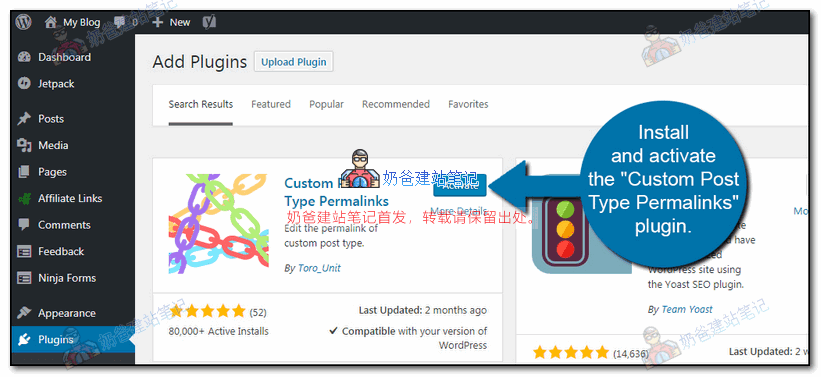
1. Search for Custom Post Type Permalinks from the Admin Dashboard, install and activate the plugin.
2. After activating the plugin, go to the WordPress permalink settings page, and you will find additional settings.
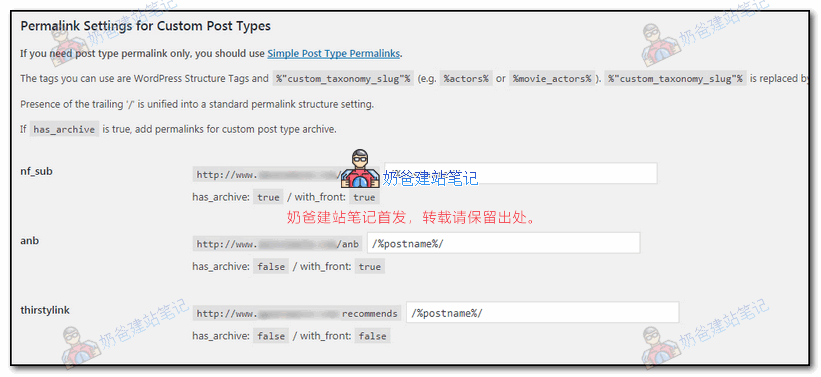
For different post types, such as images, videos, or custom post types you create, different URL structures will appear.
After setting it up and saving, you can see different URLs for different post types on the front end.
Related articles:WordPress Best Permalink Settings_Which Pseudo-Static Rule is Better