Use NowWordPress installationAfter setting up a website, the first thing to consider is configuring an SSL certificate. After all, Google and Baidu encourage using HTTPS to access websites. Without an SSL certificate, the browser title bar will not have a small lock icon, which does not give users a good feeling.
This article will introduceBaota Panelhow to apply for a free SSL certificate andautomatically configure好httpsThe effect of visiting the website.
and when the free Let's Encrypt SSL certificate is about to expirerenewal fails的Solution。
What is an SSL Certificate
SSL certificates, also called server certificates, enable HTTPS for websites, making the website trustworthy and preventing hijacking, tampering, and eavesdropping, ensuring secure encryption.
SSL certificates establish an SSL secure channel between the client browser and the web server to encrypt and hide transmitted data, ensuring data integrity during transmission.
SSL certificates can be either paid or free.Typically, individuals and small businesses use free SSL certificates for website building. If a company wants to highlight its corporate information, it can apply for a paid, advanced EV-type certificate.
SSL Certificate Classification:
SSL certificates can be simply divided into DV SSL certificates,、OV SSL certificates,、and EV SSL certificates,three types.
DVstands for Domain Validation. DV SSL certificates refer to simple SSL certificates that only require verification of website domain ownership. DV SSL certificates can only encrypt website transmission information and cannot verify the true identity of the site server. The advantage of DV is its low cost and quick application process, with approval completed in just a few minutes.
Suitable For: Small and medium-sized enterprise websites, small and medium-sized e-commerce sites, email servers, personal websites, etc.
OVstands for Organization Validation, which in Chinese is organizational verification SSL certificate or enterprise SSL certificate. It refers to a standard SSL certificate that requires verification of the true identity of the enterprise owning the website. This type of certificate not only encrypts website information but also proves the website's true identity to users.
Suitable For: Corporate websites, e-commerce sites, securities, financial institutions
EVEV stands for Extended Validation. An EV SSL certificate is an SSL certificate issued in compliance with globally unified, strict identity verification standards, representing the highest level of SSL certificate currently available worldwide. Websites deployed with an EV SSL certificate will display a green address bar in the browser when accessed. It is commonly used in areas such as financial payments and online banking.
Suitable For: Corporate websites and e-commerce websites for banks, insurance companies, and financial institutions
Baota Panel SSL Certificate Configuration Tutorial
Baota Panel supports one-click application for free Let's Encrypt and TrustAsia certificates. Among them, the TrustAsia certificate is valid for one year and needs to be reapplied upon expiration. The Let's Encrypt certificate is valid for 3 months, and Baota Panel will automatically renew it before expiration (though there is a possibility of failure; solutions for Baota SSL renewal failures will be discussed later).
Steps for Configuring SSL in Baota Panel
- Log in to the Baota Panel backend.
- Click on 'Sites' in the left navigation, then click the settings button next to the website URL for which you want to configure SSL.
- On the pop-up page, select SSL, then choose whether to apply for a Baota SSL or Let's Encrypt certificate as needed.
- After the certificate application is successful, click 'Force HTTPS' in the upper right corner.
Applying for SSL Certificate in Baota
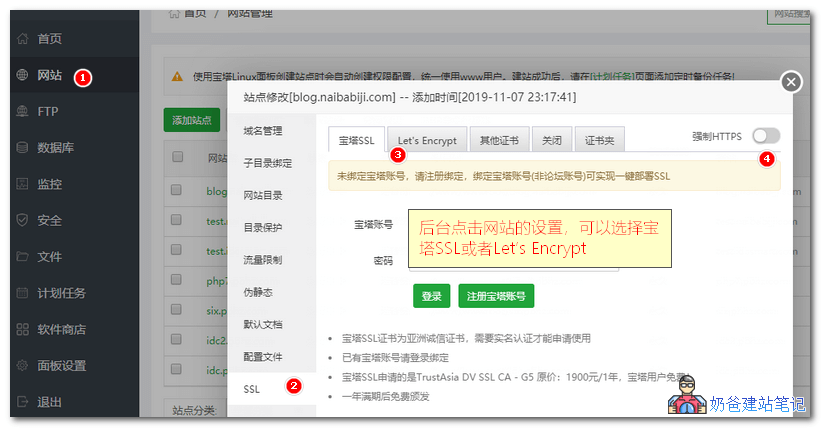
To apply for a Baota SSL certificate, you need to first register a Baota account, log in, and bind it before applying. After registering and logging in, you can apply.
The Baota free SSL certificate is TrustAsia DV SSL CA, domesticTencent Cloud和Alibaba CloudAfter registering a domain name, you can also apply for this certificate for free. If you already have one, you can directly select 'Other Certificates' in the image below, then open the certificate file with a text editor, paste the content, and save.
Tip: If you find that the interface in the image above is not displaying correctly, please clickthe 'Repair' button in the upper right corner。
Let'sEncrypt Certificate Application
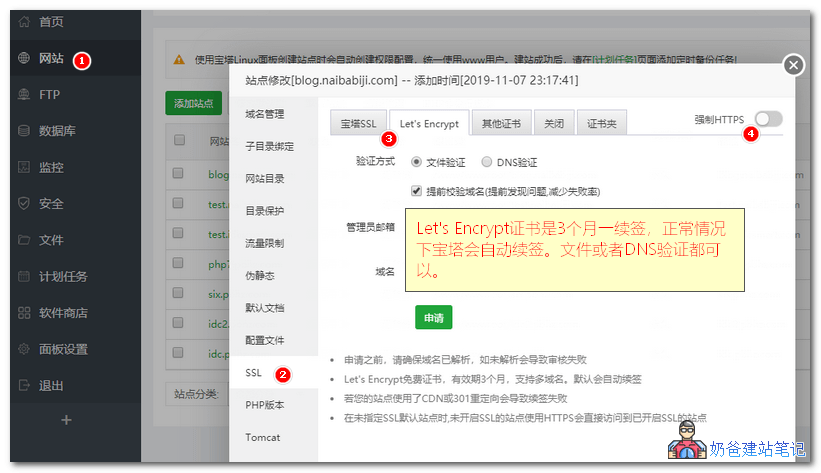
The free Let's Encrypt certificate is valid for 3 months. The default Baota Panel will automatically renew it for you. When applying, you can choose either file verification or DNS verification.
Applying for Other Certificates
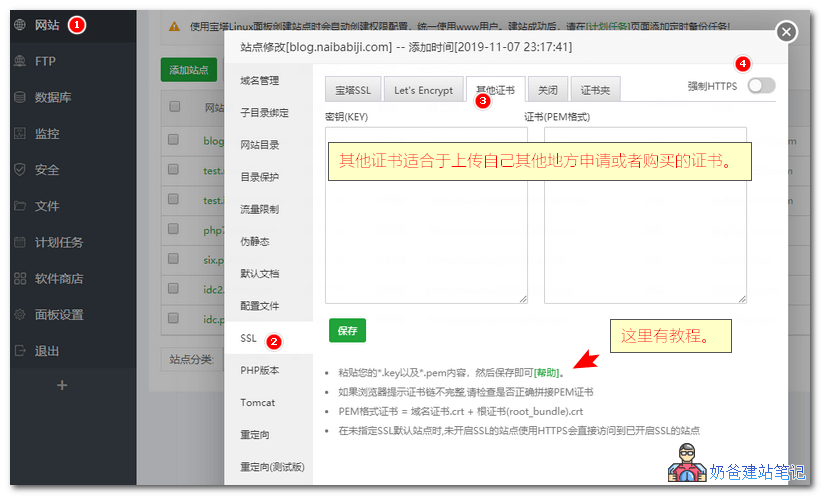
Other certificates are used to upload certificates that you have applied for or purchased from other sources to the Baota Panel for configuration and installation.
The method is simple: open the .key file in your certificate file with a text editor, copy all the content, and paste it into the key box. Then paste the content of the .crt file into the certificate box, and save.
Naiba Tip:
If the interface displays incompletely when selecting 'Other SSL' in Baota Panel, please click the 'Repair' function in the upper right corner and try again.
Solutions for SSL Certificate Renewal Failure in Baota Panel
If you apply for a free Let's Encrypt certificate, you need to renew it every 3 months. By default, the Baota Panel will automatically renew it for you. If the renewal fails with a prompt like the image below:
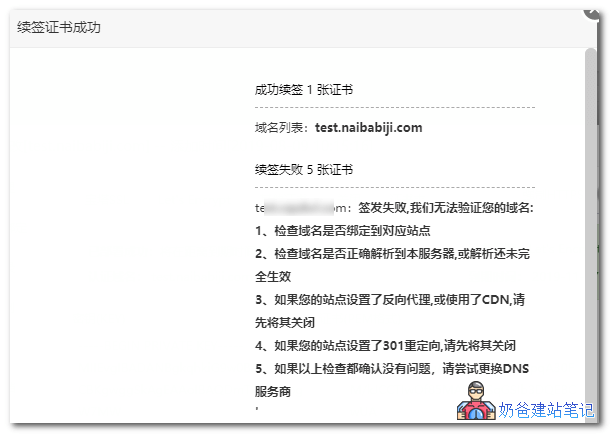
Issuance failed, we are unable to verify your domain:
1. Check if the domain name is bound to the corresponding site.
2. Check if the domain name is correctly resolved to this server, or if the resolution has not fully taken effect.
3. If your site has a reverse proxy set up or uses a CDN, please disable it first.
4. If your site has a 301 redirect set up, please disable it first.
5. If all the above checks confirm no issues, try changing your DNS provider.
If this problem occurs when renewing an SSL certificate, there are two methods to resolve it:
Method 1: Temporarily Disable Forced HTTPS
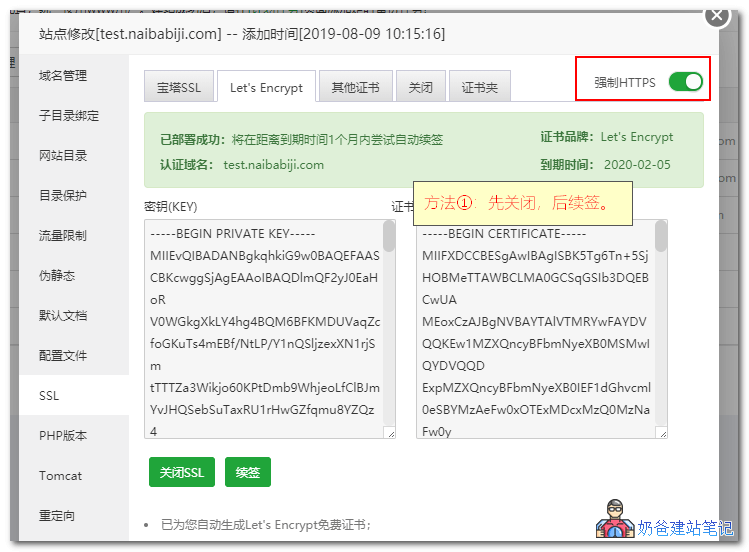
Simply go to the SSL settings within the website configuration, first disable HTTPS, then attempt to renew again.
Method 2: Update to the Latest Version or Repair the Panel
 In the upper right corner of the Baota Panel, choose to update to the latest version or repair the panel. This usually resolves the issue of certificate renewal failure.
The above is all the content on how to configure and install an SSL certificate on the Baota Panel. If you have any questions during use, you cancontact Naiba for consultation。