Enter the limit count in Search Limit (Count), enter the limit time in Block Time (in seconds), and enter the prompt message for blocked visitors in Message for blocked visitor. The Search Limiter & Blocker plugin is very small, consisting of only a single PHP file, so there's no need to worry about performance issues. You can also directly add the plugin code to the theme's functions file to achieve the functionality without a plugin (Naiba doesn't know how).Download LinkSearch Limiter & Blocker Plugin for Restricting WordPress Website User Search Frequency and Rate
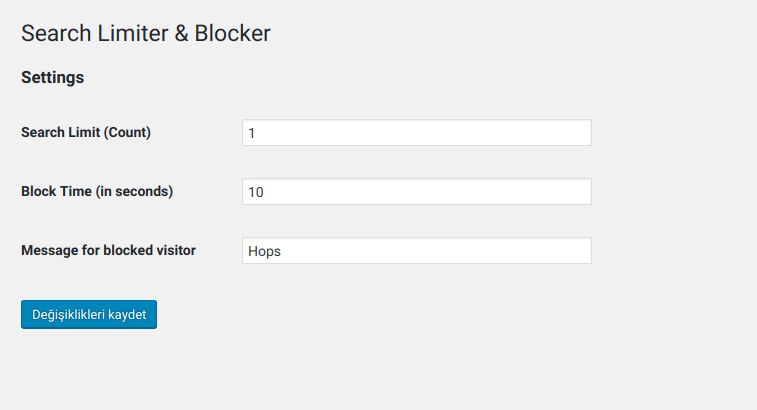
Search Limiter & Blocker is a plugin that limits the number and frequency of searches by website users.WordPress PluginPreviously, Naiba sharedSearch Meter Plugin for Recording WordPress Website User Search History, and from the search results, sometimes robot searches are encountered. For websites with poor server performance, if someone excessively uses the search function, the website's stability can be affected. Therefore, it is necessary to limit users' search frequency and rate at times. Search Limiter & Blocker determines this by checking the IP address. You can set how many times the same IP address can search within a certain period and the message displayed after exceeding the limit, as shown in the figure below:
Enter the limit count in Search Limit (Count), enter the limit time in Block Time (in seconds), and enter the prompt message for blocked visitors in Message for blocked visitor. The Search Limiter & Blocker plugin is very small, consisting of only a single PHP file, so there's no need to worry about performance issues. You can also directly add the plugin code to the theme's functions file to achieve the functionality without a plugin (Naiba doesn't know how).Download Link
Enter the limit count in Search Limit (Count), enter the limit time in Block Time (in seconds), and enter the prompt message for blocked visitors in Message for blocked visitor. The Search Limiter & Blocker plugin is very small, consisting of only a single PHP file, so there's no need to worry about performance issues. You can also directly add the plugin code to the theme's functions file to achieve the functionality without a plugin (Naiba doesn't know how).Download Link🚀 Still feeling confused after reading the tutorial? Let me guide you step-by-step instead.
「Naibabiji WordPress Website Building Coaching」 — From selecting a domain and purchasing hosting to installing themes and publishing posts, I「ll guide you through every step, helping you avoid detours and reach your goals directly.
👉 Learn about Website Building Coaching Service
Comments are closed
The comment function for this article is closed. If you have any questions, please feel free to contact us through other channels.