
Focus onwebsite SEO, or webmasters who want to understand website user needs, will definitely want to record user search logs. Today, Naiba will share this plugin for recording WordPress website search history: Search Meter
Plugin Introduction
The function of Search Meter is simple: it records and counts your website users' search history, tallying search terms, search frequency, and what content appears in the search results.
The Significance of Recording Search History
The main purpose of recording user front-end search history is to understand the needs of your own website users.
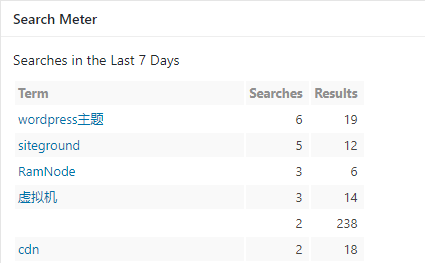
For example, the image above shows the most searched words on Naibabiji in the last 7 days.
A while ago, the most frequent ones were vulnerability keywords scanned by software in batches. If you install it, you might encounter similar results.
From the search statistics, it seems that visitors to this site are quite interested inWordPress Themes、sitegroundso I can specifically publish more articles of this type to meet user needs.
Additionally, you may also see search terms with Results of 0.
For example: index/think\app\invokefunction
So, can you write a targeted article, such as What does index/think\app\invokefunction mean?
You can search this term on Baidu and you'll find that it is actually a ThinkPHP 5.x remote command execution vulnerability. However, there are very few articles using this term as the title. So if you write an article titled What does index/think\app\invokefunction mean?, it is very likely to rank in the top few positions. This is considered a long-tail keyword. (You ask why Naiba doesn't write it? It's not that I don't want to, but I don't have time. Otherwise, I would have written it long ago.)
Plugin Usage Method
After installation, you can use it directly by enabling it. Keep the default settings; no additional configuration is needed.
Plugin Download
Click the button below to download, or directly search for 'Search Meter' in the WordPress admin dashboard.
Related plugins:Limit Website User Search Frequency and Rate