🚀 Is building a website too difficult? Let me guide you step by step—Learn about the 「Naibabiji WordPress Website Building Coaching Service」 →

Use Xftp 6 to delete the hidden file .maintenance

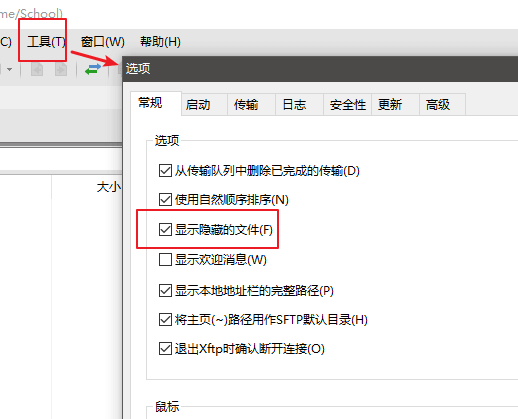
Recently, it seems accessing the wordpress.org website at night hasn't been smooth. Yesterday, while updatingWordPress Plugin, the update failed, causing the website to become inaccessible. When encountering a failed update that makes the website inaccessible, you only need to delete the `.maintenance` file. Naiba uses Xftp 6, but by default, it doesn't show this `.maintenance` file because, on Linux, this file is hidden. You need to adjust the software settings to display it.How to set Xftp 6 to show hidden files:Click on 【Tools】 in the top menu bar, then select 【Options】, check the box for 【Show hidden files】, and confirm.XFTP6显示隐藏文件

🚀 Still feeling confused after reading the tutorial? Let me guide you step-by-step instead.

「Naibabiji WordPress Website Building Coaching」 — From selecting a domain and purchasing hosting to installing themes and publishing posts, I「ll guide you through every step, helping you avoid detours and reach your goals directly.

👉 Learn about Website Building Coaching Service
🔒

Comments are closed

The comment function for this article is closed. If you have any questions, please feel free to contact us through other channels.

×
二维码

Scan to Follow