
Previously sharedPlugin for Restricting Website Access by Region: iQ Block Country, which can impose access restrictions on visitors from different countries/regions. The IP2Location Redirection plugin shared in this article can redirect visitors and can also indirectly block access from certain regions. Its features are a bit simpler than iQ Block Country.
IP2Location Redirection Plugin Introduction
First, after installing IP2Location Redirection, you need to download the IP database. You can download it directly from the plugin settings, but you need to register an account on the IP2Location website first to obtain a download token.
IP2Location registration is free, and you can also download a free IP database. If you need a more accurate database, you will need to pay.
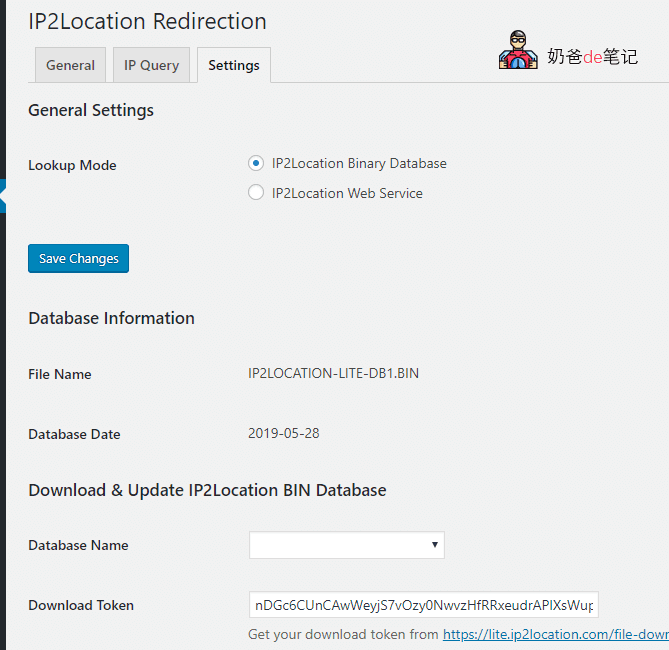
The IP2Location Web Service method in the above image is also paid, so it is recommended to download the free IP database for use.
After downloading, go to the General interface to perform a country access redirection operation, as shown below:
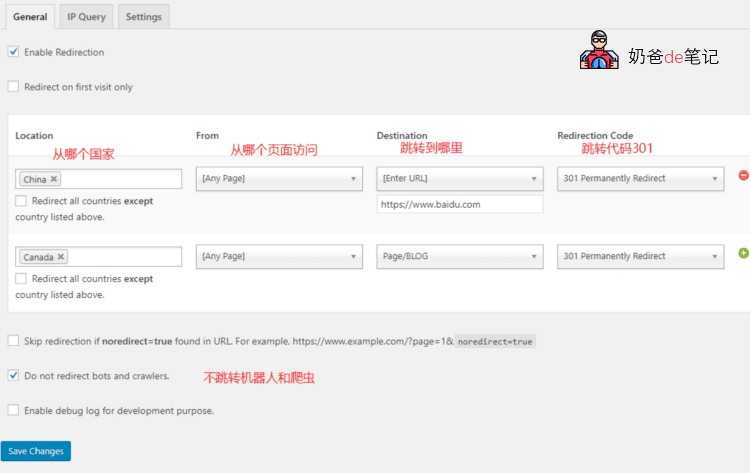
Choose which Location to access which pages, and where to redirect, then save and it will work.
For example, all pages accessed from China are redirected to Baidu. (This will also block yourself.)
You can also display different interface languages or different regional websites based on different countries.
IP2Location Redirection download link:https://wordpress.org/plugins/ip2location-redirection/
If you are also interested in building websites, click here to viewWebsite Building Tutorial from Scratch