
在Making Money by Building a WebsiteIn the article about making money by building websites, it was mentioned that earning income through ads is one of the main ways to monetize a website. For those who don't know how to code, it can be troublesome to flexibly control ad placement and conditions. So here Naiba recommends 7 popular WordPress ad management plugins.
Using ad management plugins, besides helping you quickly display different ads in different positions on your website, they also help you track impressions, click statistics, sell ad space directly to advertisers, and manage everything related to ads on your site.

Ad Inserter – Ad Manager & AdSense Ads
Total Downloads: 200,000+
5-Star Ratings: 1,200+
The ad management plugin has many advanced advertising features, allowing you to insert ads in the best positions.
Supports various ads, including Google AdSense ads, contextual Amazon native shopping ads, Media.net ads, and rotating banner ads.
This plugin is not just an AdSense plugin or an ad plugin. It provides many advanced options to insert opt-in forms, header scripts, AMP ads, Javascript, CSS, HTML, PHP, analytics, tracking, or ad codes anywhere on the page.
Features:
- Enable AdSense integration and get a powerful AdSense plugin
- Syntax Highlighting Editor
- Code preview with visual CSS editor
- Automatically insert ads on Posts and Pages
- Insert ads before or after publishing
- Insert ads before or after content
- Insert ads before or after paragraphs
- Insert ads before or after random paragraphs
- Insert ads before or after multiple paragraphs
- Insert ads before or after comments
- Insert ads before or after excerpts
- Insert ads near any element on the page (using CSS selectors)
- Insert ads above headings (after the
<body>tag) - Insert ads in the footer (before the
</body>code) - Insert ads at relative positions within posts
- Insert ads between posts on blog pages (dynamic AdSense ads)
- Insert ads between excerpts on blog pages
- Insert ads between comments
- Insert ads at custom hook locations (
do_action ()WP function) - Insert ads before or after any HTML element using CSS selectors
- Visual HTML element selector (DOM explorer)
- Avoid inserting ads near images or headings (AdSense TOS)
- Disable ads on individual posts or pages
- Insert header (
<head>section) and footer code - Insert raw HTTP response header lines
- Insert Google Analytics, Matomo (Piwik), or any other tracking code
- Insert HTML, CSS, JavaScript, or PHP code
- Code generator for banners and placeholders
- Visual ad editor – create ads from scratch
- Manual insertion: Widgets, Shortcodes, PHP function calls
- Sticky (Fixed) Widget (Sticky Sidebar – Sidebar does not move when scrolling the page)
- Custom alignment and styles for ads
- Insert ads on AMP pages (different ad codes)
- Custom CSS class name for wrapper div to avoid ad blocking
- Use shortcodes from other plugins
- Use custom fields defined in posts
- Create contextual ads using post title, tags, or category names
- PHP code processing
- Ad Label – Display custom label above ads
- Ad Rotation (Server-side and Client-side – Works with caching)
- Timed Ad Rotation – Define the time to rotate ads within a single ad block
- Create rich media ads using the standard WordPress TinyMCE editor
- Ad Block Detection – Popup message, page redirection
- Desktop/Mobile Detection (Server-side and Client-side – Works with caching)
- Blacklist/Whitelist categories, tags, taxonomies, post IDs, URLs, URL query parameters, cookies, referrers
- Easy copy and paste of ads or settings using internal clipboard
- Simple troubleshooting with many debugging features
- Feature to visualize inserted code blocks and ads
- Feature to visualize AdSense ads using ad names and IDs
- Feature to visualize available insertion positions
- Feature to visualize HTML tags
Advanced Ads – Ad Manager & AdSense
Total Downloads: 100,000+
5-star Ratings: 910+
This is a premium Google AdSense insertion plugin for WordPress websites. It has many features and can display different ads based on various conditions.
Features:
- Ad Management
- Ad Types
- Display Ads
- Advanced Ad Placements
- Display Conditions
- Visitor Conditions
- Ad Groups
- Advertising Networks and Google AdSense
- Responsive
- Statistics and Tracking
- More Features
Quick Adsense
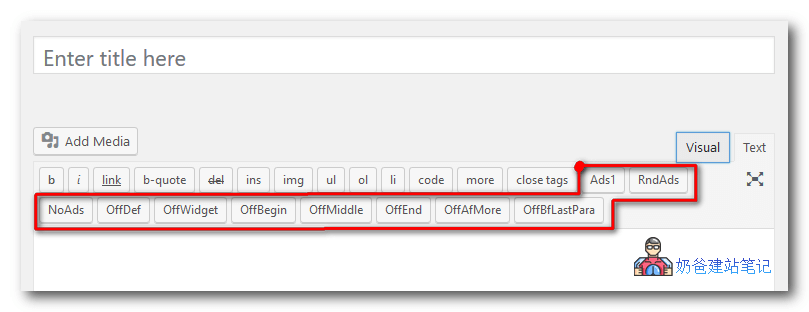
Quick AdsenseIt is an ad management WordPress plugin. It provides a faster and more flexible way to insert AdSense or any ad code into blog posts. Additionally, it can randomly place ads anywhere within posts. It comes with a simple settings page and does not overwhelm you with complex customizable options.
Generally speaking, besides optimizing AdSense, randomly placing AdSense in posts is a good way to try various ad formats and placements. If you have many regular visitors who frequently visit your blog,Randomizationit may catch their attention.
Here are some features that come with this plugin:Features:
- The author absolutely does not receive any revenue incentives or revenue sharing from your Adsense or such features.
- Default Ad Positions: Assign ads at the beginning of the post, in the middle of the post, at the end of the post, after the „More“ tag, before the last paragraph, after certain paragraphs (3 options available) and after certain images.
- Flexible ad placements, allowing ads to be inserted specifically or randomly anywhere within a post.
- Simple configuration interface, requiring no coding knowledge: just copy and paste the AdSense code, check and select options, and the plugin will do the rest for you.
- Supports any ad code, not limited to Adsense code.
- Up to 10 ads can be displayed on one page. Google allows publishers to place up to 3 AdSense content ads on one page. If you are using other ads, you can display up to 10 ads.
- Supports up to 10 ad codes on sidebar widgets.
- Supports up to 10 ad codes for specific placements and randomization within posts.
- Instant ad insertion, simply insert <!-- Ads1 -->, <!-- Ads2-->..., <!-- RndAds--> into the post to achieve this.
- Instant ad deactivation, simply insert <!-- NoAds -->, <!-- OffDef -->, <!-- OffWidget -->, <!-- OffBegin-->... etc. into the post.
- The above tags can be easily inserted into posts via additional quick tag buttons added to the HTML edit post subpanel.
AdRotate Banner Manager
Total Downloads: 50,000+
Five-star ratings: 580+
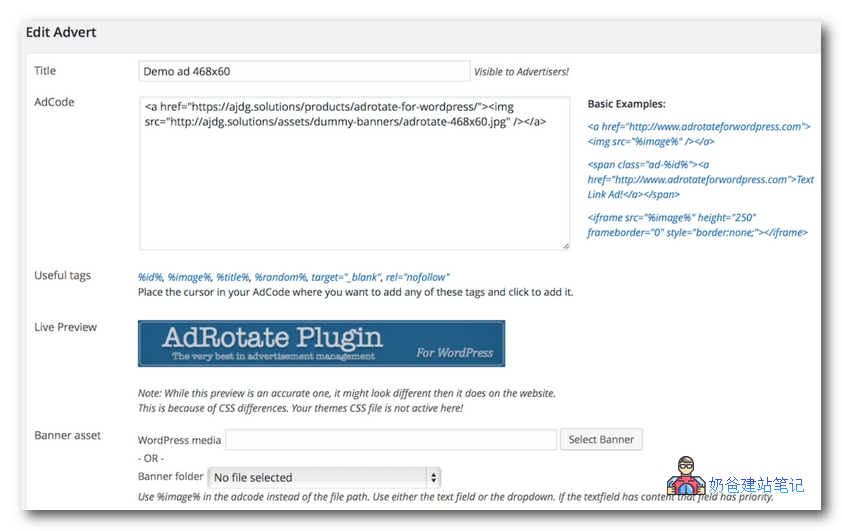
With AdRotate, you can easily place ad banners almost anywhere on your website while managing almost everything from an easy-to-use dashboard. No fuss if you don't want to.
With AdRotate, you can easily create your own ads using basic HTML and/or Javascript code, or use ads from your preferred ad servers such as Media.net, DFP, AdSense, Chitika, Doubleclick, JuiceAds, and many more similar ad servers.
Features:
- Works with the following ad servers: Media.net, Google AdSense, DFP Ad Manager, and most other referral/ad servers
- Easily manage ads and ad groups
- Automatic JavaScript rotation for ads with dynamic groups
- Let your advertisers add/edit/manage their own ads
- Geographic targeting for ads
- Accept PayPal payments from the dashboard when selling ads
- Mobile ads (differentiates between mobile phones and tablets)
- Ads that mask ad blockers, so they are not removed
- Receive push notifications about ads and important events on your iOS or Android device
- Receive email notifications when ads are needed
- Ads of any size, including 125×125, 468×60, 729×90, 160×600
- Easy-to-read statistics, so you can track the performance of each ad
- Compatible with plugins such as Yoast SEO, W3 Total Cache, SEO Framework, Borlabs Cache, bbPress, Contact Form 7, All in One SEO Pack, Jetpack from Automattic, WooCommerce, Wordfence, Regenerate Thumbnails, and more.
- Compatible with responsive ads
- Daily, monthly, and yearly statistics
- Couple ads show personalized statistics to users
- Advertisers can easily contact you through their dashboard
- Track how many times a banner ad is clicked and display its click-through rate
- Place random or selected banners in pages or posts
- Preview banners while editing
- Advanced scheduling and limits under your control
- Free use of the exclusive geolocation service AdRotate Geo from AJdG Solutions
- Export statistics
- Multiple groups per banner placement
- Unlimited widgets
- Display multiple ads at once in a grid, columns, or rows
- Automatically disable ads after expiration
- Dashboard notifications for ads about to expire or requiring attention
- Place ads on your site using shortcodes, widgets, or PHP
Above are the4 premium WordPress ad management plugins recommended by NaibabijiIf you rely on ads for revenue, using these plugins well can help you manage ad displays more scientifically and earn more income.