
Many foreign trade practitioners choose to use WordPress with the WooCommerce plugin to build their own foreign trade B2C independent websites. Usually, shipping costs are fixed, but for some goods, charging per item is unreasonable, and weight-based calculation is needed. Here, Naiba recommends five WooCommerce weight-based shipping calculation plugins.
Plugin 1: Table Rate for WooCommerce by Flexible Shipping

Table Rate for WooCommerce by Flexible Shipping is the most popular plugin among these five, a flexible WooCommerce shipping calculation plugin. It supports calculating shipping costs based on weight or total cart amount and has a Pro version.
Supported shipping calculation schemes:
- Calculate shipping costs based on the weight of products in the cart
- Calculate shipping based on cart total
- Add handling or insurance fees after reaching a certain order value
- Create a COD (Cash on Delivery) shipping method with additional costs
- Different shipping rates for different shipping classes (PRO)
- Disable/hide shipping methods if rules are already defined in the cart (PRO)
- Add costs for the entire order and each product in the cart (PRO)
Plugin 2: WooCommerce Weight Based Shipping
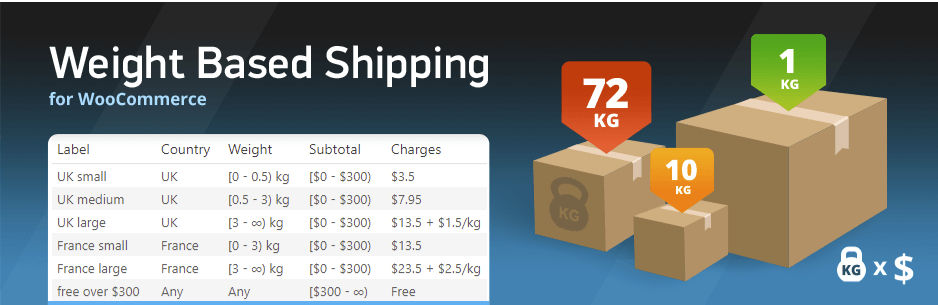
WooCommerce Weight Based Shipping has slightly fewer users than the plugin mentioned above, but its main functionality focuses on calculating fees based on weight.
Product Features:
- You can create as many shipping rules as needed for different order destinations, weight, and subtotal ranges.
- Each rule can be configured to show a constant price (like a flat rate), a cumulative price based on cart weight, or both.
- In some cases, you may want to offer free shipping based on subtotal, total weight, or other conditions. This can be achieved instantly with the plugin.
- For each shipping class you have, you can override how its shipping cost is calculated (Pro version feature).
Plugin 3: WooCommerce Advanced Shipping
WooCommerce Advanced Shipping is not specifically a weight-based shipping calculation plugin; it offers more billing rules. These include:
- Seamless integration with WooCommerce shipping features;
- Customizable shipping method labels for buyers in the cart;
- Supports calculating shipping based on total product price;
- Supports calculating fees based on weight;
- Can set whether to include tax or handling fees;
- Can set multiple shipping methods;
- And more.
Plugin 4: WC – APG Weight Shipping

WC – APG Weight Shipping can calculate shipping rates based on country, region, and postal code.
Features
- You can add fixed packaging and/or handling fees for each shipment.
- You can also add packaging costs, extra fixed costs per shipment or product, such as quantity or percentage.
- You can create an unlimited number of rates.
- You can create rates with maximum weight and/or dimensions.
- You can create rates based on the number of items.
- You can create rates based on cart total.
- You can assign rates to specific shipping classes.
- You can choose the highest shipping class rate instead of the sum of rates.
- You can choose whether to accept overweight or oversized items.
- You can exclude shipping for one or several product categories.
- You can exclude shipping for one or more product tags.
- You can exclude shipping for one, several, or all shipping categories.
- You can exclude user roles.
- You can hide payment gateways.
- You can display custom icon images.
- You can display estimated delivery times.
- 与WooCommerce Product BundlesThe plugin is fully compatible.
- 与WPMLThe plugin is fully compatible.
Plugin 5: Weight zone shipping for WooCommerce

If your WooCommerce store needs to calculate shipping costs based on cart weight and delivery region, this plugin is perfect for you.
This plugin replaces the oik-weightcountry-shipping plugin. Designed for WooCommerce 2.6 and 3.0, it integrates with shipping zones.
Each shipping zone can contain multiple shipping methods, and its rates apply to all regions within that zone.
Features
- Calculate shipping costs based on cart weight and delivery region
- Unlimited weight-based billing ranges
- 0 weight cart
- Free shipping within selected weight ranges
- Use default rates for the rest of the world
- Maximum cart weight
- WooCommerce 2.6, 3.0 and later
- Available in English, French, and Swedish
- Handling fee as a fixed rate or a percentage of the total cart cost
You can choose the most suitable shopping cart weight-based shipping plugin from the above 5 plugins to set the billing rules for your e-commerce site.
If you haven't built your WooCommerce store yet due to concerns about shipping settings, then followWooCommerce Website Installation Tutorialto build your own website. For more WooCommerce knowledge, please visitWooCommerce Tutorials。