Have you ever wondered how to hide specific products from public view while still allowing access via a direct link during your foreign trade independent website building process? ThisWooCommerce tutorial articleis what you need. Naiba will introduce how to set up hiding specific products on a WordPress site.
Before you start, make sure you havea shopping website built with WordPress and WooCommerce。
You would typically consider temporarily hiding products in the following situations:
- Products offered only to specific customers, hidden from regular visitors;
- Products not currently for sale;
- Products that need to be manually added to quotes by sales staff and should not appear on the store's homepage;
- Other situations
Below is how to set it up.
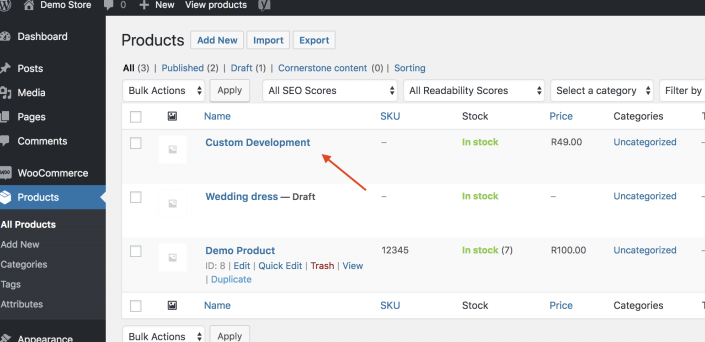
1. Add a product from the WooCommerce backend or select the product you want to hide, then click the Edit button.
2. On the right side of the product, you can set the visibility. Select 'Hidden'. (Located below the publish button)
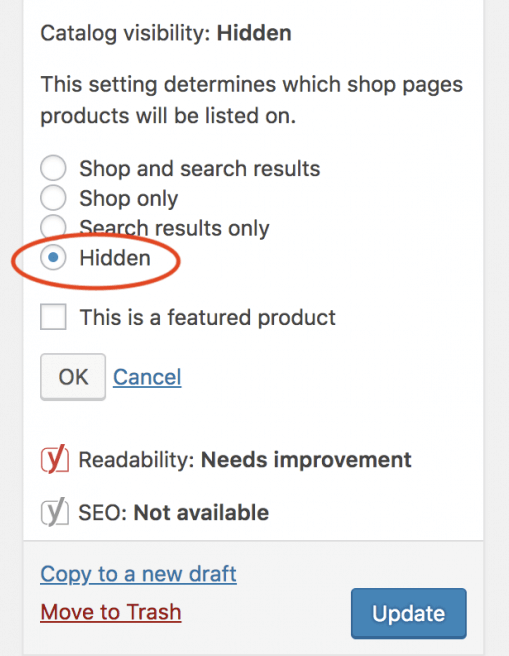
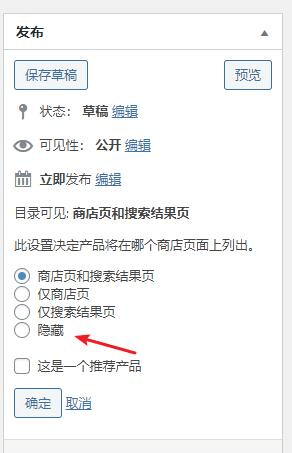
3. Click the Update button, and the product hiding feature is set.
After this operation, the product will not be visible on the front end of the site, but you can still assign it to customers from the backend.
If you need more hiding features, you will need to use some paid WooCommerce product plugins, which is beyond the scope of this article. If you need them, you can search on your own.