
AboutWordPress post QR code generation plugin or code, there are already many available online, NaibaWebsite Building NotesThe one shared here todayQr Code Composer pluginIt seems to be a more perfect solution.
Existing plugins and code for generating QR code images for articles online have three shortcomings:
- They rely on external APIs, such as Google API or third-party QR code generation platforms;
- They do not support WooCommerce product pages;
- They add an additional HTTP request.
The Qr Code Composer introduced in this article perfectly solves these three problems.
- Qr Code Composer is based on QRious and does not require calling the Google API, so users in China can also use it with confidence.
- Qr Code Composer can also generate QR code images on WooCommerce product pages.
- Qr Code Composer's images are loaded with the HTML code using Base64 encoding, eliminating an extra HTTP request.
Base64 encoding is an image processing format that encodes an image into a long string through a specific algorithm. When displaying on a page, this string can be used instead of the image's URL attribute.
Further Reading:
Qr Code Composer WordPress QR Code Generation Usage Demo
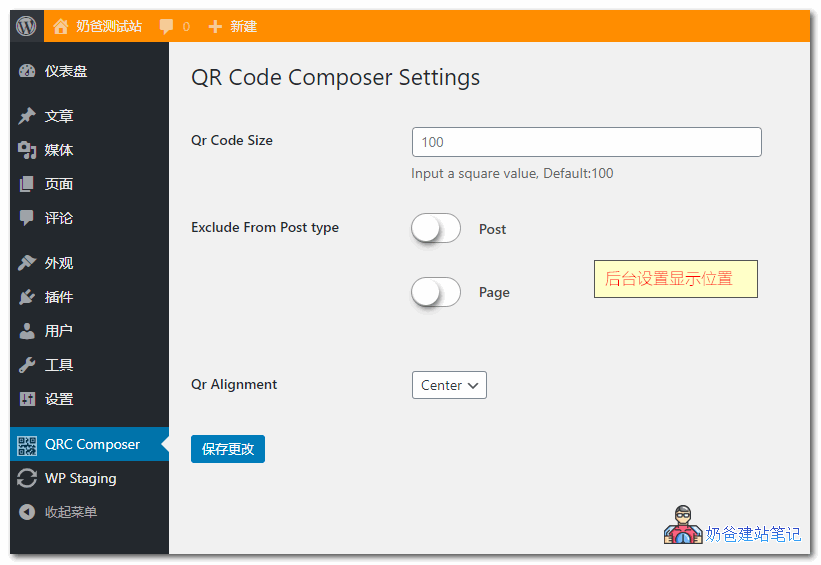
After installing the plugin, it will be displayed on the front-end by default. You can set the image size and display position in the backend.
When publishing individual articles or products, there is an option at the bottom to hide the QR code.

The relevant QR code image will then appear on the front-end page.

If you want to customize the display effect, you can modify the CSS code yourself.