Want to build a digital mall website selling drones? Is there a quick method? Of course, there is. We can use WordPress + the Drone theme to quickly set up a drone website.
How to install a WordPress website?
Want toinstall a WordPress website., you only need a domain name, a server, and then install a WordPress website on the server. It's very simple. You can refer toSteps to build a website。
How to build a drone website using WordPress?
How to build a drone website on WordPress? This is the main topic of this article. Naiba here recommends this WordPress theme named Drone, specifically designed for the drone industry. It can be used to create drone enterprise websites or drone e-commerce websites.
Drone Theme Introduction

The Chinese meaning of Drone is unmanned aerial vehicle. This theme is directly named Drone, so obviously, it is aimed at the drone industry.
The Drone WordPress theme builds a drone sales website by installing the WooCommerce e-commerce plugin. It comes with 3 different demo templates. It supports responsive layout and Retina HD screens, with every element designed to look great on all popular devices (desktop, tablet, and mobile).
The Drone WordPress theme includes two paid WordPress plugins: Slider Revolution and Visual Composer, allowing you to create beautiful slideshow effects and page layouts.
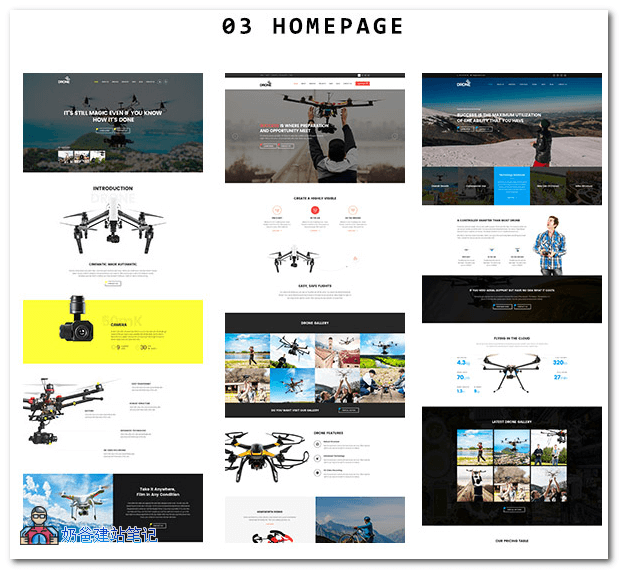
With 3 different theme effects, supports one-click demo data import, so don't worry about not knowing how to design.
Drone Theme Usage Method:
After downloading the theme, it includes the theme file, child theme file, demo data samples, and guides. You can directly read the help file in the guides to learn how to install and use the Drone WP theme.
Drone is a paid theme. For a formal website, it is recommended to purchase the genuine version. If you want to test it simply, you can join Naiba's QQ group to get it.
Join Group to DownloadGroup 774633089 share > WordPress Themes > ZT19.drone118