🚀 Is building a website too difficult? Let me guide you step by step—Learn about the 「Naibabiji WordPress Website Building Coaching Service」 →

How to Enable Automatic Loading of Previous Post Content on Astra Theme Post Pages

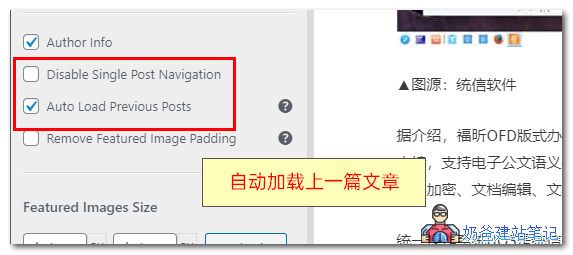
Auto-loading previous post content in the Astra Theme is called Auto Load Previous Posts, which is a feature of the Pro version. The usage method is as follows: 1. ActivateAstra Pro2. Enable the Blog Pro feature 3. Click on the Theme Customizer and switch to the Blog - Single Blog interface. 4. Enable the Auto Load Previous Posts function Then, when visiting any article on the website, scrolling down will load the content of the previous article. However, you cannot simultaneously check Disable Single Post Navigation, otherwise the function will not take effect.自动加载上一篇文章Enabling auto-loading of previous articles can increase website page views, but visitors cannot see your website's footer information, which may cause dissatisfaction among some users.  

🚀 Still feeling confused after reading the tutorial? Let me guide you step-by-step instead.

「Naibabiji WordPress Website Building Coaching」 — From selecting a domain and purchasing hosting to installing themes and publishing posts, I「ll guide you through every step, helping you avoid detours and reach your goals directly.

👉 Learn about Website Building Coaching Service
🔒

Comments are closed

The comment function for this article is closed. If you have any questions, please feel free to contact us through other channels.

×
二维码

Scan to Follow