
Home Astra Theme Tutorial Standard Post

Standard Post

What is the Astra.woff font? And how to disable Astra.woff

Friends using the Astra theme may notice that the theme loads a default Astra.woff font when optimizing website speed. This Astra.woff is the theme's default font, containing some commonly used icons. As shown below: This font is used in the following places: the search button at the end of the top-right menu, the dropdown icon of the menu...

Published on April 28, 2020 About 1 minute read
Astra.woff字体是什么?以及如何禁用Astra.woff

Friends using the Astra Theme might find that the theme loads an Astra.woff font by default when optimizing website speed. This Astra.woff is a font that comes default with the theme and contains some commonly used icons. As shown below:
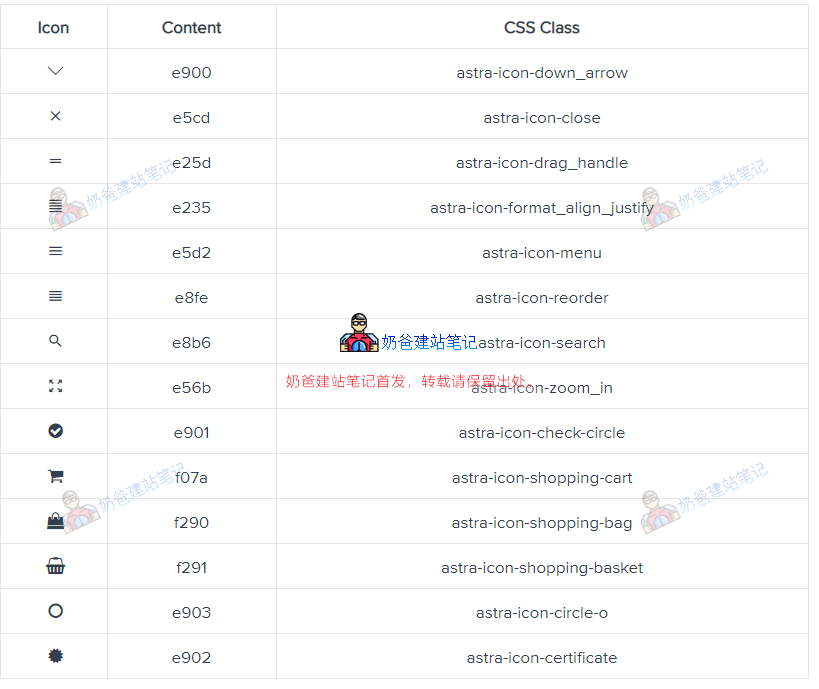
Astra.woff

This font is used in the following places:

The search button at the end of the top-right menu, the dropdown icon of the menu, and the mobile menu button.

So under normal circumstances, we cannot disable this font file.

If you really don't use this font, you can disable it with the following command.

Add the following code to the functions file

add_filter( 'astra_enable_default_fonts', '__return_false' );
2.3/5 - (10 votes)
Previous Sitelinks: Introduction to the method for website sub-links to appear in Google search results Continue reading content around the same timeline. Next Best Foreign Trade Website Building Systems and Foreign Trade Website Building Source Code Summary and Comparison View the next related tutorial or experience.

AI Website Building Assistant

🤖
Hello! I am the Naibabiji AI Assistant. How can I help you?
Quick Consultation: