
Home Experience & Tips Sharing Standard Post

Standard Post

Why Can't Plugins and Themes Be Installed in WordPress Installed via SiteGround?

Naiba has encountered several friends using SiteGround servers for foreign trade website building who, after installation, have no plugin installation or theme installation buttons. Screenshot below: This problem occurs because you selected multisite mode when installing WordPress, i.e., you checked Install WordPress Multis…

Updated on September 28, 2025 About 1 minute read
SiteGround安装的WordPress不能安装插件和主题是什么原因?

Naiba has encountered several friends usingSiteGround servers for foreign trade independent websiteswho, after installation, found no buttons to install plugins and themes. Screenshot as follows:
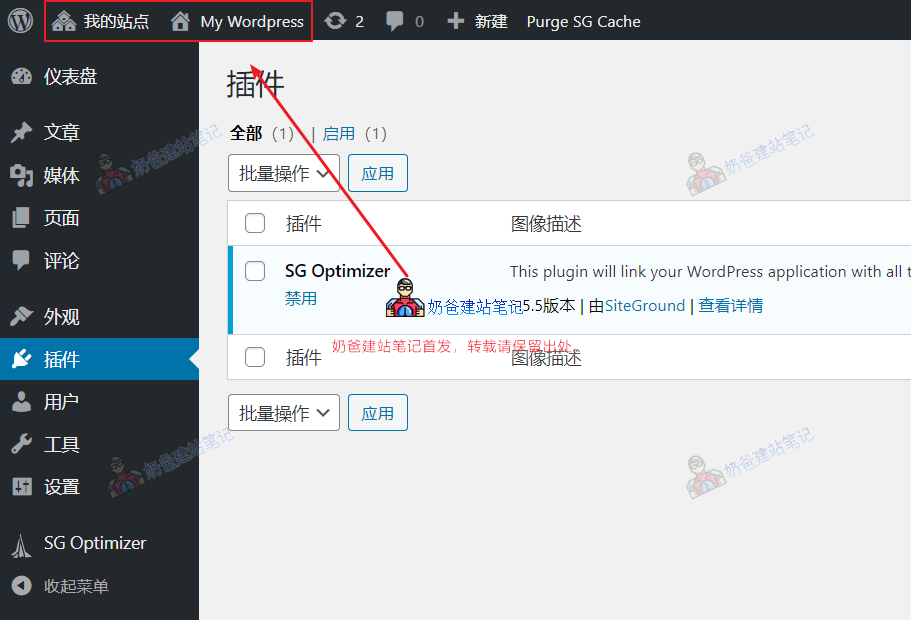
SiteGround多站点

This issue occurs because you selectedMultisite mode, i.e., you checked Install WordPress Multisite during installation, so it defaults to multisite mode.

Multisite mode is not conducive to the maintenance of a single site, so if you don't have a multisite website, it is recommended not to enable multisite mode.

The solution is to delete the currently installed multisite website, reinstall it, and do not check "Install WordPress Multisite".

3.5/5 - (10 votes)
Previous WordPress Upload and Install Theme Error „The link you followed has expired“ Solution Continue reading content around the same timeline. Next Method for Migrating from Bluehost to SiteGround, All-In-One WP Migration Tutorial View the next related tutorial or experience.

AI Website Building Assistant

🤖
Hello! I am the Naibabiji AI Assistant. How can I help you?
Quick Consultation: