
Home WP Plugins Standard Post

Standard Post

Set separate Permalink URLs for different WordPress Post types

After building your website with WordPress, when creating new posts, you may notice that you can publish different formats, such as Standard, Gallery, Image, Link, Quote, Video, Audio, Status, and Log. However, the default permalink structure is the same as what you set in settings. So how do you set different URLs for different post types? We can use C...

Updated on March 21, 2020 About 1 minute read
为WordPress不同文章类型设置单独的网址固定连接

After building your website with WordPress, when creating new posts, you may notice that you can publish in different formats, such as Standard, Gallery, Image, Link, Quote, Video, Audio, Status, and Aside. However, the default permalink structure is the same as what we set in the settings. So, how can we set different URLs for different post types?

We can use the Custom Post Type Permalinks plugin.

1. Search for Custom Post Type Permalinks from the Admin Dashboard, install and activate the plugin.
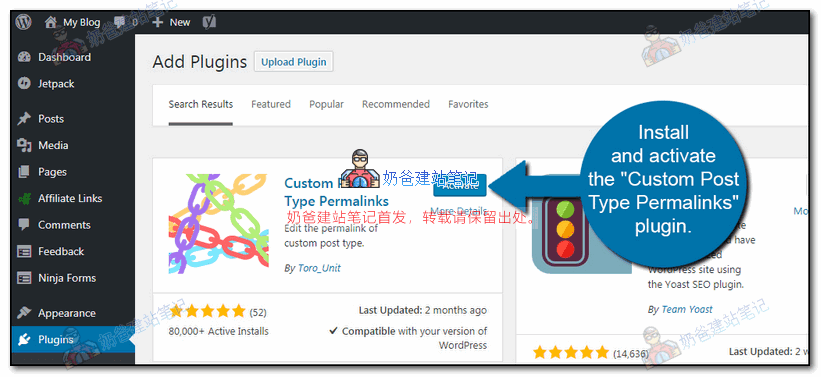
自定义文章结构

2. After activating the plugin, go to the WordPress permalink settings page, and you will find additional settings.
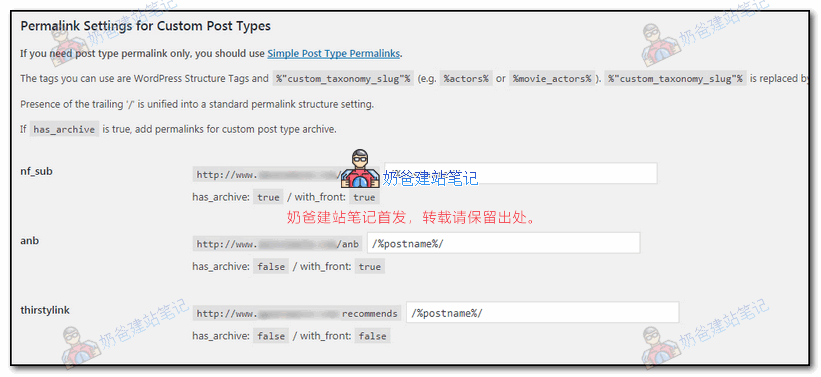
固定连接设置

For different post types, such as images, videos, or custom post types you create, different URL structures will appear.

After setting it up and saving, you can see different URLs for different post types on the front end.

Related articles:WordPress Best Permalink Settings_Which Pseudo-Static Rule is Better

5/5 - (1 vote)
Previous How to Modify WooCommerce Product Page Template Styles Continue reading content around the same timeline. Next Complete WooCommerce Shortcode List, Display Product Information from Anywhere View the next related tutorial or experience.

AI Website Building Assistant

🤖
Hello! I am the Naibabiji AI Assistant. How can I help you?
Quick Consultation: