After building an e-commerce website using WordPress and WooCommerce, the default product detail page includes related products at the bottom. These related products are automatically recommended based on categories. If you want to manually set which specific related products to recommend, we have the following two plugins to achieve this.
Plugin 1: WPC Custom Related Products for WooCommerce
WPC Custom Related Products for WooCommerce allows you to select related products for specific products.
Plugin Features:
- Add custom related products.
- Display the selected related products on the product detail page instead of showing products from the same category.
This plugin also has a Pro version with the following features:
- Main Features of Woo Custom Related Products Pro
- Select custom related products.
- Choose related products from specific categories.
- Choose related products from specific tags.
- Set the number of related products to display.
Plugin 2: Related Products for WooCommerce
WooCommerce Related Products allows you to select related products for a specific product.
Few of us dare to buy a new product without consulting someone who has used or is familiar with it. Recommendations play an important role in sales. People always tend to buy products strongly recommended by others.
It turns out that adapting this simple and effective consumer behavior to online platforms can generate huge sales revenue. Adding related products to the product or cart page increases the chance of customers making a purchase. With this plugin, you can
- Disable the default related products section
- Related products you selected (currently limited to 3)
Usage Method:
The usage methods for these two plugins are the same, steps are as follows:
- Download and install the plugin, and activate it;
- Go to edit the product details page;
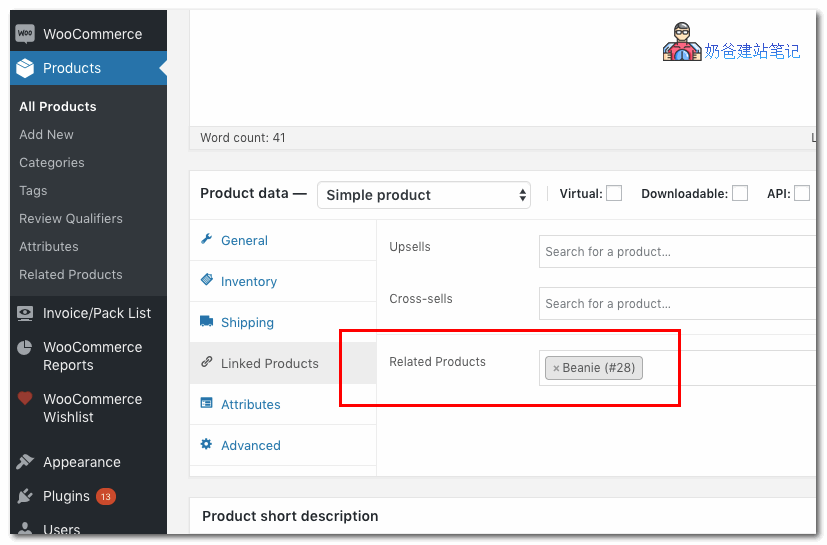
- Fill in custom products in the Related Products interface under Linked Products.