
Every foreign trade independent website will have a 'Contact Us' form. After a customer sends a request, they receive an email. By default, there's only a text message saying 'Submission Successful' after submission. How can we make the customer redirect to a specific page after submitting the form? There are two methods:
- Setting within the contact form plugin
- Using a third-party plugin for setup
1. Setting within the contact form plugin
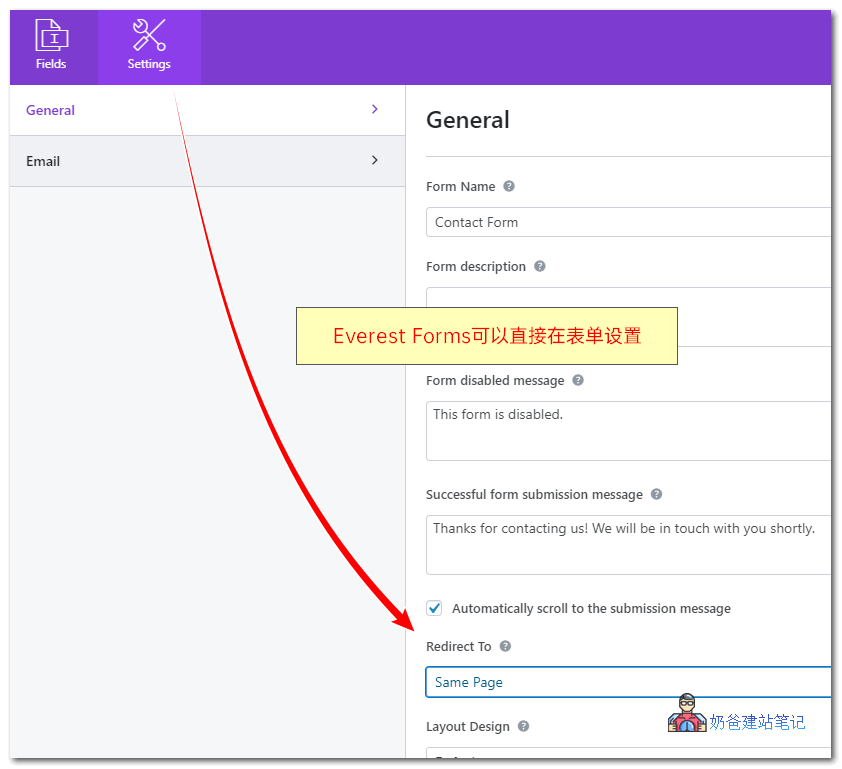
For exampleEverest FormsYou can directly see a 'Redirect To' option in the form settings, which allows you to set a redirect to a specified page or a custom link.
2. Using a third-party plugin to set it up
What if the contact form you are using does not support setting a redirect page?
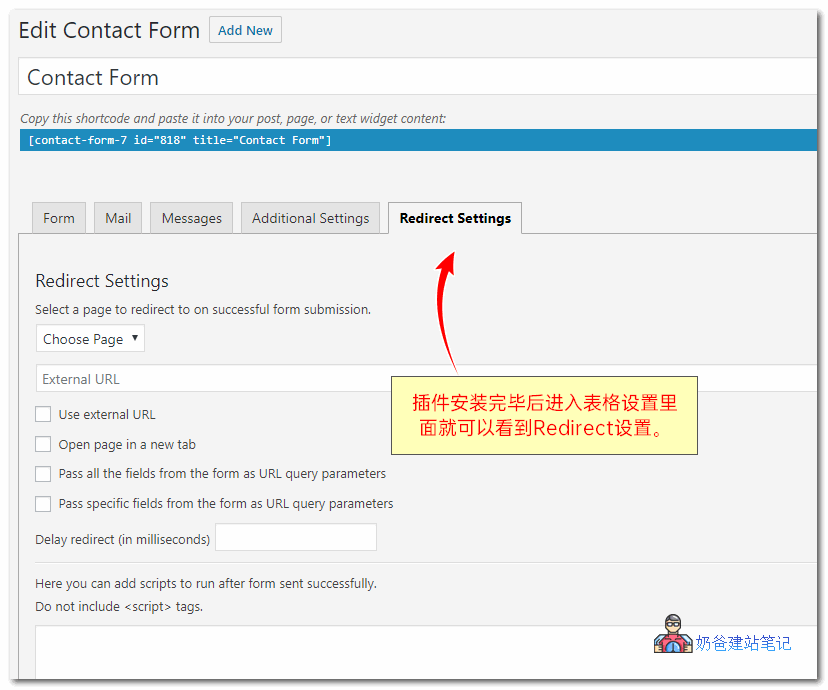
For example, Contact Form 7, which has a large number of users, we can install the Redirection for Contact Form 7 plugin to achieve the function of redirecting to a specific page after submitting the form request.
Benefits of Redirecting to Other Pages
You might wonder, why redirect to another page after submitting a request?
There are two benefits: 1. Improve user experience; 2. Facilitate conversion tracking.
1. Improve User Experience
By default, all contact form submissions only have a text reminder saying 'Your information has been submitted.' The customer might not fully believe it and feel uneasy. If we redirect to a 'Thank you for contacting us' page, where a page change occurs, the customer will be much more certain that their request was submitted successfully.

You can leave your phone number on the reminder page, as well as information like WeChat ID, WhatsApp, etc.
2. Conversion Tracking
The previously published articleHow to Track Conversion Rate for a Self-Built Website? Google Analytics Goal Setting TutorialThe article mentioned how to track contact form conversions. Tracking by filling in an ID may be troublesome for ordinary users, so we can track this thank-you page.
You can analyze how many people visit your website each day but do not contact you. Then reflect on whether the website content is not good enough and why others do not contact you, thereby improving the website's conversion rate.
Alright, the above are two methods to add a redirect page to the website's form. Hope it helps you.