
Friends who do SEO know that after changing a domain name, it's essential to set up a 301 redirect for the old domain to reduce the SEO impact of the URL change. Google has now launched a Change of Address tool, making it easier to modify and migrate domains.
Introduction to the Change of Address Tool
When you migrate your website from one domain or subdomain to another, you can use the Address Change Tool: for example, migrating from example.com to example.org or example2.com. This tool informs Google of your changes and helps reflect the migration from the old site to the new site in Google search results.
Simply put, if you want to change your domain from, for example, baidu.com to google.com, you can use this feature. Google will prioritize switching the indexed records of your old domain to the new domain in its database, which is faster than a 301 redirect.
Specific Usage Method
Step One: Preparations
First, after changing your website's domain, you need to set up a 301 redirect for the old domain.
For the 301 redirect method, refer toLNMP One-Click Package Nginx 301 Force Redirect to HTTPS Tutorialthe code inside, modifying the configuration file of the old website to point to the new website (for nginx).
server {
listen 80;
server_name 老域名;
return 301 https://blog.naibabiji.com$request_uri;
}
server {
listen 443 ssl;
server_name 老域名;
return 301 https://blog.naibabiji.com$request_uri;
}
Step Two: Using the Change of Address Tool
Before using the Change of Address tool, ensure you haveSearch ConsoleAdd and verify both the old and new domains, and ensure both domains are under the same Google account.
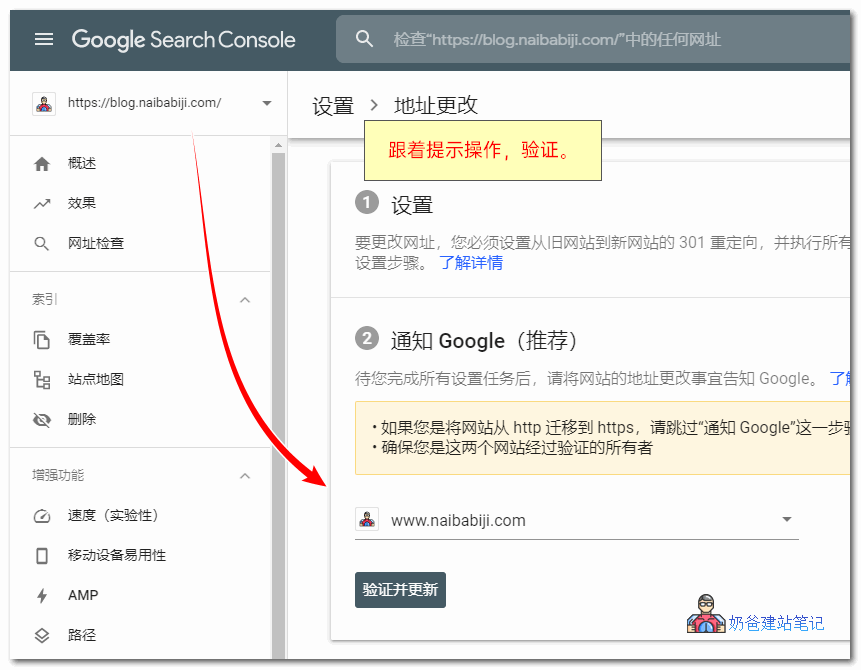
Then openGoogle Change of Address Tooland follow the instructions provided in the tool. After verification, Google will begin processing your migration request.
At the same time, Google requires you to keep the redirect for the old site for at least 180 days. If after 180 days you can still see the old site's data in Google search, you need to maintain the redirect for a longer period.
After the 180-day period, if the old site still exists and is crawlable, Google will not recognize any relationship between the old and new sites and will treat the old site as unrelated.
Canceling a Change of Address Request
If you no longer want to change the domain, you can cancel the request within 180 days.
Alright, that's it for Google's Address Change Tool. Friends who want to change their domain name can make full use of this tool to migrate traffic and authority from the old site to the new site.
For detailed introduction, visit https://support.google.com/webmasters/answer/9370220