
Auto-loading previous post content is called Auto Load Previous Posts on the Astra theme, a feature of the Pro version. Usage steps:
1. ActivateAstra Pro
2. Enable Blog Pro functionality (Blog Pro)
3. Click on Theme Customize, switch to Blog - Single Post interface.
4. Enable Auto Load Previous Posts
Then visit any post on the site, and scrolling down will load the previous post's content.
However, do not check Disable Single Post Navigation at the same time, otherwise the feature will not work.
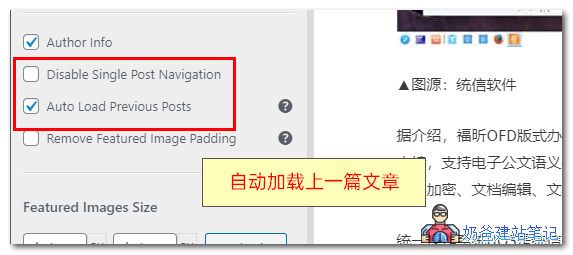
Enabling auto-loading of previous posts can increase page views, but visitors cannot see your site's footer information, which may cause some users to dislike it.