If you are prompted „Unable to create directory wp-content/uploads/2020/02. Is its parent directory writable by the server?“ when uploading a theme or images in the WordPress backend, the directory location is your current year/month, such as 2020/01, 02, 03, etc. You just need to set the correct folder directory permissions. The specific method is as follows:
Baota Panel Solution for Directory Permissions
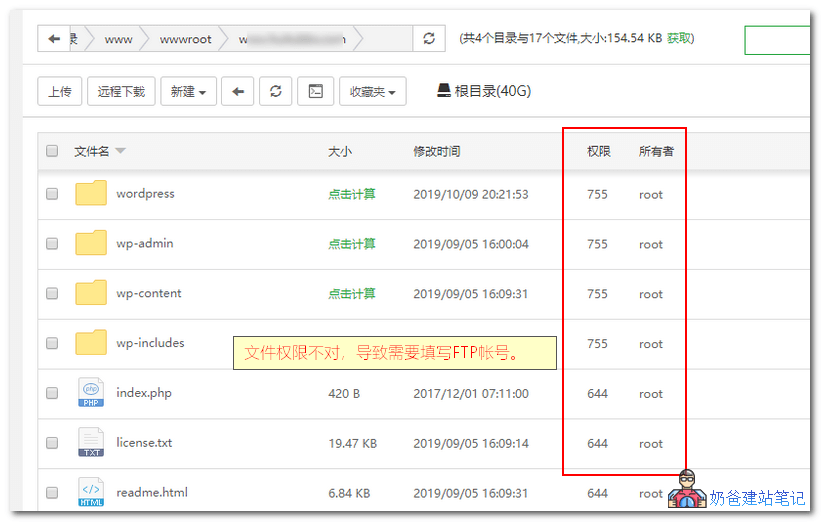
1. Log in to the Baota Panel, enter your website's folder, as shown in the figure below. You can see the permissions and owner are 755 and root respectively. The correct ones should be 755 and www, so we just need to modify them.
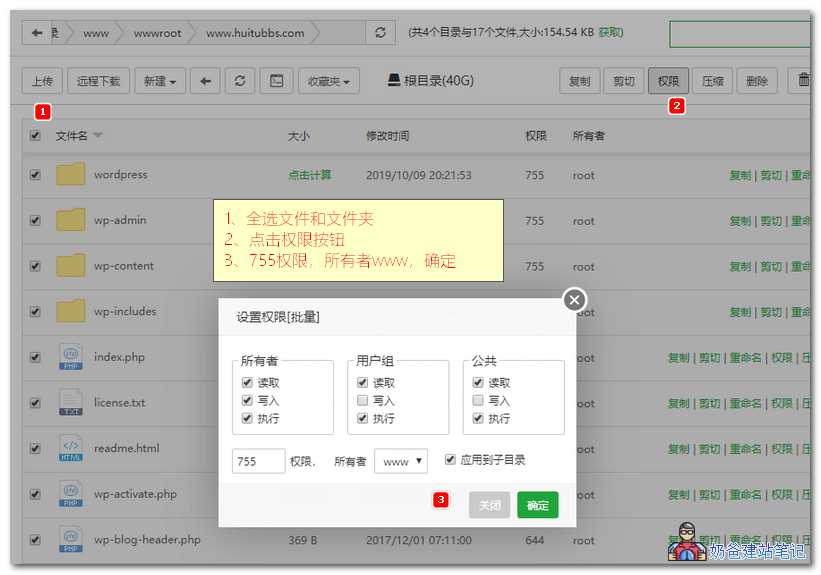
2. First, select all files and folders, then click the permissions button in the upper right corner. In the pop-up interface, choose 755 for permissions and www for the owner, then confirm. This will solve the problem.
Other Panel Setup Methods
If you are not using Baota Panel but other panels or no panel, the same principle applies: just set the folder permissions.
If you don't know how, you can refer to the method below.Connect to the VPS using xshelland then operate.
- chmod -R 755 your-website-directory-path
- chown -R www:www your-website-directory-path