By default, after installing WordPress, there is an admin panel option at the top called the Admin Bar, which allows quick switching to the admin Dashboard and publishing Posts, etc. However, not everyone likes it. This article teaches you how to remove this admin bar.

The image above is the Admin Bar (administrator toolbar). Sometimes it might look ugly when displayed, so we want to delete or hide it.
The method to remove the Admin Bar is as follows:
Open the website's WP Admin, go to Appearance, Theme Editor, modify the functions.php file, and insert the following code
// Hide Admin Bar
show_admin_bar( false );
The admin bar will be hidden on the front end.
If you are unsure how to manually add code to the theme functions file, you can use the following method to achieve it.
References:https://developer.wordpress.org/reference/functions/show_admin_bar/
Show admin bar only to administrators
// 对非 Administrator 用户均隐藏顶部工具条(Admin Bar)
function my_function_admin_bar($content) {
return ( current_user_can( 'administrator' ) ) ? $content : false;
}
add_filter( 'show_admin_bar' , 'my_function_admin_bar');
// 只对有管理权限的用户显示顶部工具条(Admin Bar)
if ( ! current_user_can( 'manage_options' ) ) {
show_admin_bar( false );
}Another way to hide the toolbar without modifying code:
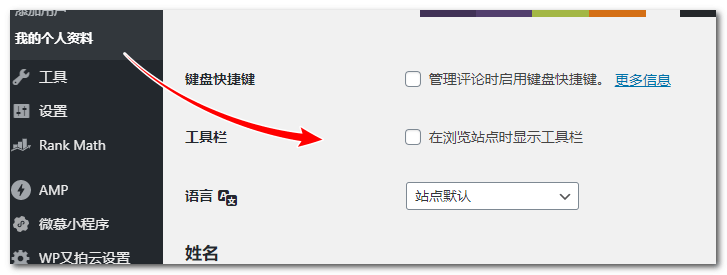
If you find adding code troublesome, you can also set it by modifying the 'Show Toolbar when viewing site' option on your profile page.