
Building your own websiteHow to attract followers to your official account? Requiring users to follow the official account and reply to make content visible is a very effective method for directing traffic to the official account. This article recommends 4 methods for viewing website content only after following an official account.
Method 1: Plugin Version for Official Account Traffic Diversion
For ordinary users, using the plugin version is the most convenient and quick method. Here we share the "WeChat Official Account Follower Growth„ plugin.
„WeChat Official Account Follower Plugin can hide any part of the article content. When visitors follow your WeChat Official Account, they can obtain a verification code to view the hidden content.
Frontend demo effect is as shown below:
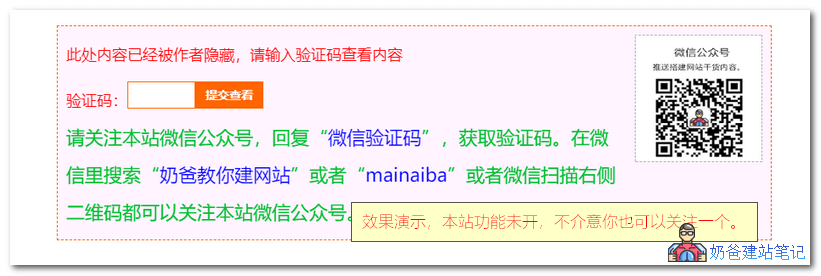
Usage Method:
- Download the plugin installation package
- Upload and install the plugin via the WP admin dashboard, and activate it
- Set up the official account information in the plugin's backend settings
- Add automatic reply keywords in the WeChat Official Account backend
Plugin 2:WeChat Public Platform Verification Code View Plugin
Method 2: Code Version for Official Account Traffic Diversion
1. The code-based method is similar to the plugin-based method. Copy the code below and paste it intoWordPress Themesin the functions.php file.
Note to modify the QR code image URL, name, etc. in the code below.
/**
 * wordpress微信公众号吸粉的3种方法
 * https://blog.naibabiji.com/skill/weixin-guan-zhu-ke-jian.html
 */
function lxtx_secret_content($atts, $content=null){
    extract(shortcode_atts(array('key'=>null,'keyword'=>null), $atts));
    if(isset($_POST['secret_key']) && $_POST['secret_key']==$key){
        return '<div class="secret-password">'.$content.'</div>';
    } else {
        return
            '<div class="post_hide_box">
             <img class="erweima" align="right" src="改为二维码图片的网址" width="150" height="150" alt="你的二维码名字"><div class="post-secret"><i class="fa fa-exclamation-circle"></i>此处内容已经被作者无情的隐藏,请输入验证码查看内容</div>
             <form action="'.get_permalink().'" method="post">
             <span>验证码:</span><input id="pwbox" type="password" size="20" name="secret_key">
             <a class="a2" href="javascript:;"><input type="submit" value="提交" name="Submit"></a>
             </form>
             <div class="details">请关注“你的名字”官方QQ公众号,回复关键字“<span>'.$keyword.'</span>”,获取验证码。【注】用手机QQ扫描右侧二维码都可以关注“你的名字”官方QQ公众号。</div>
             </div>';
    }
}
add_shortcode('gzh2v', 'lxtx_secret_content');
2. Add the code below to the theme's style.css file.
.post_hide_box, .secret-password{background: none repeat scroll 0 0 #efe;border-left: 5px solid #e74c3c;color: #555;padding: 10px 0 10px 10px;border-radius: 5px;margin-bottom: 15px;overflow:hidden; clear:both;}
.post_hide_box .post-secret{font-size: 18px; line-height:20px; color:#e74c3c; margin:5px;}
.post_hide_box form{ margin:15px 0;}
.post_hide_box form span{ font-size:18px; font-weight:700;}
.post_hide_box .erweima{ margin-left:20px; margin-right:16px;}
.post_hide_box input[type=password]{ color: #9ba1a8; padding: 6px; background-color: #f6f6f6; border: 1px solid #e4e6e8; font-size: 12px;-moz-transition: border .25s linear,color .25s linear,background-color .25s linear; -webkit-transition: border .25s linear,color .25s linear,background-color .25s linear; -o-transition: border .25s linear,color .25s linear,background-color .25s linear; transition: border .25s linear,color .25s linear,background-color .25s linear;}
.post_hide_box input[type=submit] { background: #F88C00; border: none; border: 2px solid;border-color: #F88C00; border-left: none; border-top: none; padding: 0px;width: 100px; height: 38px; color: #fff; outline: 0;border-radius: 0 0 2px 0; font-size: 16px;}
.post_hide_box .details span{color:#e74c3c;}
3. Add a shortcode. When writing an article, you can directly insert the shortcode into articles where content is visible only after following the public account.
// 后台文本编辑框中添加公众号隐藏简码按钮
function lxtx_wpsites_add_gzh_quicktags() {
    if (wp_script_is('quicktags')){
?>
    <script type="text/javascript">
    QTags.addButton( 'gzh2v', ' 公众号隐藏', '\n[gzh2v keyword="关键字" key="验证码"]隐藏内容[/gzh2v]', "" );
    </script>
<?php
    }
}
add_action( 'admin_print_footer_scripts', 'lxtx_wpsites_add_gzh_quicktags' );
When publishing an article, the shortcode is as follows:
[gzh2v keyword="关键字" key="验证码"]隐藏内容[/gzh2v]
Method 3: Service for Reading Full Article Only After Following
This method is somewhat different from the previous two. It only hides part of the article content on the front-end via CSS code, but the full content can be seen in the source code, which does not affectwebsite SEOeffectiveness.
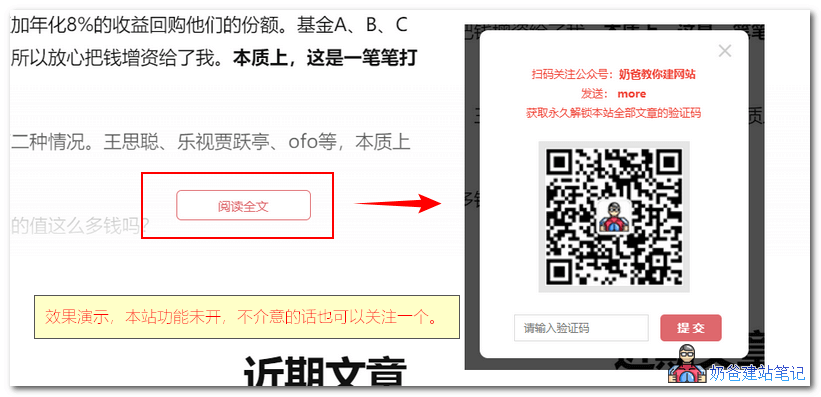
If you want to implement this method yourself using code, you can refer tothis article, but the author did not provide the complete code, only the idea.
So novice users can use third-party services. Naibabiji Website Building Notes recommends herehttps://openwrite.cn/Home.
Go to their website to register an account, then in the tools you can see the social media follower growth tool. After adding the information, add the code to the website theme file.
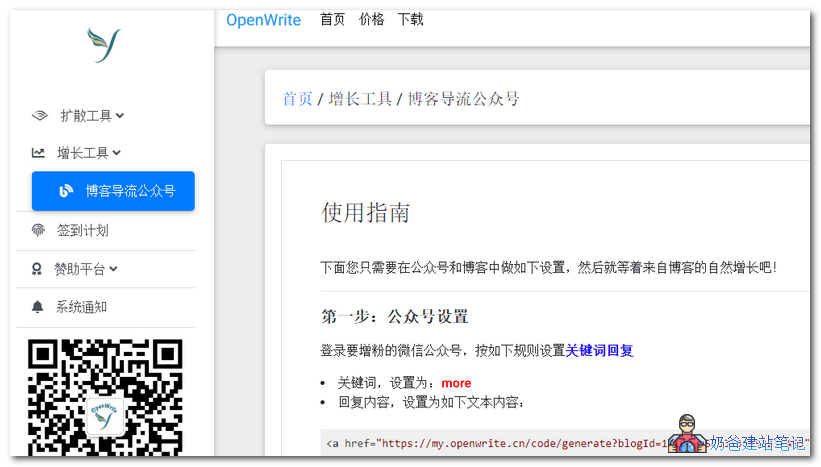
Method 4: Old Tribe WeChat Verification Plugin
Plugin download: http://tools.laobuluo.com/wordpress/plugins/cnwper-weixin.zip
We can configure the plugin settings.
1. Developer Token
If we are not using the WeChat Official Account API, then just fill in anything here. It is recommended not to use the API, otherwise it will cause other preset auto-reply keywords to become invalid.
2. WeChat Official Account URL
This is the QR code image of the WeChat Official Account that we need to display on the frontend. Appropriate size.
3. Verification Code Retrieval Keyword
It should correspond to the auto-reply settings of the WeChat Official Account according to our preset values.
4. Verification Code Validity Period
Generally set to 2 minutes. The unit is default.
5. Interface File Name
This is the PHP file that will be generated in the root directory of our website, corresponding to the return URL that needs to be set in the auto-reply later.
6. Reply Template
This is generally default, but can be fine-tuned according to your needs.
Then set up auto-reply in the WeChat Official Account.
<a href="http://我们的网站URL/api.php?url_captcha=get_captcha">查看验证码</a>
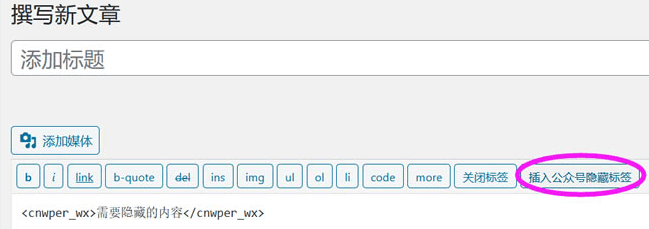
Publication address https://www.itbulu.com/weixin-saoma.html
References:
- Free WordPress plugin that requires following a WeChat public account to view specified content
- WordPress article partial content visible only after following a WeChat public account