I've modified the permanent links for some articles on the site. Is there a wayto modify all related links on the siteHuh?
The answer is yes.
For batch replacing the WordPress database, we can adopt the following two methods:
- Bulk Replace Using Plugins
- Bulk Replace Using Database Commands
Replacement Method 1: Using the Better Search Replace plugin
Better Search Replaceis a tool for batch searching and replacing in the databaseWordPress Plugin. The plugin is in English, but it's very simple to use. The specific steps are as follows:
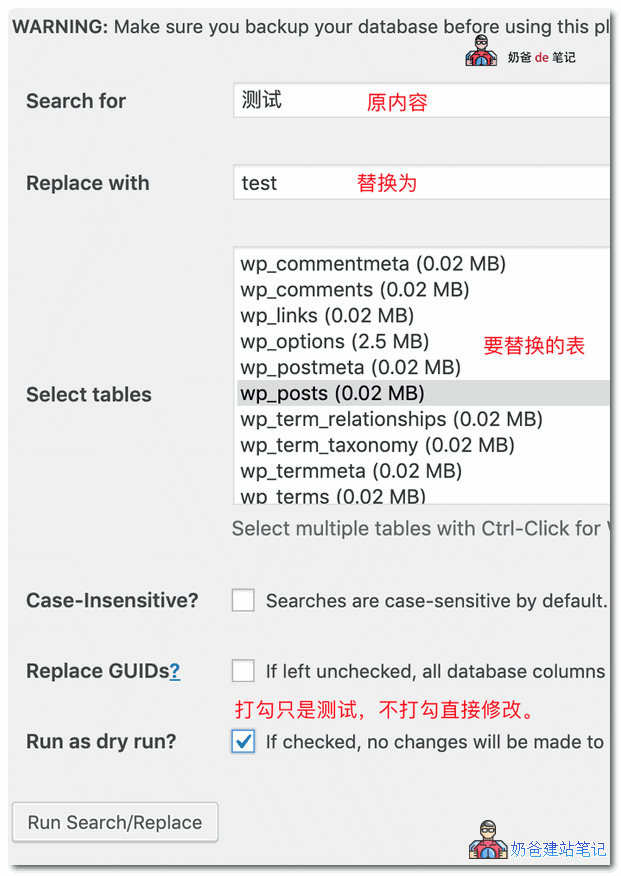
- Enter the content you want to search for in 'Search for'
- Enter the content you want to replace with in 'Replace with'
- Select the tables to search and replace in 'Select tables'. The WordPress posts table is wp_posts
- 'Case-Insensitive?' determines whether to be case-sensitive
- 'Replace GUIDs' refers to the GUID which is the website domain. Generally, do not select this.
- 'Run as dry run?' If checked, it won't write directly to the database; it will only show you how many changes would be made. To actually make the changes, uncheck this.
Take a simple example, for example, if your previous article URL was
https://blog.naibabiji.com/archives/*.html
The new URL structure has been changed to
https://blog.naibabiji.com/skill/*.html
Then we just need to fill in /archives/ in Search for and /ji-qiao/ in Replace with.
Official Download Cloud Storage Download
Replacement Method 2: Using code to replace in the database
This method requires using phpMyAdmin to access the database. If you are not familiar with database operations, it is recommended to use the plugin method (method one) for modification. The implementation is the same, but this method uses commands, while the plugin uses a graphical interface.
Open phpMyAdmin, enter your website's database, and execute the following SQL code.
UPDATE wp_posts SET post_content = REPLACE(post_content, '原内容' , '替换为的内容');
WordPress Bulk Content ReplacementIt is usually used when we have modified the website URL structure, or after modifying the URL of an important article, to batch update links in articles that reference this URL.
However, URLs written in the website theme template files cannot be replaced; only data in the database can be replaced using the above methods.
However, for safety, it is recommended to back up the database before replacing content.Backing Up WordPress Using Plugins
More Methods for Batch Processing WordPress Data
If you need to batch clear articles under a WordPress category, featured images, media library data, etc., please refer to the tutorial article below: