
If you don't know how to code, have little basic computer knowledge, but really enjoy reading novels, can you build a novel website yourself? The answer is yes. This article teaches you how to build a novel website from scratch.
Preparing to Build a Novel Website Yourself
To build a novel website, we need to prepare two basic things:
- A domain name, if you don't plan to make it publicly accessible, you can skip registering;
- A server, which is essential.
Register a cheap foreign domain name, which costs only a few dollars a year; it's recommended not to save money here, just register one. Tutorials are listed below:
- Tutorial on Registering a Domain with the Foreign Domain Registrar Namesilo
- Tutorial on how to purchase and configure DNS for a domain at the foreign domain registrar Dynadot
- Domain Registration and Usage Topic Articles
It is recommended to purchase a server abroad because domestic servers require ICP filing, and novel websites may not pass personal filing.
For beginners, just follow the tutorial below. It gives away $50. Once you get familiar with it and find the server unsatisfactory, you can switch to another one.
Note: For the above tutorial, only focus on server purchase, activation management, and installing the website environment, i.e., the Baota Panel section. After completing it, return to this article to continue.
Install Tomcat
The tutorial above mentions installing the Baota Panel. However, to build a novel website, we also need to install the Tomcat software, so we need to install it separately on the Baota Panel.
1. Log in to the Baota Panel backend
2. Switch to the App Store, search for Tomcat, and install it
3. Select Tomcat 8 as the installation version
4. After installation, click Tomcat and select Stop.
Install the Novel Website
Next, we will start building the novel website.
The novel website we build here uses Novel Boutique.
Novel Boutique House is a multi-platform (web, Android app, WeChat mini-program), fully functional responsive novel barrage website, including premium novel zones, light novel zones, and comic zones. It features novel/comic categorization, novel/comic search, novel/comic rankings, completed novels/comics, novel/comic ratings, online novel/comic reading, novel/comic bookshelves, novel/comic reading history, novel downloads, novel barrages, automatic novel/comic collection/update/error correction, automatic sharing of novel content to Weibo, email auto-promotion, automatic link submission to Baidu search engine, and more.
1. Download the installation file
On the download page above, select the latest zip archive to download. For example, at the time of writing this article, the latest version is novel-install-v2.1.2.zip
2. Extract the downloaded zip archive folder
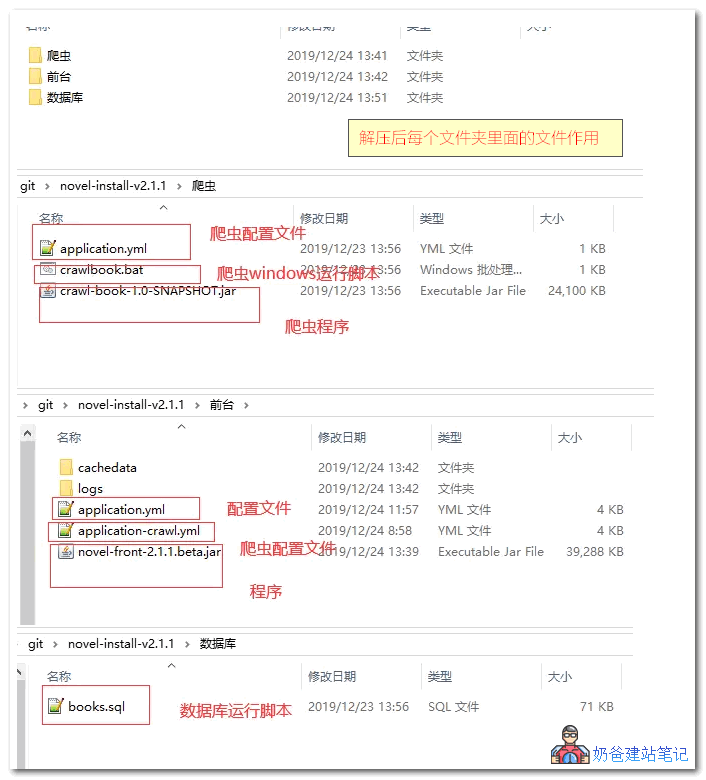
3. Upload the novel-front-2.1.2.beta.jar installation package and configuration files to the www directory of the website. (This is a demo without a bound domain; if you have bound a domain, upload it to your domain folder.)
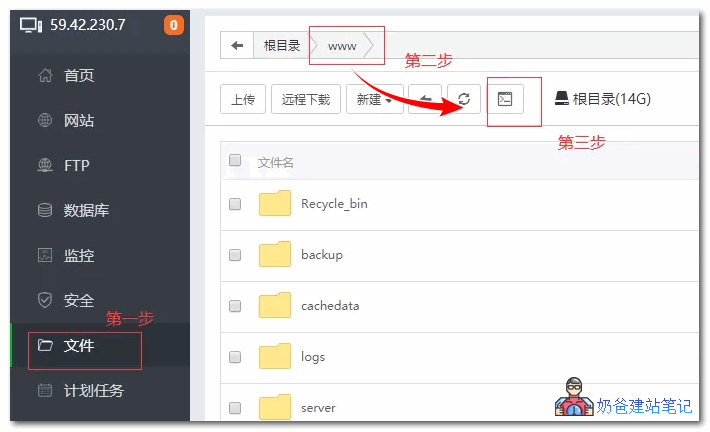
The specific steps are: log in to the Baota Panel backend, select Files, then click the www folder under the root directory, and then click Upload.
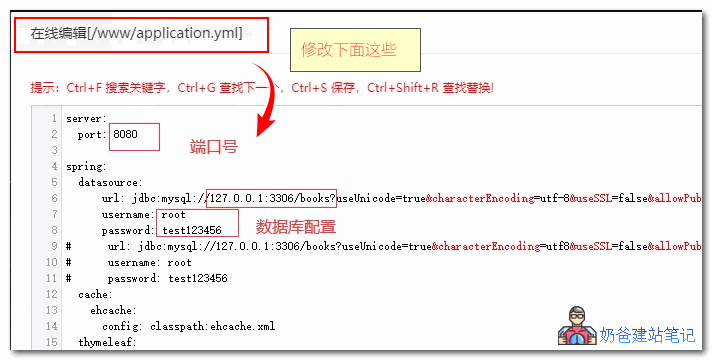
4. Modify the port number and database configuration in the configuration file. (If there is no database, create one first)
 5. Open the console and execute the service startup command: setsid java -jar novel-front-2.1.2.beta.jar.
6. Go to the Baota Panel security interface and add 8080 to the firewall rules
Finally, you can access your own novel website via http://ip:port.
Building a novel website yourself is simple, right? If you still have questions, you cango to the project homepageto view or ask questions.