Previously sharedImplement Security Measures to Avoid WordPress Websites Being HackedIn the article, a friend commented asking how to hide the WordPress admin login URL, specifically the actual address of wp-admin or wp-login.php.
Here, Naiba recommends the WPS Hide Login plugin, which is simple and lightweight, install and use.
WPS Hide Login Tutorial
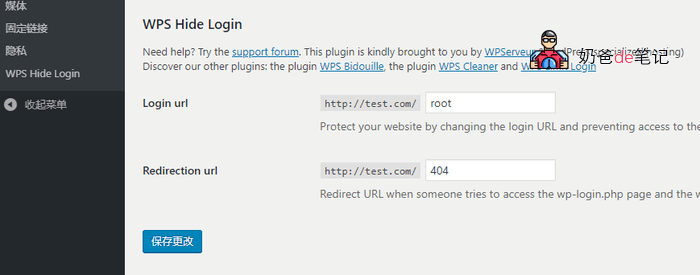
After installing WPS Hide Login, a new settings item will appear in your admin settings menu. You only need to set the login URL to your desired custom admin login address, and the redirection URL to the address where old login attempts should be redirected, then save.
After configuration, you must log in through the URL you set; otherwise, you will be redirected to the page you specified.
The advantage of WPS Hide Login is its simplicity. Once set and saved, it takes effect immediately without needing to modify server rewrite rules or website files.
Extension Download Address:https://cn.wordpress.org/plugins/wps-hide-login/
Another plugin with the same function is this one:https://wordpress.org/plugins/fullestop-lock-down-admin/