
Previously, Naiba wrote an article introducingWordPress Best Permalink Settings_Which Permalink Type is Better, the article stated that the best WordPress permalinks are numeric, post name, or custom.
Early yesterday morning,Naibabijiswitched the SEO plugin from All in One SEO Pack to Yoast SEO. While using the Yoast SEO wizard, it suggested changing the original numeric permalink structure to post name.
After waking up, considering the long term, I decided to change the site's permalink structure, as shown below:
 Reasons for Changing Permalinks
Changing a site's permalink structure from an SEO perspective is a very cautious move; if done poorly, it can reduce search engine rankings.
Based on the following reasons, I ultimately decided to make the change.
- Numeric permalinks have low recognizability
- WordPress WeChat Mini ProgramDoes not support article redirection for numeric permalinks
- Post name permalinks are more beneficial for SEO and recognition
Actually, I had considered changing the permalink structure when building the WordPress WeChat Mini Program before, but at that time, I didn't do it due to SEO concerns.
Although the numeric permalink structure is foolproof and doesn't require manually editing aliases for each article, the links are too hard to recognize. Often, when netizens ask Naiba about website issues, I would send them the corresponding URL, but a string of numbers makes it difficult to see the article content. So now I've switched to pinyin format.
Additionally, I added the category to the permalink, making it look like a second-level directory, to test if this format helps with SEO.
Website SEO Data When Changing Permalinks
To experiment with the impact of this WordPress permalink change on the site's SEO, I'll record the current SEO data.
As of November 2nd
- Baidu Indexed 167
- Google Indexed 771
- 360 Indexed 67
- Bing Indexed 2680
- Sogou Indexed 149
- Average traffic in the last 3 days is between 400-500
What Did I Do When Changing Permalinks?
1. Change SEO Plugin
Switched from All in One SEO Pack free version to Yoast SEO premium cracked version.
I've used the free version of Yoast SEO before, and it felt similar to All in One SEO Pack. However, yesterday I saw a well-known blogger in the foreign trade circle suggest that his students should get familiar with Yoast SEO and then purchase the premium version.
So I conveniently installed the Yoast SEO premium version to experience what unique advantages it offers.
I'll write an article comparing All in One SEO Pack and Yoast SEO when I have time. For now, my impression is the same as before—they are similar, but Yoast SEO's interface and translations are more beginner-friendly. However, Yoast SEO's key keyword density feature is not suitable for Chinese websites, so English website users can prioritize Yoast SEO.
2. Change Permalinks
In the backend settings, changed the permalink structure from numeric to a custom format.
3. Modify the slug for each post and set up 301 redirects
This was a labor-intensive task. If the slug is not modified, the default URL suffix directly uses the Chinese article title, which looks very unappealing. Therefore, I manually changed all article slugs to pinyin form. (Of course, you can also use theWordPress Article, Category, and Tag Page URLs Automatic Conversion to English Pinyin Plugin)
But if the Chinese article title is too long, converting it entirely to pinyin will also be too long. Manually naming the alias would be better.
After changing the permalink structure, the URLs of all articles on the site changed, so I need to set up 301 redirects one by one. Yoast SEO has this feature built-in, as shown below:
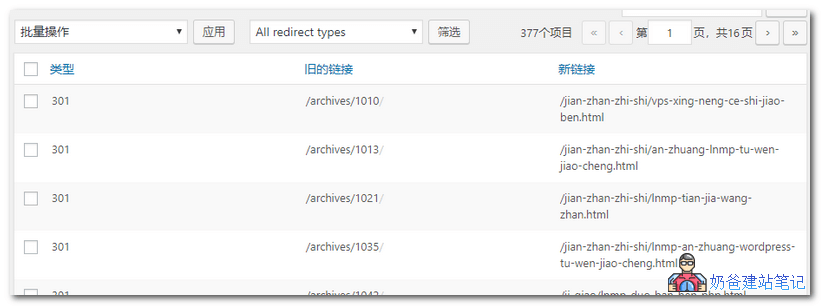
377 301 redirect rules. Adding the slugs and setting up the 301 redirects took a full day.
4. Modify internal links in posts to the new post URLs
Usually, articles on the site contain some internal links. Initially, I manually modified them one by one, but then I thought of batch replacing them in the database. It took over 2 hours to finish.
The database batch modification was done usingWordPress Batch Find and Replace Plugin and Code for Modifying Article Content
5. Modify other links and resubmit the sitemap
In the website theme and menu, there are still some old permalink URLs. Manually modify them to the new URLs.
The previous sitemap file format was sitemap.xml. After installing Yoast SEO, the generated file is named sitemap_index.xml.
Although sitemap.xml will automatically redirect to sitemap_index.xml, it's still safer to manually submit it to search engines.
6. Install a 404 logging plugin
After a website redesign, 404 error pages are inevitable. Even without a redesign, logging 404s lets you know which links have become invalid. Therefore, Naiba also installed the following plugin.
No more worries about dead links WordPress 404 SEO plugin recommendation: 404 Solution
This concludes the permalink modification for this blog (I also took the opportunity to modify the homepage description again). Let's continue updating and observe the search engines' reactions.