
This statistic is a resource limit imposed by the server on the shared hosting you purchased. Since shared hosting involves many people sharing one server, without limits, some might use more resources while others use less or none. SiteGround's limit is not to exceed 20,000 points within 24 hours. The image above clearly shows that the resource usage limit has been exceeded. As for how SiteGround handles exceeding this limit, Naiba hasn't found relevant information on their website. If you encounter this issue, you can ask customer service or pretend not to know; if they need to take action, they will contact you. If you don't want to experience such resource restrictions, you can consider upgrading to a VPS. Foreign trade users who are not familiar with VPS can considerScala Hostingthis provider's, which is also managed, comes with a shared hosting control panel. The difference from shared hosting is that all shared hosting on this server is for your use only, so you can occupy all the CPU, memory, disk, and other resources of the server.What does SiteGround's CPU Time Usage mean? Why is there an exclamation mark?
After purchasing SiteGround's server, in the Cpanel management interface statistics bar, you see that the CPU Time Usage information bar is full and has two exclamation marks. This indicates that your website resources have exceeded the server usage limit.
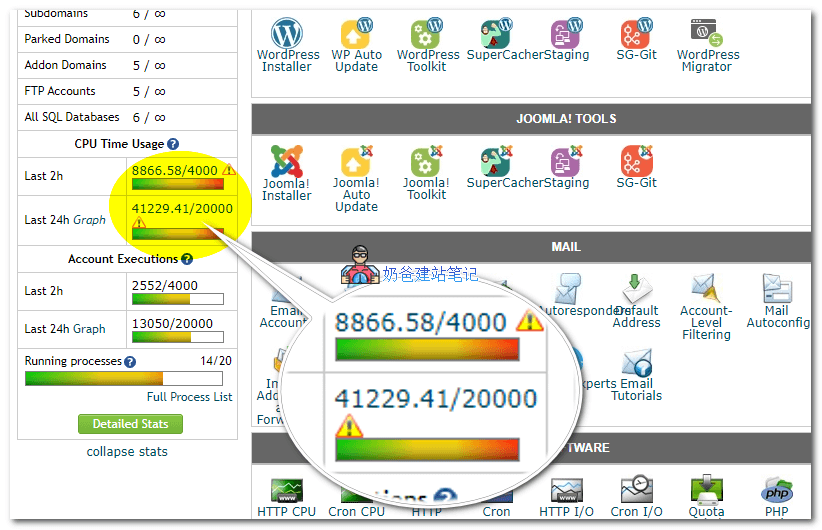
This statistic is a resource limit imposed by the server on the shared hosting you purchased. Since shared hosting involves many people sharing one server, without limits, some might use more resources while others use less or none. SiteGround's limit is not to exceed 20,000 points within 24 hours. The image above clearly shows that the resource usage limit has been exceeded. As for how SiteGround handles exceeding this limit, Naiba hasn't found relevant information on their website. If you encounter this issue, you can ask customer service or pretend not to know; if they need to take action, they will contact you. If you don't want to experience such resource restrictions, you can consider upgrading to a VPS. Foreign trade users who are not familiar with VPS can considerScala Hostingthis provider's, which is also managed, comes with a shared hosting control panel. The difference from shared hosting is that all shared hosting on this server is for your use only, so you can occupy all the CPU, memory, disk, and other resources of the server.
This statistic is a resource limit imposed by the server on the shared hosting you purchased. Since shared hosting involves many people sharing one server, without limits, some might use more resources while others use less or none. SiteGround's limit is not to exceed 20,000 points within 24 hours. The image above clearly shows that the resource usage limit has been exceeded. As for how SiteGround handles exceeding this limit, Naiba hasn't found relevant information on their website. If you encounter this issue, you can ask customer service or pretend not to know; if they need to take action, they will contact you. If you don't want to experience such resource restrictions, you can consider upgrading to a VPS. Foreign trade users who are not familiar with VPS can considerScala Hostingthis provider's, which is also managed, comes with a shared hosting control panel. The difference from shared hosting is that all shared hosting on this server is for your use only, so you can occupy all the CPU, memory, disk, and other resources of the server.🚀 Still feeling confused after reading the tutorial? Let me guide you step-by-step instead.
「Naibabiji WordPress Website Building Coaching」 — From selecting a domain and purchasing hosting to installing themes and publishing posts, I「ll guide you through every step, helping you avoid detours and reach your goals directly.
👉 Learn about Website Building Coaching Service
Comments are closed
The comment function for this article is closed. If you have any questions, please feel free to contact us through other channels.