
After building your own website, if it opens slowly, we can add a caching function to the site. The most common method to add caching to a WordPress website is to install caching plugins, such asWP Super Cache和WP RocketToday, I'll share another method: directly using PHP to generate HTML cache.
This method directly uses PHP to generate HTML on the server. When a user visits, it checks if the MD5 hash has changed. If not, it directly sends the HTML file to the user, avoiding regeneration on the server.
Method for PHP to Generate WordPress Cache Files
1. Copy the code below and save it as a cache.php file.
<?php
define('CACHE_ROOT', dirname(__FILE__).'/cache');
define('CACHE_LIFE', 86400);                   //缓存文件的生命期,单位秒,86400秒是一天
define('CACHE_SUFFIX','.html');             //缓存文件的扩展名,千万别用 .php .asp .jsp .pl 等等
$file_name  = md5($_SERVER['REQUEST_URI']).CACHE_SUFFIX;    //缓存文件名
//缓存目录,根据md5的前两位把缓存文件分散开。避免文件过多。如果有必要,可以用第三四位为名,再加一层目录。
//256个目录每个目录1000个文件的话,就是25万个页面。两层目录的话就是65536*1000=六千五百万。
//不要让单个目录多于1000,以免影响性能。
$cache_dir  = CACHE_ROOT.'/'.substr($file_name,0,2);
$cache_file = $cache_dir.'/'.$file_name;    //缓存文件存放路径
if($_SERVER['REQUEST_METHOD']=='GET'){      //GET方式请求才缓存,POST之后一般都希望看到最新的结果
    if(file_exists($cache_file) && time() - filemtime($cache_file) < CACHE_LIFE){   //如果缓存文件存在,并且没有过期,就把它读出来。
        $fp = fopen($cache_file,'rb');
        fpassthru($fp);
        fclose($fp);
        exit();
    }
    elseif(!file_exists($cache_dir)){
        if(!file_exists(CACHE_ROOT)){
            mkdir(CACHE_ROOT,0777);
            chmod(CACHE_ROOT,0777);
        }
        mkdir($cache_dir,0777);
        chmod($cache_dir,0777);
    }
    function auto_cache($contents){         //回调函数,当程序结束时自动调用此函数
        global $cache_file;
        $fp = fopen($cache_file,'wb');
        fwrite($fp,$contents);
        fclose($fp);
        chmod($cache_file,0777);
        clean_old_cache();                  //生成新缓存的同时,自动删除所有的老缓存。以节约空间。
        return $contents;
    }
    function clean_old_cache(){
        chdir(CACHE_ROOT);
        foreach (glob("*/*".CACHE_SUFFIX) as $file){
           if(time()-filemtime($file)>CACHE_LIFE){
               unlink($file);
           }
        }
    }
    ob_start('auto_cache');                 //回调函数 auto_cache
}
else{
    if(file_exists($cache_file)){           //file_exists() 函数检查文件或目录是否存在。
        unlink($cache_file);                //不是GET的请求就删除缓存文件。
    }
}
?>
2. Upload the cache.php file to your website's root directory.
3. Create a cache folder in the website root directory and set its permissions to 777.
4. Modify the index.php file in the website root directory, and in the<?phpnext line.
require('cache.php');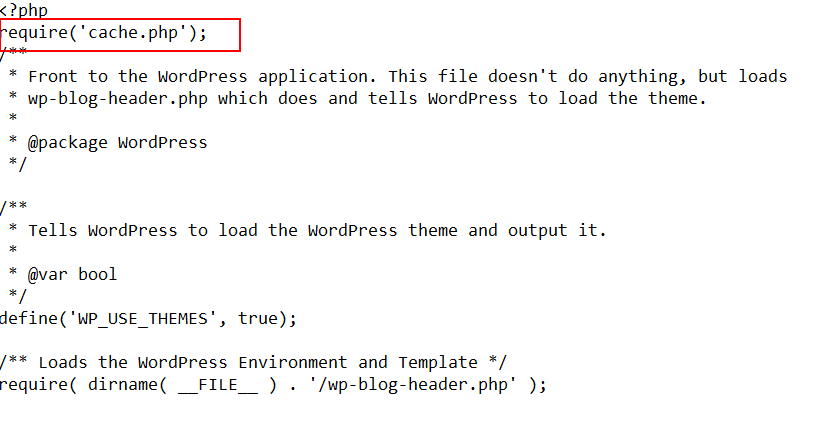
Note: Naiba has not actually tested the feasibility of this method, nor does it recommend that novice users use it.
For beginners, it is recommended to use plugins to generate cache files for WordPress websites, such as the following: