🚀 Is building a website too difficult? Let me guide you step by step—Learn about the 「Naibabiji WordPress Website Building Coaching Service」 →

LNMP installation of multiple PHP versions to achieve coexistence of PHP 5.6 and PHP 7

It is possible to run multiple PHP versions on a single server. Because some website scripts are incompatible with newer PHP versions, we have to use older ones. So, how do you install multiple PHP versions on LNMP? The method is simple. After SSHing into the VPS, navigate to lnmp1.5 (modify if you are not using version 1.5)
cd lnmp1.5
Then enter
./install.sh mphp
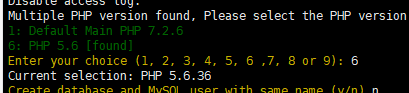
The installation options for PHP versions will appear. Enter the number corresponding to the PHP version you need to install and press Enter to begin installation.选择PHP版本Then, when you add a virtual host, you will see the option to select the PHP version. Additionally, if you are usingBaota Panelyou can also directly install multiple PHP versions in the control panel, but don't install too many, as it may slow down the system.

🚀 Still feeling confused after reading the tutorial? Let me guide you step-by-step instead.

「Naibabiji WordPress Website Building Coaching」 — From selecting a domain and purchasing hosting to installing themes and publishing posts, I「ll guide you through every step, helping you avoid detours and reach your goals directly.

👉 Learn about Website Building Coaching Service
🔒

Comments are closed

The comment function for this article is closed. If you have any questions, please feel free to contact us through other channels.

×
二维码

Scan to Follow