Recently, Naiba switched to using the Firefox browser due to the instability of Chrome's bookmark sync feature. During this process, he came across the Brave browser and has been using it as his main browser. However, Brave has some minor bugs, such as Google Translate not working. Personally,indirectly solvepasswords cannot be synced. I solved this with Keepass, but for compatibility issues with some websites, Naiba is helpless.For example, Baidu Statistics repeatedly returns to the login interface and cannot access the statistical details.(I found that Chrome also has this issue; probably because my multiple Baidu accounts have messy login cookies)
So, I considered using Chrome as the main browser again (Firefox is too resource-intensive on my Macbook). Therefore, I needed to find a stable domesticcross-browser bookmark synchronizationsolution.
Many people online recommend using the EverSync plugin. Because of the Xmarks incident, I'm not very confident in third-party sync solutions, so I wanted to find a solution where I can control the data myself. Then I found this open-source floccus.floccus supports bookmark synchronization between Firefox and Chrome browsers.
Introduction to Floccus
floccus is an open-source solution for syncing bookmarks across different browsers via Nextcloud, WebDAV, local files (or any sync file). It currently supports Firefox and Chrome (and other browsers that can install Chrome extensions), and on mobile, it supports Kiwi Browser.
Open Source Address:https://github.com/marcelklehr/floccus
Tutorial for Syncing Bookmarks with Floccus and Nutstore
Floccus supports WebDAV, Nextcloud Bookmarks, and local file cloud sync.
Naiba here uses the WebDAV solution with Nutstore. Previously,KeePass sync also used Nutstore's WebDAV.。
Nextcloud is even more powerful; friends who have set up their own Nextcloud service can choose this. Local file cloud sync requires installing additional software, so the WebDAV sync method is recommended.
Preparation on Nutstore
Create a folder in the root directory of the sync folder, choose not to sync to local by default (you can sync if you want), name it arbitrarily—Naiba uses floccus here.
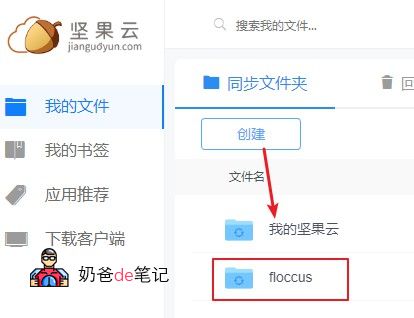
Then upload a bookmarks.xbel file to the newly created folder. If you don't have one,click here to download。
Then go to Nutstore „Account Info“ - „Security Options“ - „Third-party Application Management“, create a WebDAV application, and get the password.
Floccus Plugin Installation and Settings
Chrome extension address(offline address),Firefox extension address
After installing the Floccus plugin, click the icon, then select XBEL in WebDAV, and then Add Account.
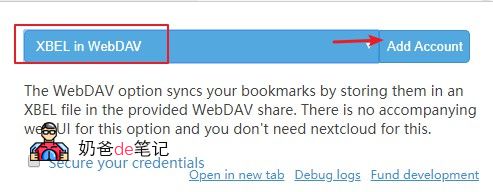
Fill in the WebDAV server information according to the information provided by Nutstore.
Fill in the Bookmarks file path with the „folder/bookmarks.xbel“ you just created.
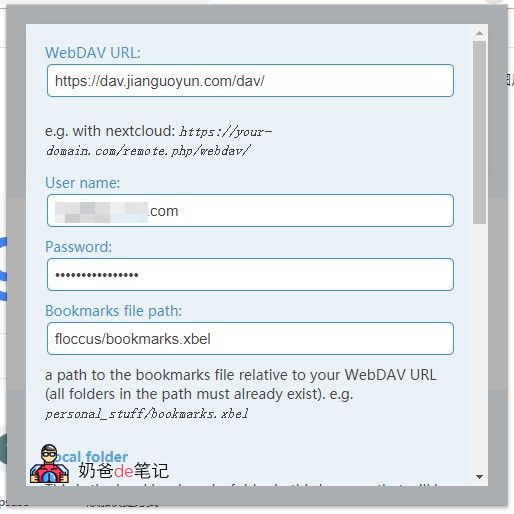
For the bookmark directory, simply select the root directory. If creating new, it will create a synced bookmark folder based on your current browser bookmarks.
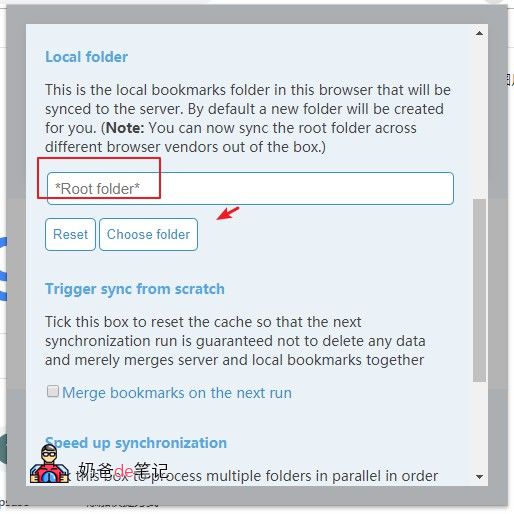
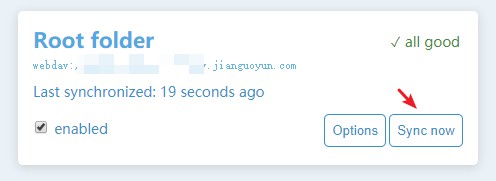
After configuration, click sync once, and it will first sync all bookmarks from your browser to Nutstore. Then, syncing on another browser will merge Nutstore's bookmarks with your local ones. You can set re-import in the settings, but it's recommended to clear bookmarks in a new browser and sync directly.
Open-source password synchronization solution
Got bookmark sync working? You might also want to try open-source password sync.
KeePass is an open-source password manager that allows users to manage passwords using a master password, key file, or Windows user account as the key.
The software encrypts the password database using the 256-bit AES algorithm. Users can also set the number of encryption iterations for the key, increasing this value to make it harder to crack.
KeePass keeps all data in your own hands (you can upload it to various cloud drives for backup), and the client is cross-platform compatible. KeePass also supports a plugin architecture, which can enhance various parts of the software.
If you are interested, please refer to the following article.
Method One for KeePass to Automatically Fill Passwords in Chrome Browser
Method Two for KeePass to Automatically Fill Passwords in Chrome Browser
Another alternative
I wonder if you have used the new version of Edge browser, produced by Microsoft. It can sync seamlessly across computers and phones, and is even faster than Chrome. However, it currently doesn't have many extensions, but you can install Chrome extensions with a couple of extra steps. If you find Chrome sync troublesome, consider this.
Download link: https://www.microsoftedgeinsider.com/en-us/download/?platform=win10