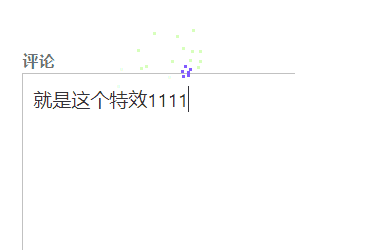
While browsing other blogs these past few days, I noticed several sites had firework ???? effects when typing in the comment section, and some even had vibration effects. So I searched for it and found the implementation method is very simple. I'll share how to achieve it below.WordPressImplementation method for comment box firework and vibration effects.

Firework effect js file download:
The main component for achieving the firework blooming effect is this js file. The specific code is as follows. You can choose to copy the code below and create a new js file, or simply click here to download it directly.activate-power-mode.zip
(function webpackUniversalModuleDefinition(root,factory){if(typeof exports==='object'&&typeof module==='object')module.exports=factory();else if(typeof define==='function'&&define.amd)define([],factory);else if(typeof exports==='object')exports["POWERMODE"]=factory();else root["POWERMODE"]=factory()})(this,function(){return(function(modules){var installedModules={};function __webpack_require__(moduleId){if(installedModules[moduleId])return installedModules[moduleId].exports;var module=installedModules[moduleId]={exports:{},id:moduleId,loaded:false};modules[moduleId].call(module.exports,module,module.exports,__webpack_require__);module.loaded=true;return module.exports}__webpack_require__.m=modules;__webpack_require__.c=installedModules;__webpack_require__.p="";return __webpack_require__(0)})([function(module,exports,__webpack_require__){'use strict';var canvas=document.createElement('canvas');canvas.width=window.innerWidth;canvas.height=window.innerHeight;canvas.style.cssText='position:fixed;top:0;left:0;pointer-events:none;z-index:999999';window.addEventListener('resize',function(){canvas.width=window.innerWidth;canvas.height=window.innerHeight});document.body.appendChild(canvas);var context=canvas.getContext('2d');var particles=[];var particlePointer=0;POWERMODE.shake=true;function getRandom(min,max){return Math.random()*(max-min)+min}function getColor(el){if(POWERMODE.colorful){var u=getRandom(0,360);return'hsla('+getRandom(u-10,u+10)+', 100%, '+getRandom(50,80)+'%, '+1+')'}else{return window.getComputedStyle(el).color}}function getCaret(){var el=document.activeElement;var bcr;if(el.tagName==='TEXTAREA'||(el.tagName==='INPUT'&&el.getAttribute('type')==='text')){var offset=__webpack_require__(1)(el,el.selectionStart);bcr=el.getBoundingClientRect();return{x:offset.left+bcr.left,y:offset.top+bcr.top,color:getColor(el)}}var selection=window.getSelection();if(selection.rangeCount){var range=selection.getRangeAt(0);var startNode=range.startContainer;if(startNode.nodeType===document.TEXT_NODE){startNode=startNode.parentNode}bcr=range.getBoundingClientRect();return{x:bcr.left,y:bcr.top,color:getColor(startNode)}}return{x:0,y:0,color:'transparent'}}function createParticle(x,y,color){return{x:x,y:y,alpha:1,color:color,velocity:{x:-1+Math.random()*2,y:-3.5+Math.random()*2}}}function POWERMODE(){{var caret=getCaret();var numParticles=5+Math.round(Math.random()*10);while(numParticles--){particles[particlePointer]=createParticle(caret.x,caret.y,caret.color);particlePointer=(particlePointer+1)%500}}{if(POWERMODE.shake){var intensity=1+2*Math.random();var x=intensity*(Math.random()>0.5?-1:1);var y=intensity*(Math.random()>0.5?-1:1);document.body.style.marginLeft=x+'px';document.body.style.marginTop=y+'px';setTimeout(function(){document.body.style.marginLeft='';document.body.style.marginTop=''},75)}}};POWERMODE.colorful=false;function loop(){requestAnimationFrame(loop);context.clearRect(0,0,canvas.width,canvas.height);for(var i=0;i<particles.length;++i){var particle=particles[i];if(particle.alpha<=0.1)continue;particle.velocity.y+=0.075;particle.x+=particle.velocity.x;particle.y+=particle.velocity.y;particle.alpha*=0.96;context.globalAlpha=particle.alpha;context.fillStyle=particle.color;context.fillRect(Math.round(particle.x-1.5),Math.round(particle.y-1.5),3,3)}}requestAnimationFrame(loop);module.exports=POWERMODE},function(module,exports){(function(){var properties=['direction','boxSizing','width','height','overflowX','overflowY','borderTopWidth','borderRightWidth','borderBottomWidth','borderLeftWidth','borderStyle','paddingTop','paddingRight','paddingBottom','paddingLeft','fontStyle','fontVariant','fontWeight','fontStretch','fontSize','fontSizeAdjust','lineHeight','fontFamily','textAlign','textTransform','textIndent','textDecoration','letterSpacing','wordSpacing','tabSize','MozTabSize'];var isFirefox=window.mozInnerScreenX!=null;function getCaretCoordinates(element,position,options){var debug=options&&options.debug||false;if(debug){var el=document.querySelector('#input-textarea-caret-position-mirror-div');if(el){el.parentNode.removeChild(el)}}var div=document.createElement('div');div.id='input-textarea-caret-position-mirror-div';document.body.appendChild(div);var style=div.style;var computed=window.getComputedStyle?getComputedStyle(element):element.currentStyle;style.whiteSpace='pre-wrap';if(element.nodeName!=='INPUT')style.wordWrap='break-word';style.position='absolute';if(!debug)style.visibility='hidden';properties.forEach(function(prop){style[prop]=computed[prop]});if(isFirefox){if(element.scrollHeight>parseInt(computed.height))style.overflowY='scroll'}else{style.overflow='hidden'}div.textContent=element.value.substring(0,position);if(element.nodeName==='INPUT')div.textContent=div.textContent.replace(/\s/g,"\u00a0");var span=document.createElement('span');span.textContent=element.value.substring(position)||'.';div.appendChild(span);var coordinates={top:span.offsetTop+parseInt(computed['borderTopWidth']),left:span.offsetLeft+parseInt(computed['borderLeftWidth'])};if(debug){span.style.backgroundColor='#aaa'}else{document.body.removeChild(div)}return coordinates}if(typeof module!="undefined"&&typeof module.exports!="undefined"){module.exports=getCaretCoordinates}else{window.getCaretCoordinates=getCaretCoordinates}}())}])});Specific implementation steps for the firework comment effect:
Upload the downloaded JS file to your website. You can upload it to your theme folder or any other folder you prefer.
Then edit your theme's footer (footer.php) file and add the following code:
<?php if (is_single() || is_page() ) { ?>
<script src="<?php bloginfo('template_directory'); ?>/js/activate-power-mode.js "></script>
<script>
POWERMODE.colorful = true; // ture 为启用礼花特效
POWERMODE.shake = false; // false 为禁用震动特效
document.body.addEventListener('input', POWERMODE);
</script>
<?php }?>
If you don't know where to add it, just add it before the </body> tag. Note: If you didn't upload the JS file to your theme folder, you need to modify the path in script src=.
Method fromCongliang Weisui
Additionally, Naiba has also shared an article about adding webpage background effects to WordPress. If you're interested, take a look:Add a line segment mouse attraction effect to a WordPress website