With the outbreak of the domestic novel coronavirus, the growth of e-commerce has become even more promising. Shopping online has become a habit for most people. And if you want to build your own online e-commerce platform, it has become very simple, achievable without programming. In this article, we will introduce two popular e-commerce platformsDifferences and Pros & Cons of Shopify vs WordPress。
Shopify and WordPress are two independent platforms, both can be used to build e-commerce websites to sell products online. So we need to discuss which platform is more suitable for your needs, based on your own situation, capabilities, and resources to choose the best e-commerce platform for you.
Introduction to Shopify

Shopify is very famous in the e-commerce platform space and is popular among many foreign trade professionals. It comes with a large number of e-commerce-centric features bundled in a super easy-to-use package. The platform was created to ensure that almost anyone can choose it and create their e-commerce website without getting bogged down in complex details.
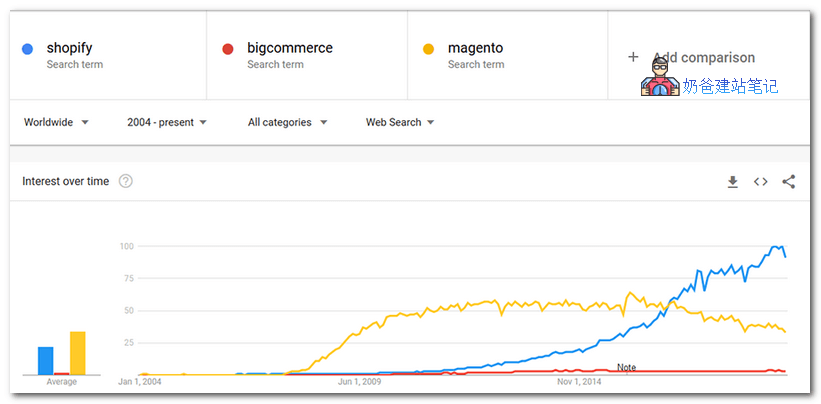
Shopify's origins can be traced back to 2004, when Tobias Lütke and Scott Lake founded the online ski equipment store Snowdevil. Their experience trying to create an online store made them dissatisfied with the existing options for e-commerce platforms. So they started creating their own e-commerce platform.
As of October 2019, Shopify has served millions of e-commerce professionals worldwide, supporting1.4 million full-time jobs. In 2018 alone, its revenuereached $1.073 billion,and the revenue for 2019 is estimated to be between$1.545 billion and $1.555 billion. Not bad for something that started as a snowboard equipment store.
Introduction to WordPress
On the other hand, WordPress is also used by many to build e-commerce platforms. However, WordPress is a versatile website building program, and e-commerce is just one of its extended features. Compared to Shopify, it is not suitable for beginners. However, where it really shines is its flexibility. Due to its vast number of themes and plugins (both free and premium), you will be able to create a website that looks and functions powerfully.
WordPress is an open-source content management system whose origins can be traced back to 2003, all the way back to the little-known blogging system b2/cafelog. WordPress was originally a fork of a system created by Matt Mullenweg and Mike Little. Later, it obtained the GNU General Public License, and since then, it has become the guiding principle of WordPress. Therefore, WordPress is and will remain free. Since its inception, a huge community of talent has transformed it from a small blogging platform into a dominant content management system, powering over 35% of websites on the internet.
Shopify vs WordPress Comparison
General Ease of Use
Before choosing a platform, it is important to first consider whether the platform is easy to use, especially when consideringbuilding your own website. Simplicity and advanced features often cannot coexist; do you need it as simple as possible or more features? Are you willing to give up control over your website for convenience? You need to think carefully because Shopify and WordPress have different answers to this question. In this case, the ideal choice depends on your level of technical knowledge and personal preference.
Shopify:
When it comes to ease of use, Shopify is undoubtedly more user-friendly than WordPress. Once you create a Shopify account, you can immediately start adding products without any setup. The interface is also clean and easy to navigate. The user interface also makes it clear where you need to go to use various features, such as analytics, marketing, etc. Adding products is also easy and streamlined, so you can set everything up and start selling products right away.
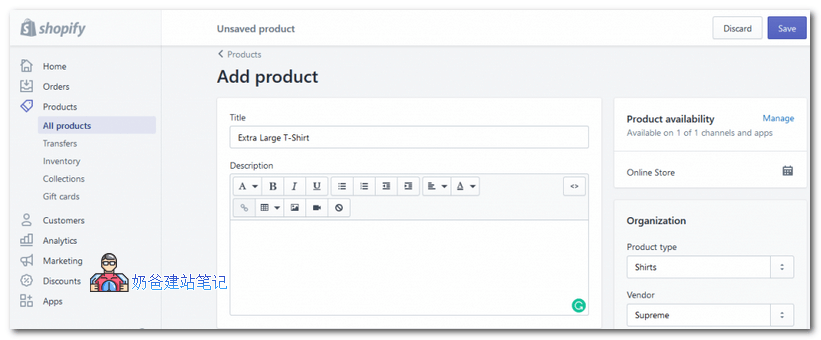
Another huge advantage of using Shopify is that it will handle hosting for you. You don't have to worry about choosing a hosting service or installing any type of content management software, as this is done automatically. In terms of convenience versus control, Shopify leans entirely towards convenience, while controlling the ownership of the website. You can build a website and sell products on Shopify, but the ultimate control of the website is held by Shopify.
WordPress:
On the other hand, WordPress is a bit difficult for beginners. First, you must purchase a domain and server before you can install WordPress. Although there are many helpful resources to assist youInstalling a WordPress Website, Shopify users only need to purchase a domain. After setting everything up, you will need to installWooCommerce Pluginto enable e-commerce for your website. Only after installing the appropriate plugin can you start building your website. Although for beginners, it may be unclear which plugins to install and how to use them, making it somewhat more difficult than Shopify. However, all data in WordPress is controlled by you; you have complete control over the website, but lose some convenience.
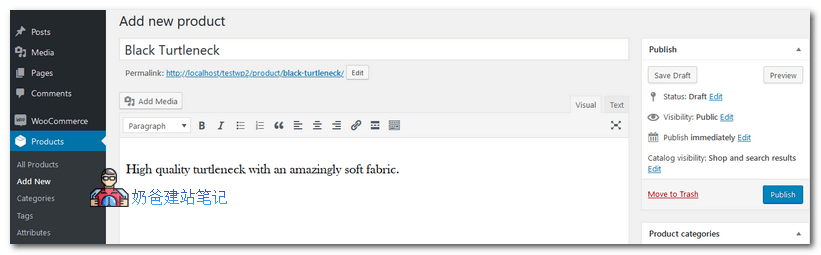
The actual process of adding products, setting prices, creating coupons, etc., will vary depending on the plugins added. WooCommerce also has many functional plugins for you to choose from. When selecting plugins, users must be careful to avoid plugin compatibility issues. In summary, compared to Shopify, WordPress places much higher demands on users, requiring a certain level of expertise.
Appearance Design
Both Shopify and WordPress offer you a variety of Themes that you can install on your website. Moreover, as long as you know how to design, both allow you to design Themes yourself. Despite these similarities, there are actually significant differences in their design options. Shopify's Themes are not as abundant as WordPress's.
Shopify:
When it comes to design options, Shopify has many Themes available for your website. You can go to theShopify Theme Storeto choose your favorite Theme. They are usually well-designed, clean-looking, and can help you showcase your products. You can choose from free and premium Themes, all designed for e-commerce websites. There areover 100 Themesto choose from, which is somewhat limited for a Theme directory, but the Themes included are professionally designed.
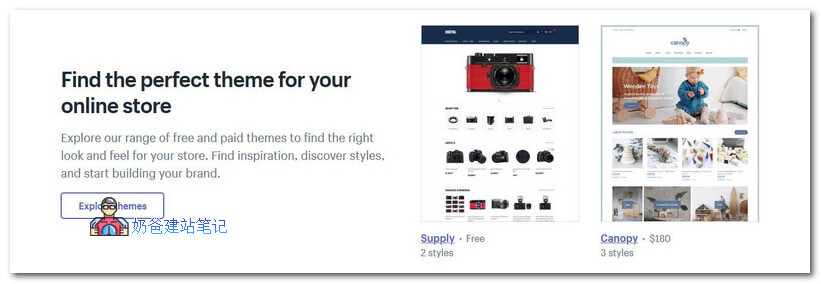
Shopify's free Themesare only8in number, with the rest priced from$140-180each. While the Themes are certainly good, the prices are on the high side. With some searching, you should be able to easily find WordPress Themes of comparable quality at a lower price.
WordPress:
Flexibility is where WordPress truly excels, especially evident in terms of design options. In the WordPress Theme repository alone, you can findover 4,000 free Themes. Similarly, onlyThemeForestthere areover 12,000 WordPress Themesavailable for sale. With WordPress, you hardly need to worry about not finding a Theme for your industry. Moreover, it's easy to find premium Themes with a wealth of features, which are much cheaper than any Shopify. Additionally, if you choose a universal Theme (such as Zakra), you can customize all aspects of the website. After all, you will have complete control over the website's design with WordPress.
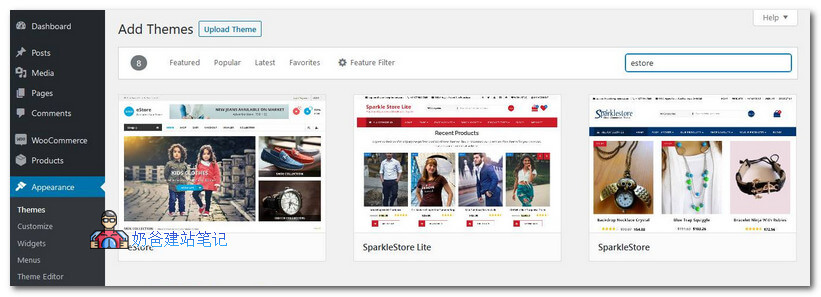
Although WordPress has a rich selection of themes, without experience, the theme you find may not be suitable or you may not know how to customize it, which can cause some trouble for beginners.
E-commerce Features
Now, let's dive into the core issue. First of all, both Shopify and WordPress can fulfill all e-commerce functions.
Comparing Shopify and WordPress is somewhat difficult because it's hard to determine the exact e-commerce features WordPress offers, as it depends on the installed plugins. The most popular and feature-rich WordPress e-commerce plugin isWooCommerce,So we will use WooCommerce for comparison.
You can easily enable many useful e-commerce features for both WordPress and Shopify, such as unlimited products, secure payments, built-in analytics, and more. However, you should consider some differences, as they affect visitors' experience on your site. Since we are comparing the two platforms here, let's look at the differences between them.
Shopify:
Shopify offers a series of powerful features and can be set up with minimal changes. The notable features available in the basic plan are as follows:
- Abandoned cart recovery
- Dedicated support
- promo code
- Free SSL certificate
- Fraud analysis
- Shipping discounts from USPS, UPS, or DHL Express.
- Point of Sale (POS) system for selling from physical locations
With some higher-tier paid options, you can also access advanced features such as hardware peripheral support and professional reports.Shopify App Storefurther supports it, containing various paid and free apps to help improve your website. If you find this complex, don't worry, you can directly refer to these popular Shopify apps below:
- Pre-order Manager: Enable pre-orders for your store.
- Smile: Rewards and Loyalty: Integrate loyalty points, referral programs, and VIP programs.
- Wishlist: Add wishlists and personalized email campaigns.
- Insert SEO: All-in-one SEO tool to optimize your store.
- Yotpo: Product and Photo Reviews: Display reviews, ratings, photos, etc., for your products.
- Fera Social Proof: Insert customer testimonials, recent buyer popups, etc., to increase conversion rates.
- Candy Rack: Allow automatic upsells with additional services, free gifts, and packaged items.
WordPress:
In terms of e-commerce features, WordPress is certainly not lacking. As with design options, you will need to do some work to search for relevant features and add them to your site. This is done byinstalling different plugins, which can be more complex than you might expect. Using just WooCommerce, you can have the following features:
- Full control over your data
- Sell anything on your site
- Unlimited customization
- Tax options
- One-click refunds
- No transaction fees
- Product ratings and reviews
- Over 400 official extensions
You can install only WooCommerce (free) for product sales, but if you want to expand your store's functionality, there are many excellent extensions available. Additionally, if you feel WooCommerce is not suitable for your niche, you can completely discard it and choose one of the many other e-commerce plugins. The possibilities are truly amazing. Some of the best plugins that can support WooCommerce are as follows:
- WooCommerce Buzzer: Marketing automation to boost sales.
- WooCommerce Mailchimp: Email marketing campaigns for your website.
- WooCommerce Subscriptions: Create and manage products with recurring payments.
- Product Bundles: Product grouping tool.
- User Registration: Build registration forms for your online store.
- WooCommerce One Page Checkout: Allows for super-fast one-page checkout.
- WooCommerce Product Filters: Add advanced filters to your store.
Search Engine Optimization
When operating an online store, excellentSearch Engine Optimization (SEO)is absolutely crucial. After all, goodSEOmeans your website has more opportunities for search engine visibility, which in turn means more revenue. Both Shopify and WordPress have many built-in options designed to help your website rank higher in search engine results. Additionally, you can extend them through plugins or apps. Below is a comparison of Shopify vs. WordPress SEO features:
| SEO Features | Shopify | WordPress |
| Title Tags | Available | Available |
| Meta Descriptions | Available | Available via plugins |
| Header Tags | Available | Available |
| URL Structure | Available | Available |
| Mobile Support | Available | Depends on theme and plugins |
| Site Speed | Optimized for speed | Depends on hosting, themes, and plugins |
| Image optimization | Accessible via App | Available via plugins |
| Sitemap | Available but limited | Available via plugins |
| SSL certificate | Available | Depends on hosting |
| Redirects | Available | Available via plugins |
Fees
Comparing the costs of Shopify and WordPress is more complex than you might think. It's not simply a matter of which is cheaper than the other. In reality, you'll find that the actual cost of WordPress depends on how much you are willing to spend. On the other hand, Shopify has a simpler and more flexible set of plans, which is less confusing for beginners.
Shopify:

Shopify comes with a strict set of payment plans that offer different features based on how much you are willing to pay. The different plans are outlined below:
- Shopify Basic Plan:This plan provides you with the very basic features needed for an online store. It is perfect for startups and small businesses that just want a fully functional store without any frills.
- Shopify Plan:This plan is suitable for various businesses and comes with lower credit card rates and transaction fees. With additional features like unlimited Staff POS PINs, gift cards, and professional reports, you will be able to create a more efficient and engaging online store.
- Advanced Shopify:The Advanced Shopify plan is best suited for large enterprises and features more powerful capabilities along with the lowest credit card rates and transaction fees. With advanced customer reports, you will have access to important information about your customer base.
WordPress:
With WordPress, the cost entirely depends on your choices for themes, plugins, hosting, domain, etc. Therefore, it has a higher pricing ceiling and a lower pricing floor. You can easily choose the cheapest combination to create an online store, but you can also choose to spend more to build an e-commerce website. To illustrate the costs involved in running an online store with WordPress, we will outline and provide examples:
- Domain:Typically tens of yuan per year
- Hosting:Prices vary depending on configuration, usually several hundred yuan per year
- WordPress Software:WordPress software isFree
- E-commerce Plugin:WooCommerce isFree
- E-commerce Theme:Premium WP themes generally cost around $59, including one year of technical support
- SEO Plugin:Can be used directlyFree premium SEO plugin
A fully functional e-commerce websiteAnnuallyThe total cost is around 1000 to 2000 yuan, and this is without calculating other potentially used paid services. If you have sufficient funds, you can invest in other plugins and WooCommerce plugins to extend the website's functionality.
Customer Support
Another type of support you need to consider when choosing the right platform. After all, every minute your website is offline due to issues is a minute of lost sales. As with other cases, in this situation, Shopify vs. WordPress depends on how you wish to handle this issue. Shopify's dedicated customer support seems like an obvious advantage, but it's worth noting that you can also get similar services from WordPress if you choose the corresponding plugins/themes.
Shopify:
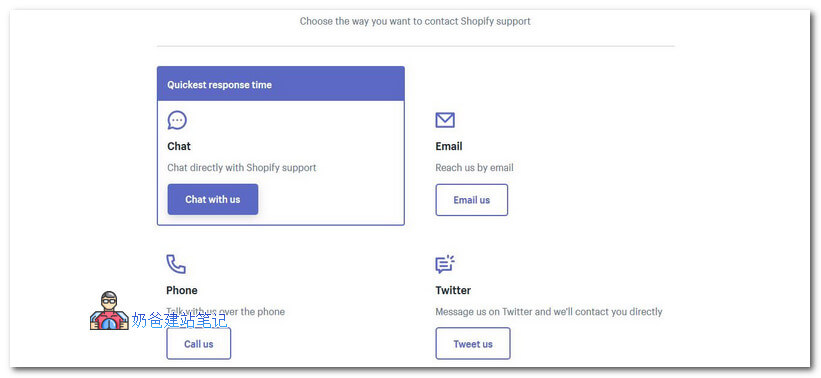
Shopify has a dedicated support team available 24/7 to answer any questions that may arise. Not only that, but it also offers multiple ways to contact the support team. You can chat with them directly, call them, send them an email, or even tweet at them. Therefore, if you lack the technical knowledge to solve problems that may arise on your site, you don't need to worry because there will always be someone to help you.
Additionally, Shopify has many other resources to help you, including free tools, support forums, documentation, and more.
WordPress:
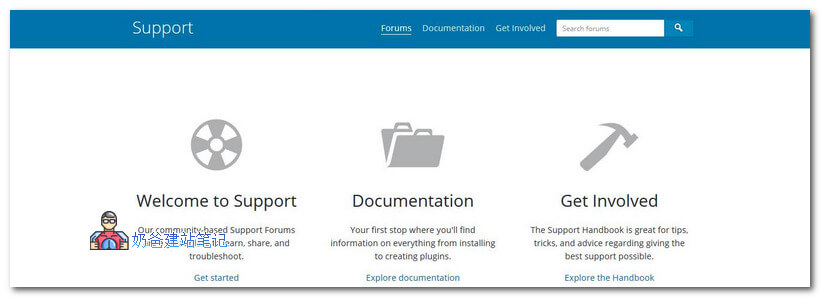
Since WordPress itself is free, you won't get dedicated customer support like Shopify. You can visit the support forums and register to ask questions via support tickets, rather than real-time customer support. Although it may seem bad, this is mitigated by WordPress's large and active user base and similarly large knowledge base. At the same time, there are a large number of WordPress articles online, and you can easily find solutions to most problems through Google.
As mentioned earlier, you can access high-quality dedicated support from hosts, premium themes, and plugins. However, it is the site owner's responsibility to make informed decisions and choose the right theme or plugin. If you can do that, there will be no lack of customer support.
Conclusion
At this point, we have summarized our article on Shopify vs WordPress, where we compared two of the richest e-commerce platforms. Both Shopify and WordPress are great platforms that can serve you well, but be sure to note their specific advantages so that you can make an informed decision. Shopify is a convenient option that packages all necessary features in a neat package, allowing even those without technical knowledge to start using it directly. Compared to WordPress, it has certain limitations, but you don't need to spend much time to set up your website. If you just want to build an online store and are willing to give up control, go with Shopify.
In contrast, WordPress offers immense flexibility and a vast array of potential features. However, it requires more input from the site owner, so things won't be as convenient as Shopify. If you are prepared to invest time and effort, you can create a great site that meets your specific needs. On the other hand, if you are lazy or make wrong decisions, you may end up with a messy site. If you feel ready to take on the responsibility, you should use WordPress.
Simply put, for beginners building a 2C website, Shopify is better. With WordPress, you may encounter some problems you can't solve and need to spend time researching. For 2B websites, WordPress is more suitable.