
When you need to perform website maintenance, such as upgrading the site or debugging features, and you don't want users to access your site, what should you do? Adding a prompt like the one shown below would be very user-friendly.

Plugin Introduction
Create a maintenance mode page, install and configure in less than a minute. This plugin won't waste your time! With just four tabs of settings, it's simple, fast, efficient, and user-friendly.
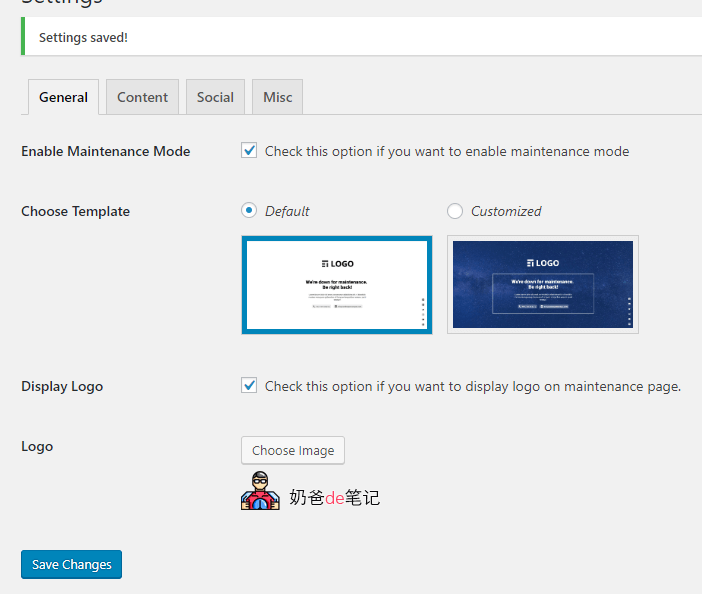
Tabs and Options
‚General‘ Tab
* Enable Maintenance Mode
* Select Template
* Display Logo
* Logo
* Background Options
‚Content‘ Tab
* Title
* Content
* Content Border
* Select Border Color
* Content Text Color
‚Social‘ Tab
* Facebook
* Twitter
* Linkedin
* Instagram
* YouTube
* Email
* Phone Number
* Social Icon Color
* ‚Other‘ Tag
* Page Title
* Favicon
* Google Analytics Tracking
* Google Tracking ID
Usage Method
1. Download the plugin and install it, or search and install it from the backend plugin page.
2. Activate the plugin.
3. Go to the plugin settings and configure your own logo, maintenance message, and contact information.
4. Check the option 'Check this option if you want to enable maintenance mode' to enable maintenance mode.
5. At this point, visitors to your site will see the maintenance interface.
Plugin Download
You can download this free WordPress plugin using the download button below. You can also directly search for 'WEN Maintenance Mode' in the backend to install it.
More fun and useful ????WordPress Plugin
If you are also interested in building websites, click here to viewWebsite Building Tutorial from Scratch