
beginners building websites, Naiba recommends using the WordPress program. Although WordPress may seem bloated, its customizability is extremely high, and it has a rich selection of plugins, allowing you to achieve desired functions without needing to know much code. This article introduces how toadd a rating system to a WordPress website。
Effect Demo
For the most direct effect demonstration, you can refer to the image below or visitHow Much Does It Cost to Build a Websiteto experience it firsthand.
 Implementation Method
As mentioned earlier, WordPress has strong extensibility and many plugins, so Naiba directly choseWordPress Pluginto implement.
After trying and comparing many article rating plugins, I finally settled on the Rate my Post – WP Post Rating plugin.
As of the publication of this article, Rate my Post has over 3,000 active installations with an overall rating of 4.7.
However, Naiba feels it offers the best user experience.
What makes it so good? Naiba will detail it in the usage instructions below.
Usage Method
1. Download the plugin from the end of this article, upload and install it, then activate the plugin.
2. Enter the plugin settings interface to configure.
The plugin is in English. Naiba used translation software to translate and capture some of the settings content.
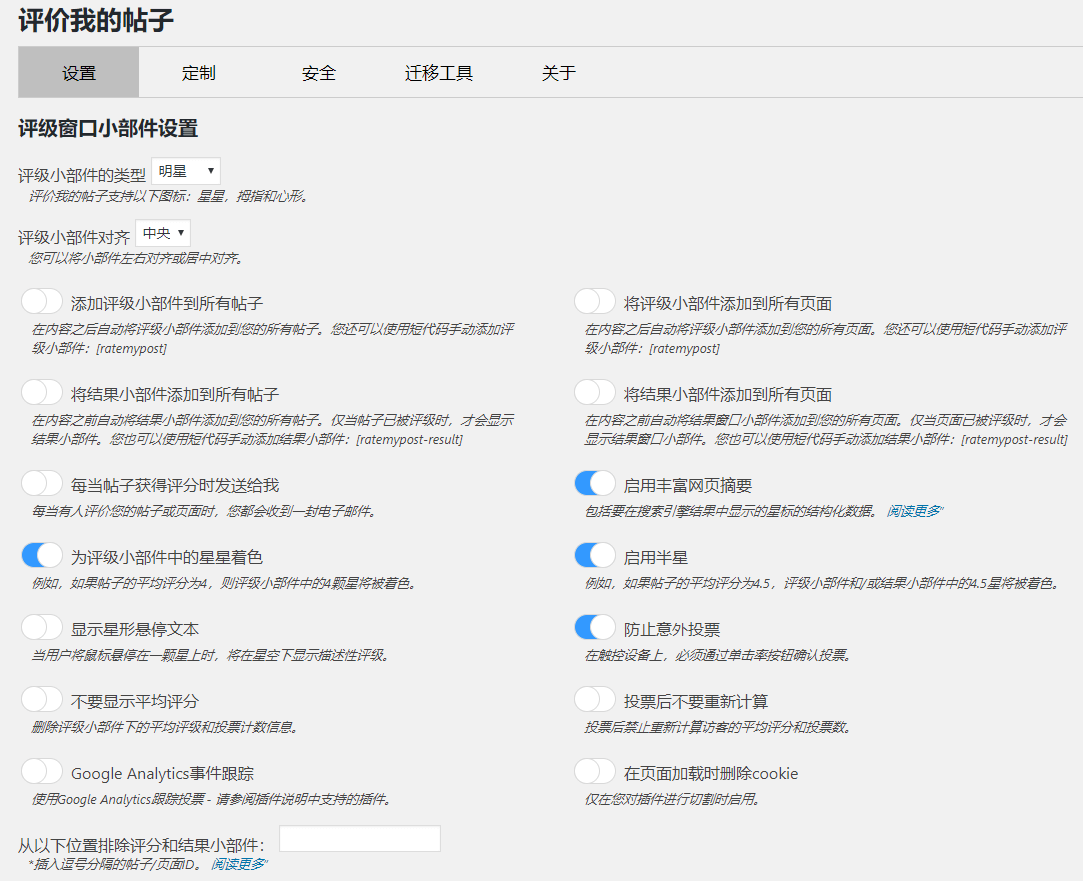

3. In the settings interface, you can set the rating interface to automatically display on every article or page, or use a shortcode (change this symbol 【→[ to use) [ratemypost].
The reasons why Rate my Post is better than other similar article rating plugins are mainly the following two points.
1. The display effect is attractive. It shows at the bottom of the article, which is eye-catching and can guide users to rate your article, helping you analyze whether your article is useful to users.
2. It includes a feedback component, which is the feature Naiba values most.
When someone gives your article a low rating, you can set it so that the voter must provide a reason for the low score. If not submitted, the rating is not recorded. This prevents malicious ratings on one hand, and on the other hand, allows you to listen to users' requests and suggestions for the article, helping you improve your content.
3. The analysis and statistics system is intuitive. From the backend, you can view all articles that have been rated, including total votes, scores, and number of feedback comments.
You can also see which IP voted. If user registration and login are enabled, it records which logged-in user voted. This can be very effective for certain open registration websites, such as educational training sites, where you can directly contact the user to understand why they gave a negative review, thereby improving your article content.
Plugin Download
You can download the plugin using the link below, or directly search for 'Rate my Post – WP Post Rating' in the WordPress backend to install it.
Rate my Post is currently the best WordPress article rating plugin in Naiba's opinion. If you have a better one, feel free to leave a comment and share it.