
How to set different product prices for different membership levels on a WooCommerce-based B2C e-commerce site? We can use this plugin called Dynamic Pricing With Discount Rules for WooCommerce.
The Dynamic Pricing With Discount Rules for WooCommerce plugin features dynamic pricing, allowing you to batch set different prices for WooCommerce products. Simply install the plugin, perform the necessary settings, test the interface, and put it into use online.
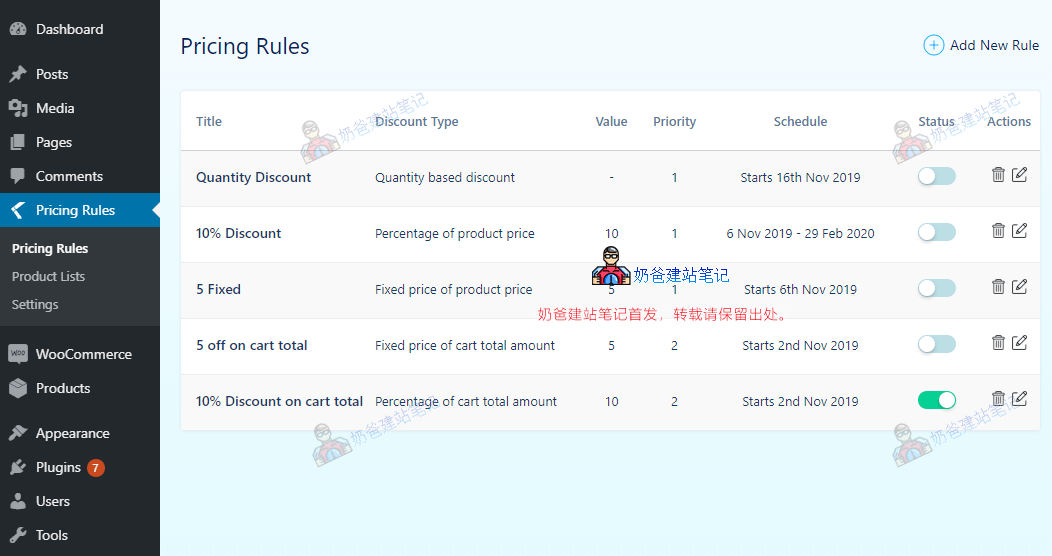
Pricing features supported by this plugin:
- Percentage/Fixed price discount.
- Discount based on product price.
- Discount based on cart total.
- Discount based on the number of items in the cart.
- Discount for all products in a category.
- WooCommerce quantity-based discount.
- WooCommerce dynamic pricing table.
- Discount for specific products.
- Exclude selected products from discounts.
- Apply discounts only when the cart or products meet certain conditions/rules.
- Schedule discounts for upcoming dates.
- Set discounts across multiple date ranges (set multiple start and end dates).
- Display the pricing table on the product details page.
- Options to customize pricing table title, border color, etc.
- Restrict or limit discount rules to a selected product list.
- Limit discount rules to registered users.
In addition to the above features, you can purchase the Pro version to get more features.
However, the free features are sufficient for most websites. If you need it, you can search for Dynamic Pricing With Discount Rules for WooCommerce in the backend or click the button below.