You probably know how to make a WordPress post sticky. Simply check the 'Stick this post to the blog front page' () option.
But how do you set sticky posts for category pages, showing sticky posts only on category pages and not on the homepage? This article introduces twoWordPress category page sticky posts的plugins and codeimplementation methods.
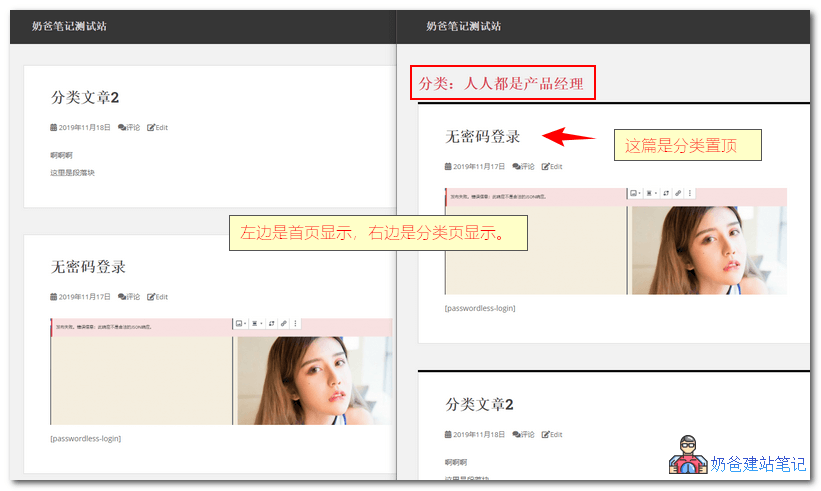
Category Directory Sticky Post Plugin
There are two plugins introduced here that can achieve sticky posts on category pages,NaibabijiTested and working properly under WordPress 5.3.
Category Sticky Post
It is recommended to use the Category Sticky Post pluginWordPress Plugin, you can easily achieve the effect of sticking posts on category pages.
Category Sticky Pos allows you to display specified posts at the top of each category page.
- Allows you to select the category directory where you want to display sticky posts
- Just like the built-in sticky feature, display posts at the top of category directories
- Allows displaying different sticky posts in specific category directories
- Supports WordPress 5.3
 After installing the plugin, when publishing a post, a Category Sticky option will appear in the right sidebar; simply select the category you want to make sticky.
Sticky Posts – Switch
The Sticky Posts – Switch plugin is newer, supporting sticky posts on category pages, as well as on tag pages and custom post types.
Moreover, posts made sticky through this plugin will show a star icon in the backend post list, making it easy to manage sticky posts.
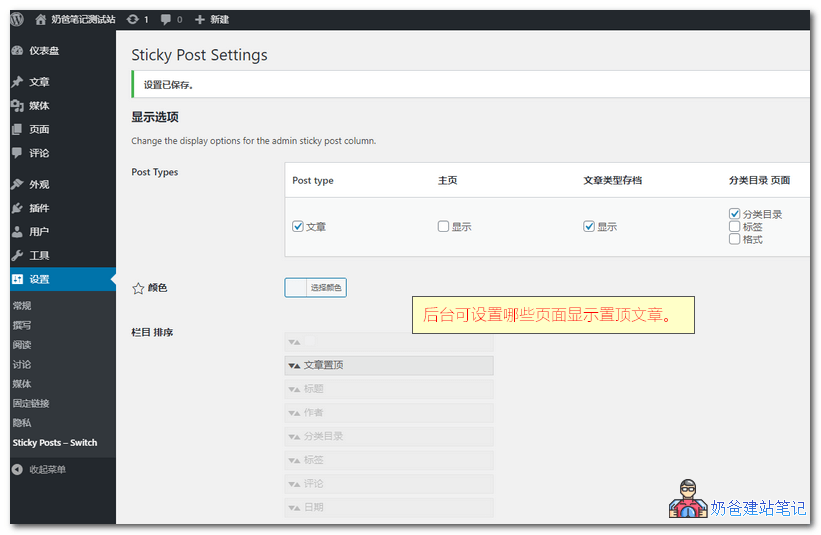
Additionally, you can set whether to display sticky posts on the homepage in the settings.
Code Implementation for Displaying Sticky Posts in Categories
Naiba has not tested the code version. If you don't want to use a plugin, you can research the code implementation method yourself.
Insert the following code into your theme's functions.php file. If you don't know how to insert it, you can use a plugin for help. Reference:Safe Method to Add Code to the functions.php File: Code Snippets
add_filter('the_posts',  'putStickyOnTop' );
function putStickyOnTop( $posts ) {
  if(is_home() || !is_main_query() || !is_archive())
    return $posts;

  global $wp_query;

  // 获取所有置顶文章
  $sticky_posts = get_option('sticky_posts');

  if ( $wp_query->query_vars['paged'] <= 1 && !empty($sticky_posts) && is_array($sticky_posts) && !get_query_var('ignore_sticky_posts') ) {
    $stickies1 = get_posts( array( 'post__in' => $sticky_posts ) );
    foreach ( $stickies1 as $sticky_post1 ) {
      // 判断当前是否分类页
      if($wp_query->is_category == 1 && !has_category($wp_query->query_vars['cat'], $sticky_post1->ID)) {
        // 去除不属于本分类的置顶文章
        $offset1 = array_search($sticky_post1->ID, $sticky_posts);
        unset( $sticky_posts[$offset1] );
      }
      if($wp_query->is_tag == 1 && !has_tag($wp_query->query_vars['tag'], $sticky_post1->ID)) {
        // 去除不属于本标签的文章
        $offset1 = array_search($sticky_post1->ID, $sticky_posts);
        unset( $sticky_posts[$offset1] );
      }
      if($wp_query->is_year == 1 && date_i18n('Y', strtotime($sticky_post1->post_date))!=$wp_query->query['m']) {
        // 去除不属于本年份的文章
        $offset1 = array_search($sticky_post1->ID, $sticky_posts);
        unset( $sticky_posts[$offset1] );
      }
      if($wp_query->is_month == 1 && date_i18n('Ym', strtotime($sticky_post1->post_date))!=$wp_query->query['m']) {
        // 去除不属于本月份的文章
        $offset1 = array_search($sticky_post1->ID, $sticky_posts);
        unset( $sticky_posts[$offset1] );
      }
      if($wp_query->is_day == 1 && date_i18n('Ymd', strtotime($sticky_post1->post_date))!=$wp_query->query['m']) {
        // 去除不属于本日期的文章
        $offset1 = array_search($sticky_post1->ID, $sticky_posts);
        unset( $sticky_posts[$offset1] );
      }
      if($wp_query->is_author == 1 && $sticky_post1->post_author != $wp_query->query_vars['author']) {
        // 去除不属于本作者的文章
        $offset1 = array_search($sticky_post1->ID, $sticky_posts);
        unset( $sticky_posts[$offset1] );
      }
    }

    $num_posts = count($posts);
    $sticky_offset = 0;
    // Loop over posts and relocate stickies to the front.
    for ( $i = 0; $i < $num_posts; $i++ ) {
      if ( in_array($posts[$i]->ID, $sticky_posts) ) {
        $sticky_post = $posts[$i];
        // Remove sticky from current position
        array_splice($posts, $i, 1);
        // Move to front, after other stickies
        array_splice($posts, $sticky_offset, 0, array($sticky_post));
        // Increment the sticky offset. The next sticky will be placed at this offset.
        $sticky_offset++;
        // Remove post from sticky posts array
        $offset = array_search($sticky_post->ID, $sticky_posts);
        unset( $sticky_posts[$offset] );
      }
    }

    // If any posts have been excluded specifically, Ignore those that are sticky.
    if ( !empty($sticky_posts) && !empty($wp_query->query_vars['post__not_in'] ) )
      $sticky_posts = array_diff($sticky_posts, $wp_query->query_vars['post__not_in']);

    // Fetch sticky posts that weren't in the query results
    if ( !empty($sticky_posts) ) {
      $stickies = get_posts( array(
        'post__in' => $sticky_posts,
        'post_type' => $wp_query->query_vars['post_type'],
        'post_status' => 'publish',
        'nopaging' => true
      ) );

      foreach ( $stickies as $sticky_post ) {
        array_splice( $posts, $sticky_offset, 0, array( $sticky_post ) );
        $sticky_offset++;
      }
    }
  }

  return $posts;
}
Code Explanation
① If you want archive pages to also display all sticky posts, delete lines 12-45 of the code;
② If you don't want to display sticky posts on a certain category page, modify line 3if(to
// abc是分类名称
if ( is_category( 'abc' ) ||
③ If you do not want to display sticky posts on a certain tag page, change the code on line 3if(Change it to:
// abc是标签名称
if ( is_tag( 'abc' ) ||
④ If you do not want to display sticky posts on a certain author page, change the code on line 3if(Change it to:
// abc是作者昵称
if ( is_author( 'abc' ) ||
⑤ The above code only works for the main loop. If you use WP_Query or query_posts to fetch post lists on archive pages and still want sticky posts to appear at the top of these lists, you can delete the following code from line 3 (Note: This may cause the number of displayed posts to differ from your settings):
|| !is_main_query()
The code method is fromLudou Blog