
Now when building foreign trade websites, you cannot rely solely on the website. You need to participate in various SNS platforms to get close to users and let them know your company is still active. Twitter is a platform that many companies join.
Generally, corporate websites have low content update frequency. Many foreign traders tell Naiba that they cannot write beautiful original articles. So we can consider displaying the latest Twitter message on the website homepage. Updating a Twitter post every day is easier than writing an article.
How to display Twitter information on the website? We can achieve this through a WordPress plugin.
Free Plugin Custom Twitter Feeds
Custom Twitter Feeds is the most popular and highly-rated free Twitter plugin for WordPress. It is fully customizable, crawlable by search engines, features responsive design, and is suitable for all web pages.
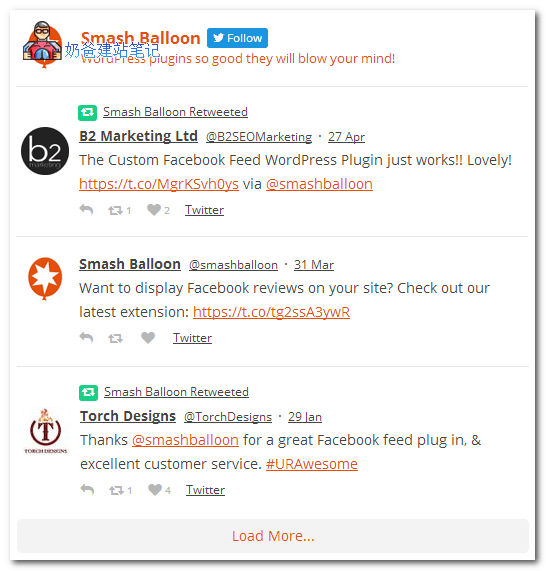
You can add Custom Twitter Feeds to the website's widgets or pages.
Download link: https://wordpress.org/plugins/custom-twitter-feeds/
Paid Plugin Twitter Timeline Feed
Twitter Timeline Feed is a paid WordPress plugin for displaying Twitter messages. It differs from the one above in its display format; Twitter Timeline Feed resembles a chat window, as shown in the image below:
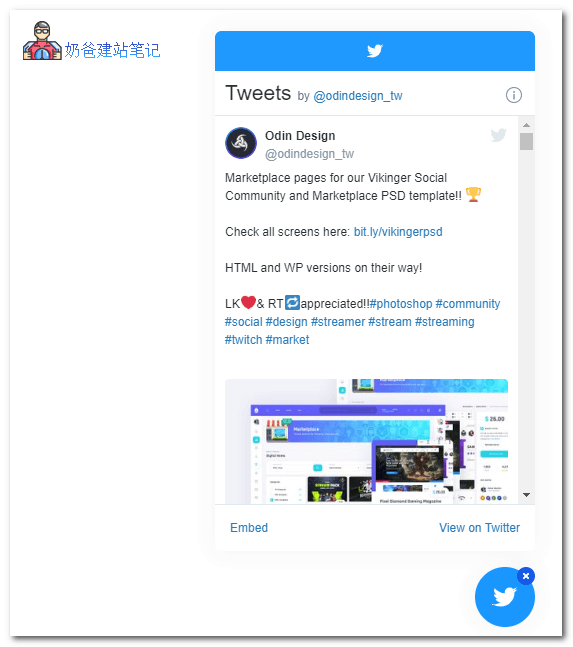
Twitter Timeline Feed WordPress Plugin also supports customization. This expandable and collapsible form is more in line with the website design style, and the conversion for attracting followers should be better than placing it in a widget.
This plugin costs only $12. Users who need it can consider purchasing a genuine copy.
Once you can display your company's latest Twitter messages on your website, ensure you post some industry-related content on Twitter daily to stay active. When visitors see your website isn't updated frequently but your Twitter is very active with high user interaction, it will subconsciously add value to your website.