
Building a website yourself is also quite simple. Purchase a domain and server, set up WordPress, and then combine it withAstra multipurpose theme, you can design a beautiful website. This article teaches youHow to set up the sitemap.xml file for the Astra theme。
After the website is installed, how do you add a sitemap?
Naibabiji has previously written a dedicated article on this. For further reading, please visit the article below:
Here, we will use the free advanced SEO plugin Rank Math to set up the sitemap for the Astra theme.
1. Install the Rank Math plugin.
Search in the backend plugin library or click the link below to download the installation package and upload it for installation.
If you want to learn more about how to set up Rank Math, please refer to the article below:
2. Enable Rank Math. The sitemap feature is enabled by default in the settings. Let's go to the sitemap settings interface.
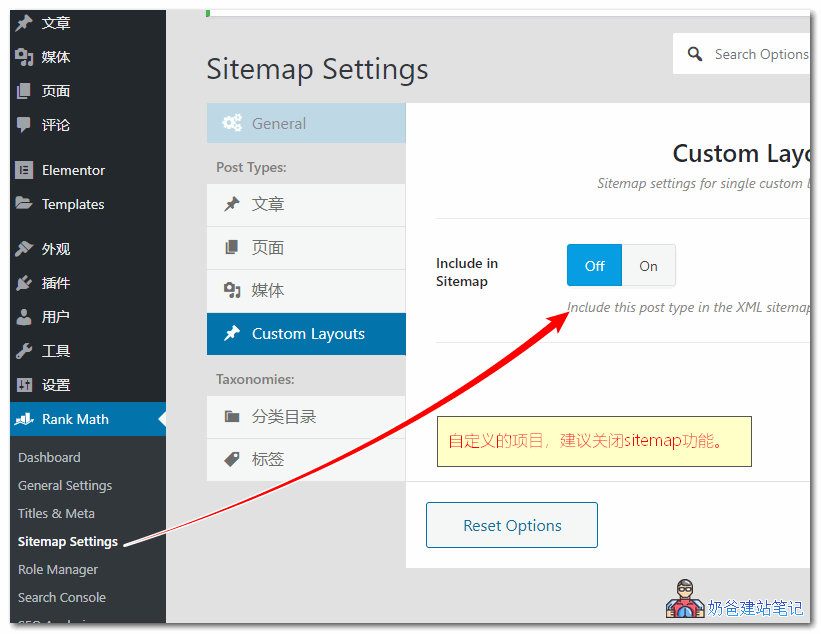
3. Disable the sitemap function of Custom Layouts.
Some demo data imported by Astra Pro or free version may use custom header code to design web pages, and by default, it will be added to the sitemap file.
These files are not suitable for search engines to crawl, so we exclude them from the sitemap to prevent search engines from crawling them.
To be safer, you can set the page attribute to noindex via Rank Math when editing layouts in Custom Layouts.