What to do if WordPress automatically crops an image with a resolution greater than 2560 pixels into a 2560-pixel wide thumbnail? The previously sharedDisable WordPress 5.3 Automatic Thumbnail Cropping Featureseems ineffective for this size. Don't worry, the solution is here.
Why is the maximum image size only 2560 pixels?
When you upload a high-definition large image, it only displays as a 2560-pixel image because after WordPress 5.3, the WP core introduced a new function for handling oversized images.big_image threshold
If an image exceeds 2560px in dimension, it will automatically be proportionally scaled down to a 2560-pixel image, while the original image is still saved on the server, as shown in the image below:
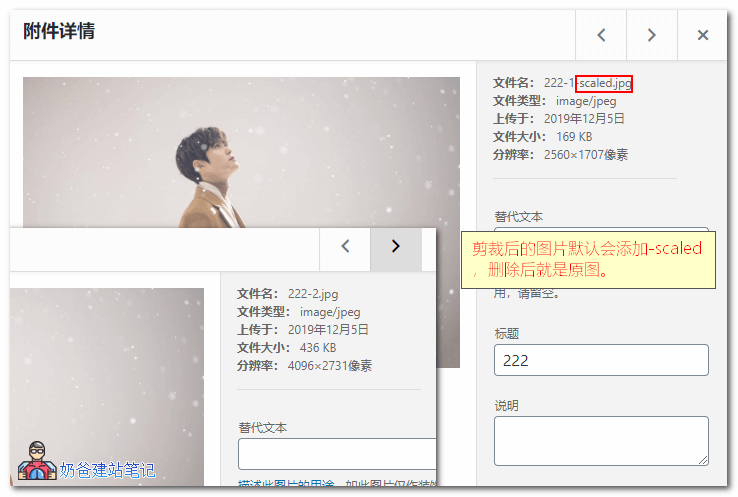
If you want to find the original image, you just need to delete '-scaled' from the end of the image filename to get the original.
Method to Solve Automatic Generation of 2560px Pixel Images
WP 5.3 achieves this throughbig_image_size_thresholdThis function controls whether to scale oversized images. We can disable this function.
Add the following code to your website's theme functions file.
If you don't know how to add it, then use > Safe Method to Add Code to the functions.php File: Code Snippets
//超过2560px的图片不剪裁
add_filter( 'big_image_size_threshold', '__return_false' );
Official documentation: https://make.wordpress.org/core/2019/10/09/introducing-handling-of-big-images-in-wordpress-5-3/
In addition to the above method of adding code to disable the 2560 pixel image, the official recommendation is to use the following plugin to disable it (to avoid the code becoming invalid after theme updates).
Disable „BIG Image“ Threshold