在Multi-Datacenter Cross-Border Foreign Trade VPS Server Recommendation_Vultr_Complete Purchase and Usage TutorialIn the article, Naiba recommends using Vultr for foreign trade websites or beginnersBuilding Your Own Website. With so many Vultr data centers, how do you test which one is the fastest? The method is explained below.
Find the fastest Vultr data center for local access
First, you can create a server in each datacenter in the Vultr backend (since it's billed hourly, just delete them after testing).
Then, on your computer, press WIN + R to open the Run dialog, enter cmd and press Enter, then enter the following command and press Enter to test the response speed from your computer to the Vultr server.
ping 服务器ip地址
For example, as shown in the image below:
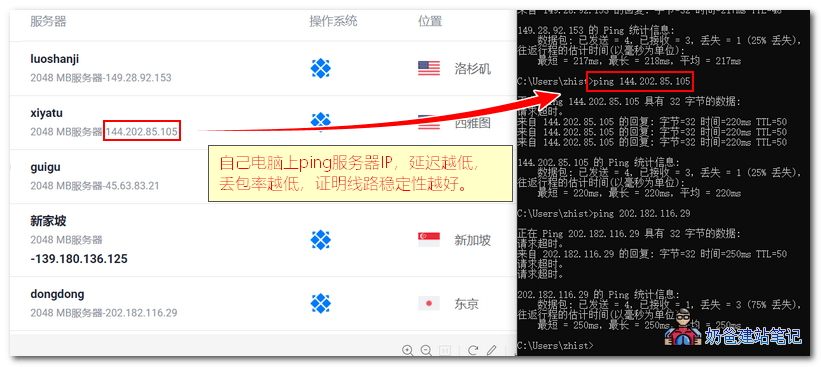
The lower the time value, the faster the route from your computer to the server (but it does not mean the download speed will be fast).
The fewer lost packets, the more stable the route from your computer to the server.
By default, it only tests 4 times. You can add -t at the end of the command to keep pinging continuously.
Vultr official speed test nodes
Below are Vultr's official test nodes. You can also test directly, but usually the speed of the official demo site will be better than the actual server you purchase, similar to the difference between buyer's show and seller's show on Taobao.
If you click directly on the official test addresses below, they use a webmaster tool to test the speed of accessing the server nationwide. This has some reference value but is not necessarily accurate, because the test route is from the local datacenter to the server datacenter, and our ordinary home broadband may not take the same route as the datacenter.
| Geographic location | Official test server address | File Download Test Address |
| (Asia) Tokyo, Japan [日本 东京] | hnd-jp-ping.vultr.com | 100MB 1GB |
| Singapore [新加坡] | sgp-ping.vultr.com | 100MB 1GB |
| (AU) Sydney, Australia [悉尼] | syd-au-ping.vultr.com | 100MB 1GB |
| (EU) Frankfurt, DE [德国 法兰克福] | fra-de-ping.vultr.com | 100MB 1GB |
| (EU) Amsterdam, NL [荷兰 阿姆斯特丹] | ams-nl-ping.vultr.com | 100MB 1GB |
| (EU) London, UK [英国 伦敦] | lon-gb-ping.vultr.com | 100MB 1GB |
| (EU) Paris, France [法国 巴黎] | par-fr-ping.vultr.com | 100MB 1GB |
| Seattle, Washington [美东 华盛顿州 西雅图] | wa-us-ping.vultr.com | 100MB 1GB |
| Silicon Valley, Ca [美西 加州 硅谷] | sjo-ca-us-ping.vultr.com | 100MB 1GB |
| Los Angeles, Ca [美西 加州 洛杉矶] | lax-ca-us-ping.vultr.com | 100MB 1GB |
| Chicago, Illinois [美东 芝加哥] | il-us-ping.vultr.com | 100MB 1GB |
| Dallas, Texas [美中 德克萨斯州 达拉斯] | tx-us-ping.vultr.com | 100MB 1GB |
| New York / New Jersey [美东 新泽西] | nj-us-ping.vultr.com | 100MB 1GB |
| Atlanta, Georgiaa [美东 乔治亚州 亚特兰大] | ga-us-ping.vultr.com | 100MB 1GB |
| Miami, Florida [US East, Florida, Miami] | fl-us-ping.vultr.com | 100MB 1GB |
Related knowledge
Generally, when accessing foreign servers from within China, a ping value around 200ms is considered a decent route. If it's a CN2 line, the speed will be even better. For specifics, you can refer to the article below.
Additionally, when testing the speed of foreign servers, testing at night usually best reflects the quality of the route, because night is usually the peak time for accessing foreign networks, and the route will be more congested.
Finally, you can also use a script to test the speed of the website server.