
If you want a plugin to list all the posts on your website and provide an instant search function, you can use the Posts Table with Search & Sort plugin.
For the specific effect, please refer to the image below.:
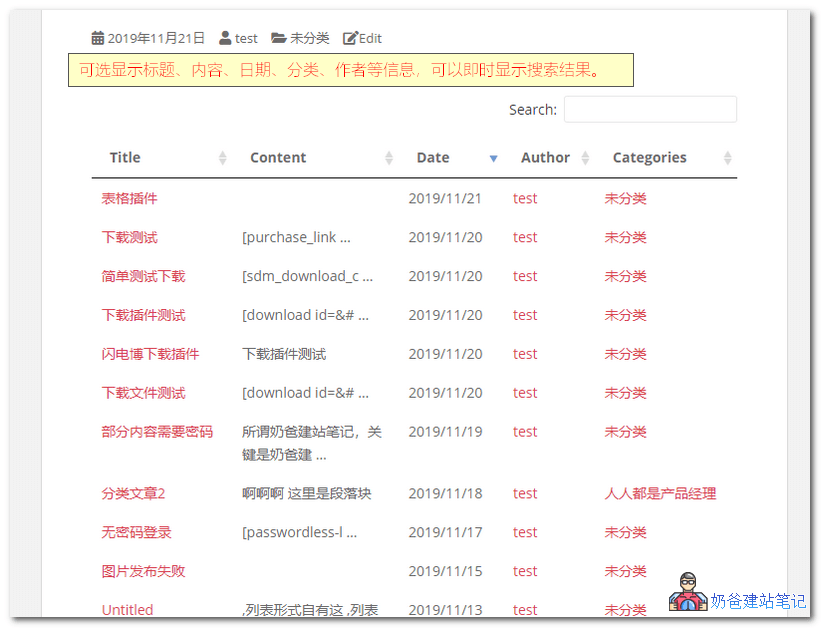
Using a shortcode, you can output all website posts to a table displayed on the front-end page.
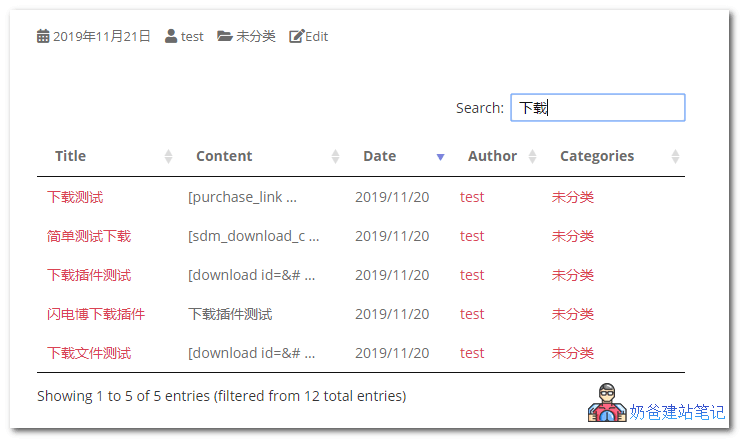 Entering content in the search box in the upper right corner will instantly display search results below, which is faster than the built-in search.
Features provided by the free version of the plugin:
- Create sortable and filterable post tables.
- Select any or all of the following columns: Post ID, Title, Content, Category, Tag, Author, or Date.
- Simplify content using pagination.
- 100% responsive to different screen sizes.
- Display WordPress blog posts in a simple HTML table.
- WPML compatible for international translation.
Features supported by the premium version:
- Display posts, pages, or any custom post type (e.g., documents, audio/music, courses, products, staff and member directories, publications, articles, books, etc.).
- Add extra columns: Image, Excerpt, Status, or any custom field or taxonomy.
- WordPress media embedding support, including audio and video galleries or media playlists.
- Display featured images with a lightbox.
- Dropdown filters for taxonomies, categories, and tags.
- Select posts by custom field, term, date, ID, etc.
- Advanced Custom Fields support.
- Enable AJAX to reduce server load.
- 100% responsive, with options to control behavior on different screen sizes and devices.
- Supports advanced use cases, such as how to create compelling tables for your blog, WordPress document libraries, member directories, audio libraries, or organizational intranets.
Usage Method:
After installing the plugin, enter the shortcode on the page where you need to call it.[posts_data_table]is sufficient.