🚀 Is building a website too difficult? Let me guide you step by step—Learn about the 「Naibabiji WordPress Website Building Coaching Service」 →

How to Set Up Blacklist and Whitelist for WPForms Inquiry Form Tutorial

When we useWordPress Foreign Trade WebsiteWhen it comes to collecting customer inquiries, a form plugin is often required. WPForms is an excellent form plugin. To prevent malicious comments, most people use Google's CAPTCHA system. However, we can directly use WPForms' built-in allowlist/denylist feature to block specific comments, which is more efficient.

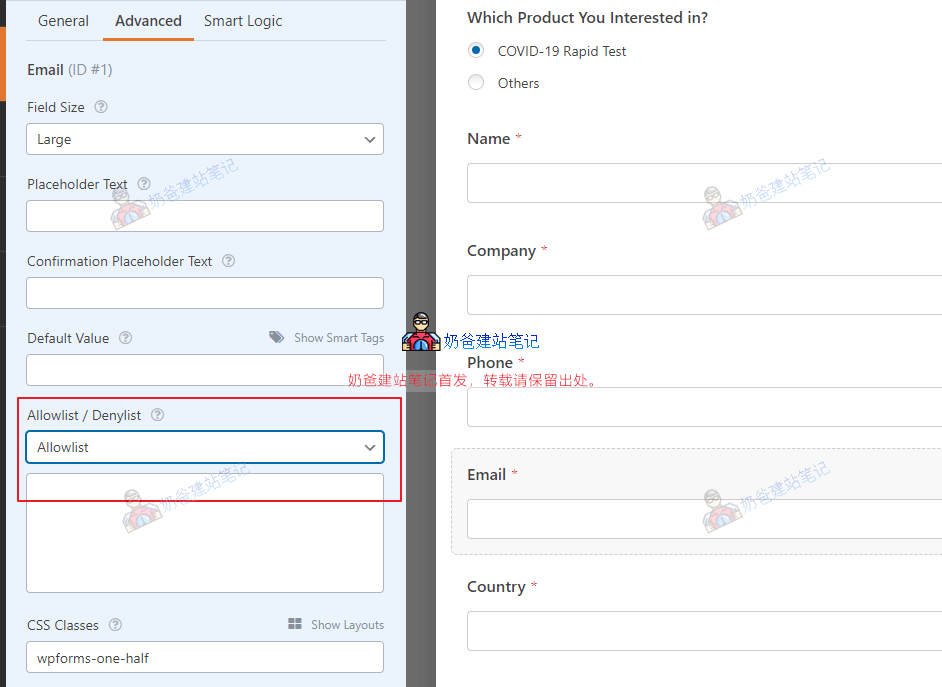
WPForms Allowlist/Denylist Setup Steps

1. Go to your WPForms, find the form you need to configure, and click on it.2. In the Advanced Options, you will see an 'Allowlist / Denylist' section. This is where you can set up the allowlist and denylist. 3. Select 'Denylist' and enter the email addresses you wish to block in the field below.

🚀 Still feeling confused after reading the tutorial? Let me guide you step-by-step instead.

「Naibabiji WordPress Website Building Coaching」 — From selecting a domain and purchasing hosting to installing themes and publishing posts, I「ll guide you through every step, helping you avoid detours and reach your goals directly.

👉 Learn about Website Building Coaching Service
🔒

Comments are closed

The comment function for this article is closed. If you have any questions, please feel free to contact us through other channels.

×
二维码

Scan to Follow