🚀 Is building a website too difficult? Let me guide you step by step—Learn about the 「Naibabiji WordPress Website Building Coaching Service」 →

Elementor Error: „Uncaught SyntaxError: Identifier “a’ has already been declared (at instant-page.min.js„

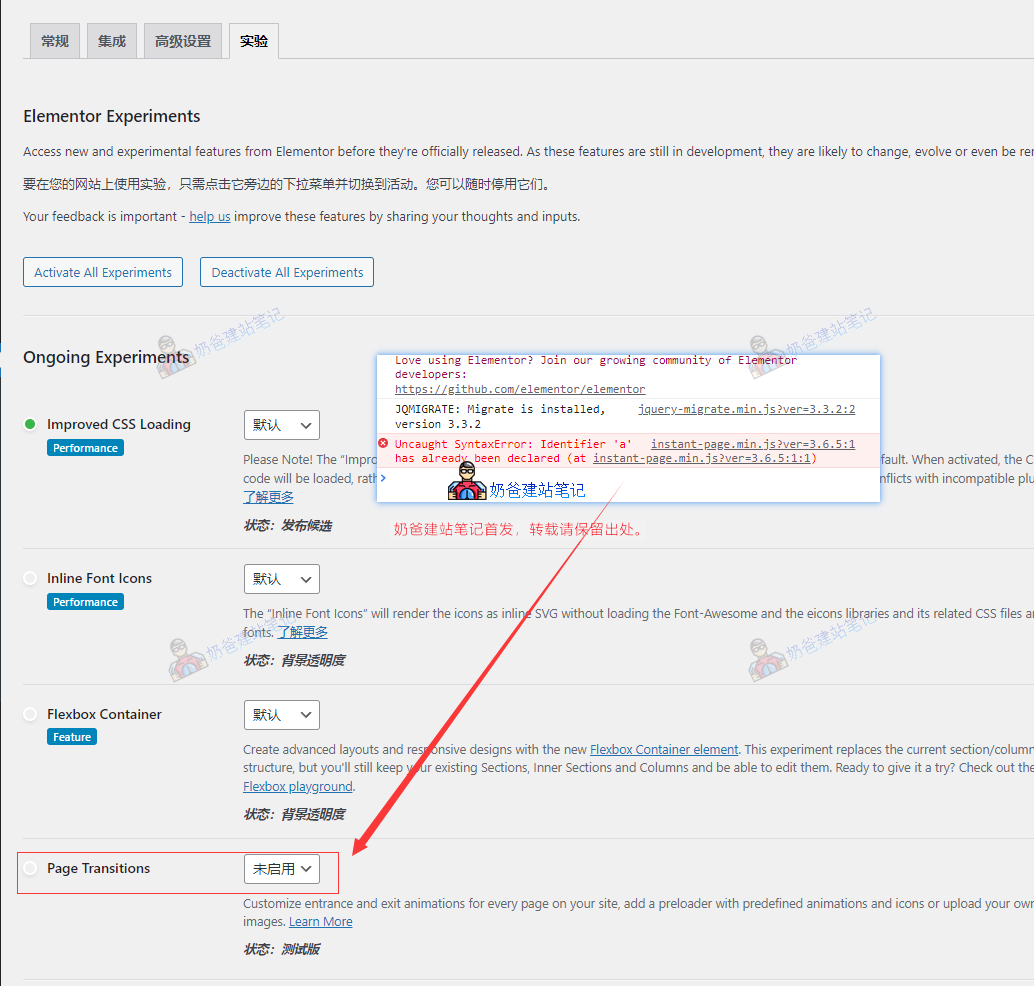
Today, while creating a website for a client, I carelessly updated Elementor and then found that when editing pages with Elementor, an error occurred. The general content was: Uncaught SyntaxError: Identifier 'a' has already been declared (at instant-page.min.js?ver=3.7.3:formatted:1:1). Then, some pages could not be edited normally with Elementor, resulting in a 500 error. I tried rolling back to older versions, including reverting both Elementor and Elementor Pro to previous versions, but the issue persisted. After some research, I found that it was because the new version enabled a Page Transitions feature by default. Simply go to Elementor's settings, under Experiments, and turn off Page Transitions to resolve the issue.关闭Page Transitions

🚀 Still feeling confused after reading the tutorial? Let me guide you step-by-step instead.

「Naibabiji WordPress Website Building Coaching」 — From selecting a domain and purchasing hosting to installing themes and publishing posts, I「ll guide you through every step, helping you avoid detours and reach your goals directly.

👉 Learn about Website Building Coaching Service
🔒

Comments are closed

The comment function for this article is closed. If you have any questions, please feel free to contact us through other channels.

×
二维码

Scan to Follow