
SiteGround's data center location affects website access speed. When choosing a server location, don't just look at where you are, but where your main visitors are: the closer the visitors are to the server location, the lower the latency and the easier it is to achieve good loading speed.
SiteGround official data center page:SiteGround Data Centers
What data centers does SiteGround currently have
The data center locations listed on the SiteGround official data center page include:
- Madrid, Spain
- London, UK
- Eemshaven, Netherlands
- Frankfurt, Germany
- Paris, France
- Council Bluffs, Iowa, USA
- Ashburn, Virginia, USA
- Dallas, Texas, USA
- Los Angeles, California, USA
- Singapore
- Sydney, Australia
SiteGround also offers its own CDN service, and the official page lists multiple CDN and edge node locations. CDN can improve cross-region access speed, but it cannot completely replace the correct selection of the origin server location.
Which SiteGround server location is better
The principle is simple: the server location closer to your main visitors is more suitable.
- If your main clients are in the US: prioritize US data centers.
- If your main clients are in Europe: prioritize European data centers such as the UK, Germany, Netherlands, France, or Spain.
- If your main clients are in Southeast Asia or Asia: prioritize Singapore.
- If your main clients are in Australia: prioritize Sydney.
If you are building a foreign trade B2B website, first consider the main target market; if you are building a Chinese website but targeting overseas clients, do not choose a server location solely based on domestic access speed.
How to change the data center on SiteGround
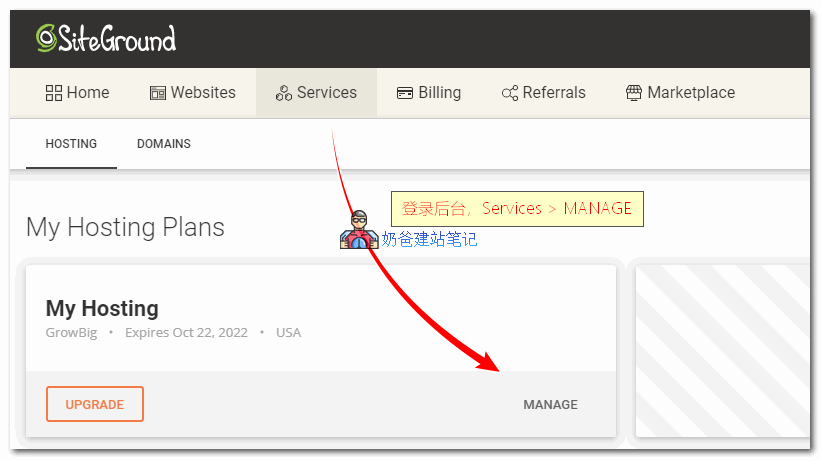
After logging into the SiteGround dashboard, go to Services, find the corresponding hosting service, and click Manage.
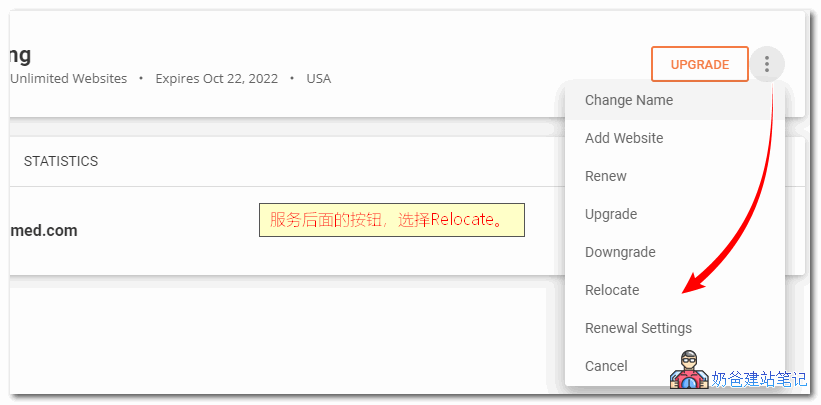
Then, on the service management page, find the data center or Relocate entry.
Select the target region you want to migrate to, and confirm the cost and migration as prompted on the page.
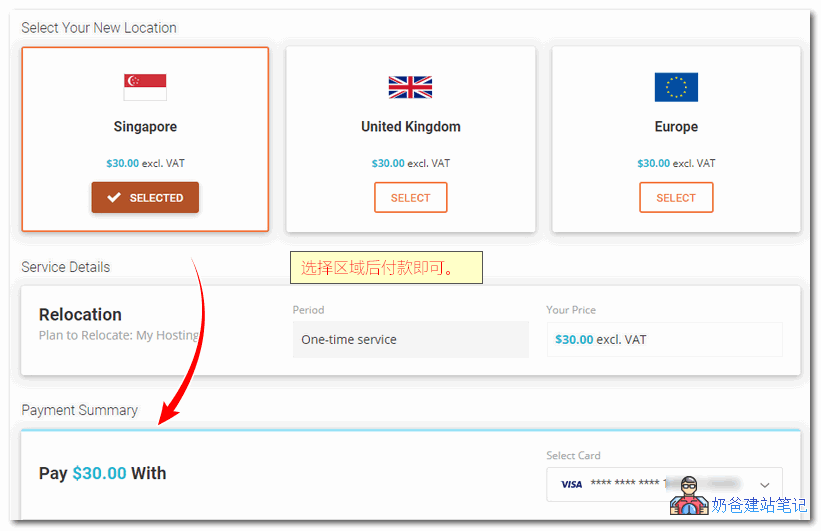
Changing the data center may involve fees and may require waiting for the migration to complete. After migration, if your domain is not using SiteGround's DNS directly, you also need to check whether the domain resolution IP needs to be adjusted accordingly.
What to do if you don't want to pay the region switching fee
If you have just built a new website with little content and don't want to pay the region switching fee, you can consider fully backing up the website, then deleting the current website, recreating the website, and selecting the desired data center during the creation process.
This method is suitable for new sites or test sites, not for official websites with a large amount of content, orders, members, inquiries, or stable traffic. Before operating on an official website, always back up files and the database first, and ensure you can restore them before making changes.