
How to transfer (Push) a domain registered with Namesilo to someone else? Naiba will introduce how to push a domain on Namesilo.
First, enter your domain management list.
Then, check the domain you want to push, and click Push Domains above.
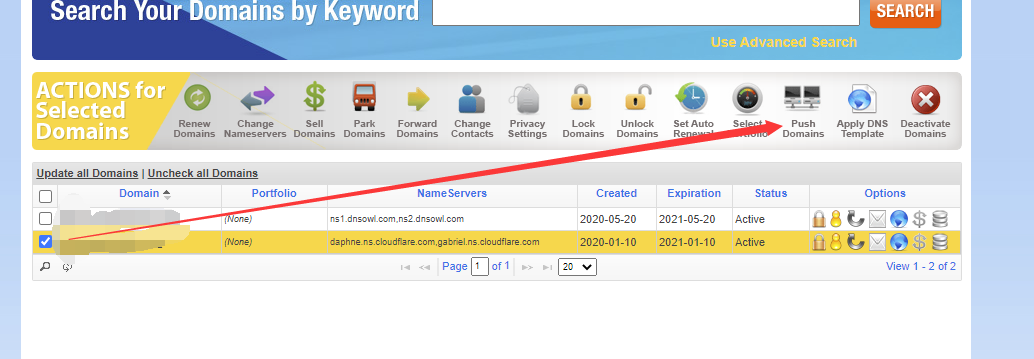
If your domain is not unlocked, you will be prompted: „The following domain(s) cannot be pushed since they are currently set as locked, are part of an active marketplace sale or cannot be pushed:“
At this point, we need to click the small lock icon in the domain list to unlock the domain.
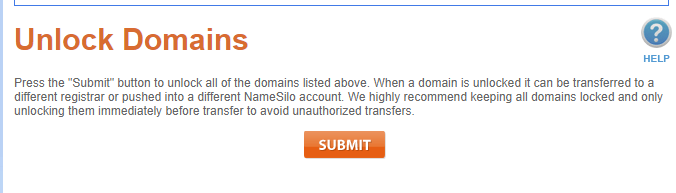
After unlocking, go back to push the domain again, and you will see the following interface:
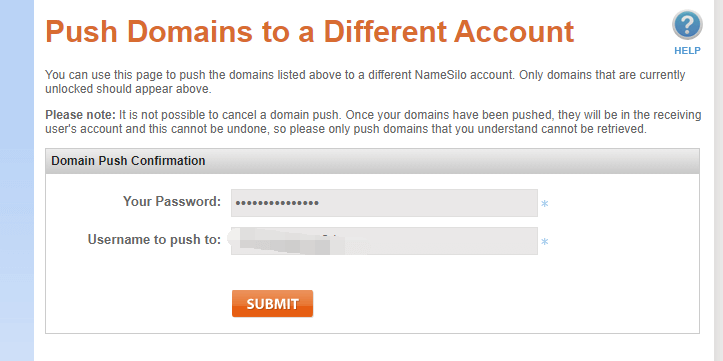
Fill in your own password and the username to push to (also an account registered with Namesilo).
Click SUBMIT to transfer. After submission, refresh your domain list, and you will find that the domain is no longer in the list.
The above is the tutorial for domain transfer on Namesilo.