Is there any software for listening to lossless music locally on an iPhone? The answer is yes. A friend recommended Foobar2000, the mobile version of the lossless music player. I believe many friends who like listening to local music have come across Foobar2000. Naiba installed Foobar2000 on his iPhone, but got stuck when transferring music files to the phone.
Foobar2000 iPhone version supports transferring music files from a computer to the Foobar2000 folder via LAN FTP. However, by default, after enabling the FTP server (Server running) through the FTP Server interface in Foobar2000's Tools, the computer on the LAN simply cannot connect.
How to solve the issue where the computer cannot upload files to Foobar2000 via FTP?
On iPhone, all software that needs to connect to the internet must have network permission authorization. However, when enabling the FTP service, no authorization prompt for Foobar2000 was seen, and no place to enable authorization was found in iPhone settings.
After a long time of exploration, I finally found thatThe method to trigger the network permission switch for Foobar2000 on the iPhone is as follows:
In the Browse interface, select Media Servers, then Add new to add a new server, for example, randomly enter an FTP server like ftp://192.168.2.1
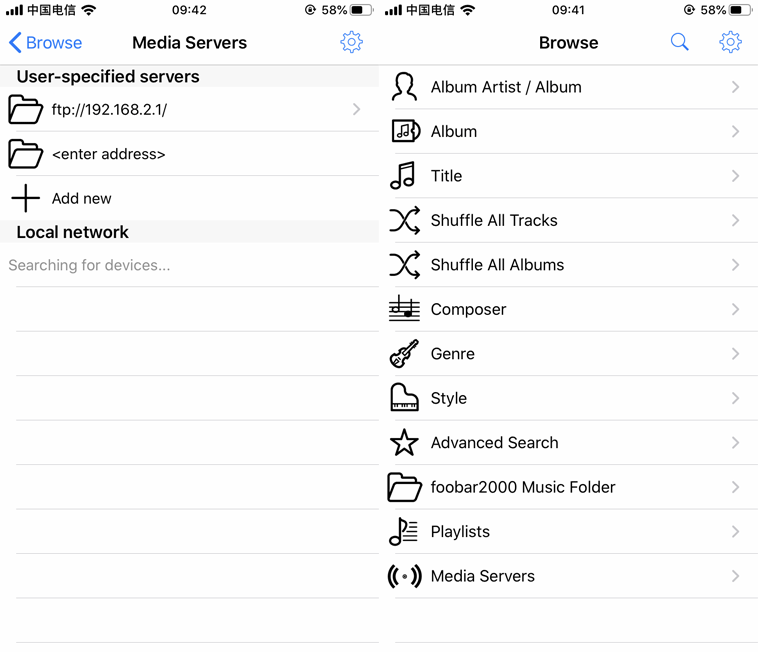
A network authorization button will then pop up. After allowing it, go back and enable the FTP service. You can then access the FTP service of the Foobar2000 mobile version from a computer and transfer files to the phone.