When we use WordPress to build a website and it runs for many years, the WordPress database usually becomes quite bloated, which can affect the website's loading speed. Naiba recently purchased the Advanced Database Cleaner PRO database optimization plugin and found it excellent, so I'm sharing it with everyone.
Firstly, Advanced Database Cleaner PRO is a paid plugin. You can install its free version from the Plugin repository in the Admin Dashboard, but for in-depth database optimization, you need to purchase the Pro version.
After purchasing this plugin, download the Pro installation package file, upload it to the website's Admin Dashboard for installation, and then activate it.
Reminder: Before performing database optimization and cleanup, it's best to back up the database once to avoid optimization errors.(Prevent Data Loss: 10 Excellent WordPress Backup Plugins Recommended)
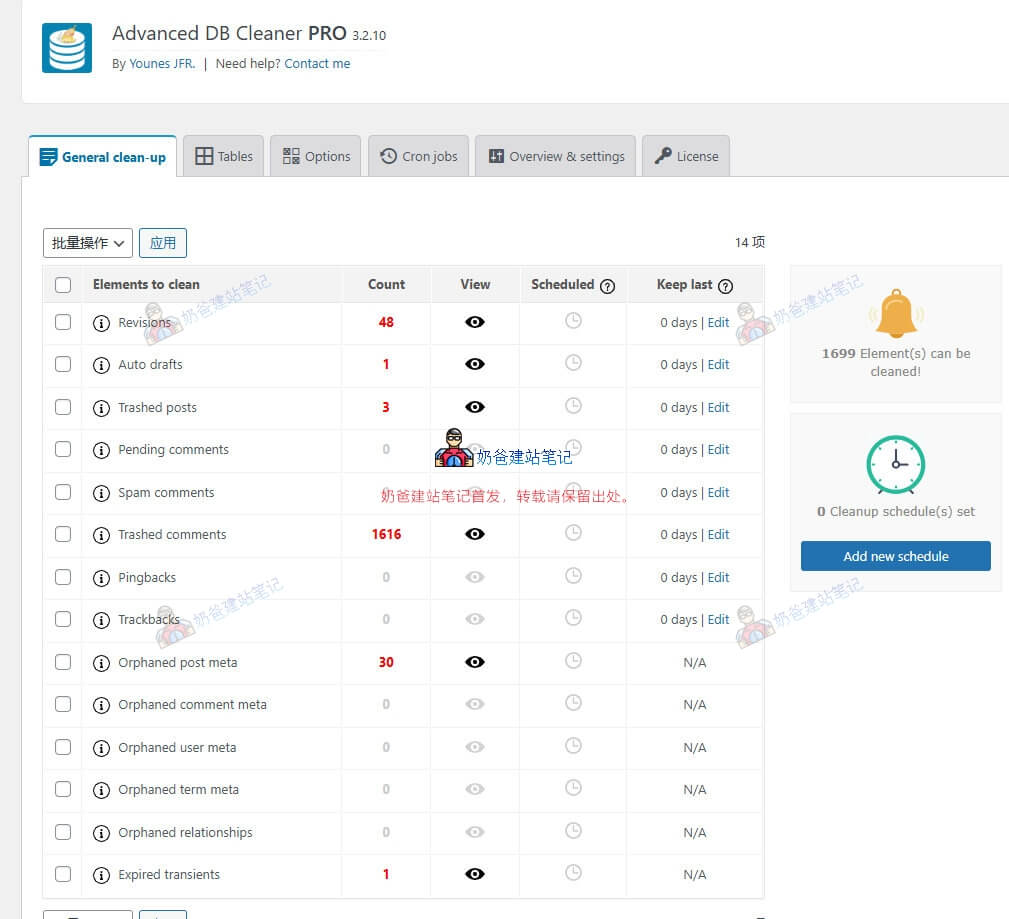
After activation, enter the plugin interface, and you can see content like the image above.
This interface is for cleaning up database junk information. The free version of the plugin also supports this function.
The items marked in red represent what can be cleaned. Although the plugin is in English, these cleanups generally won't cause any issues; you can safely check them and proceed with the cleanup.
Now comes the important part: in-depth database optimization and cleanup.
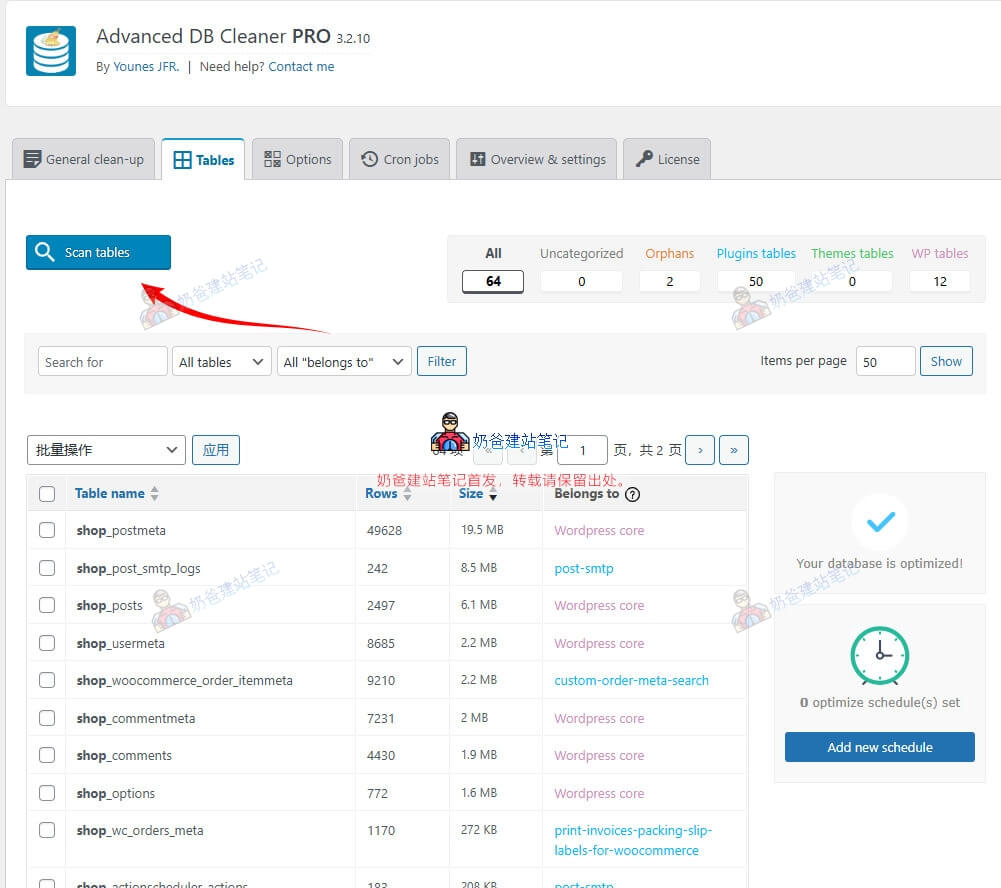
Switch to the Tables interface, first click the [Scan tables] button, and then the plugin will list which plugin each database table corresponds to.
We can delete all Orphans database tables.
After the cleanup is complete, click the Size header in the interface to sort. For example, the shop_postmeta table in our screenshot has a size of 19.5MB.
We can check it and select Optimize. Naiba tested and optimized about 1MB here. (The main Naibabiji site was optimized more; this tutorial was written after that optimization. So, a smaller shop website is used for demonstration. The data itself is small, so not much optimization was possible.)
Then switch to the [Options] page. This is for optimizing the WordPress options table. If this table is too large, it can significantly impact website speed. A new website typically has this table under 1MB. Generally, the more plugins installed, the more junk information is left in this table.
Similarly, first Scan tables.
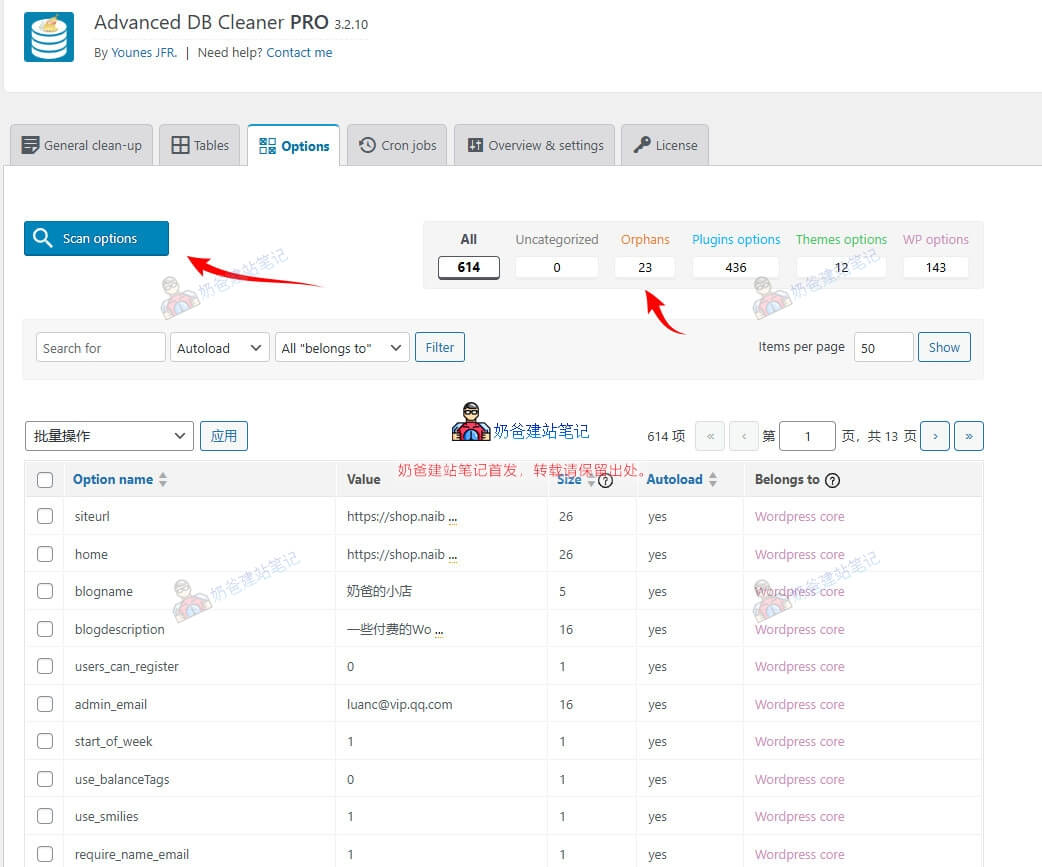
Orphans content scanned here, like in our example, can all be deleted. These are leftover junk database information from previously installed plugins.
The following Cron jobs section is for optimizing website scheduled tasks. There's usually not much to optimize here under normal circumstances, so this part is skipped in the tutorial.
Summary
The free version of Advanced Database Cleaner can be installed from the Plugin repository in the Admin Dashboard. It's sufficient for routine database optimization. However, for in-depth optimization and cleanup of the database, purchasing the Advanced Database Cleaner Pro version is recommended.
For new websites or websites operated for less than a year, where few plugins are installed, the advanced version might not be necessary. But if your website has frequently tried different plugins since its inception—installing and deleting, then installing other plugins, and deleting them if unsatisfied—such operations will leave a lot of residual information in the database. It is recommended to purchase the Pro version for cleanup.