
How to convert WordPress TAGs into categories? Naiba introduces a plugin here that can solve this. Term Taxonomy Converter is a plugin that supports mutual conversion between website categories and TAG tags on WordPress sites. It can convert all articles from a category into TAGs, and also convert all articles from a TAG into article categories.
How to Use Term Taxonomy Converter:
Click the download button at the end of the article to download, or directly search for and install the plugin in the WP admin dashboard, and activate it.
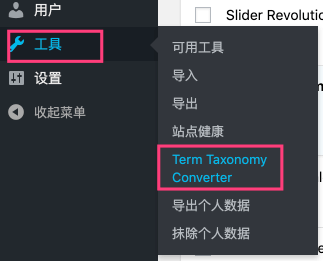
Enter the WordPress admin sidebar,select Tools > Term Taxonomy Converter.。
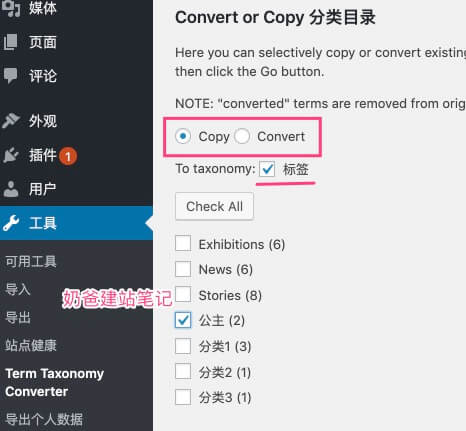
On the top of the new page, you can choose to copy or convert categories or tags, as shown above.
Select „copy“, then check the category, and all articles under the category „Princess“ will be tagged with „Princess“.
If you select „Convert“, all articles under the „Princess“ category will be converted to the „Princess“ tag, and the „Princess“ category will be deleted.
The original „Princess“ category will be deleted, and all articles will be moved to the default category.
If you select the „Tags“ page at the top, the same copy or conversion to category operation will be performed.
The above is how to use the Term Taxonomy Converter plugin to convert WordPress categories to tags, or tags to categories.
Term Taxonomy Converter Download Link:
Click the button below to download the plugin, then upload and install it via the WordPress website admin dashboard.