
I'm not sure if the term 'otaku' in this title is accurate, because Naiba doesn't understand otaku culture. The theme author told me this, but in my own words, it's an anime-style WordPress theme. Today, I'm sharing one that otaku and enthusiasts would likeWordPress Themes: Sakura.
Theme Release Page、Download Page
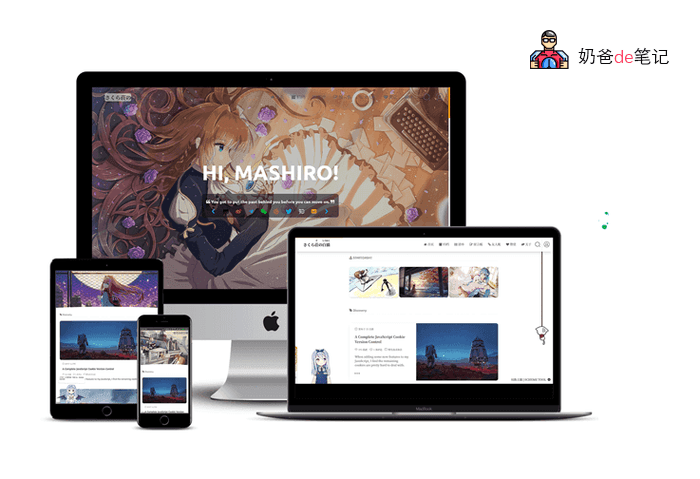
Below is the introduction content after Naiba's trial
Sakura Theme Introduction
Sakura is an open-source WordPress theme
- Supports random cover images
- Supports Lazyload for image lazy loading
- Supports article floating effect on the homepage
- Can set videos as article covers
- Supports custom login interface
- Supports Bilibili emoticons
- Can call QQ avatars
- Comments support image insertion
- Supports displaying user UA and IP in comments (the theme has a built-in 8M+ IP database)
- Supports article table of contents
- Supports Mac-style code highlighting
- Supports modifying background images on the frontend
- Supports timeline
- Built-in gallery feature
- Built-in email beautification template
- Supports Aplayer
- CDN optimization
- Can interface with an Android client (the author's own, not ready-to-use for you)
- Theme options built-in SEO description
- Includes three focus image ads
- There are many more theme settings, Naiba won't list them all here.
The random featured images that come with the Sakura theme are located in the theme's /cover/gallery folder; you can add or delete them yourself.
To set a video as the post cover, refer toofficial wiki
For the table of contents, insert [toc] when writing the post to enable it.
For the gallery feature, seetheme wiki
Sakura Theme Usage Notes
After downloading, extract and rename the folder toSakuraThen upload it to the website backend; otherwise, it cannot be used.
You need to installWP Statisticsthis plugin, otherwise it cannot be used.
If you need to use the email reply feature, you need to enable SMTP sending. Refer toWordPress Email Plugins I Have Used and Recommend
If you need to use the APlayer player, you need to installHermit-X plugin。
Server PHP version minimum 7.1, recommended PHP 7.2
After installing the theme, remember to go to WP backend - Appearance - Sakura theme settings to configure it.
Sakura Theme Download
This theme is open source,click heredownload.
Finally, if you are going to use this theme, do not add too many random background images, and remember to compress the images.