
Today, Naiba shares with you a simple and clean Windows system resource monitoring and management tool: Wise System Monitor
Wise System Monitor supports real-time display of CPU and memory usage, hardware temperature, network traffic information, and management of currently running processes.
After running Wise System Monitor, you can view process information, hardware information, etc. through the window, or directly display a monitoring floating window, as shown in the red box below.
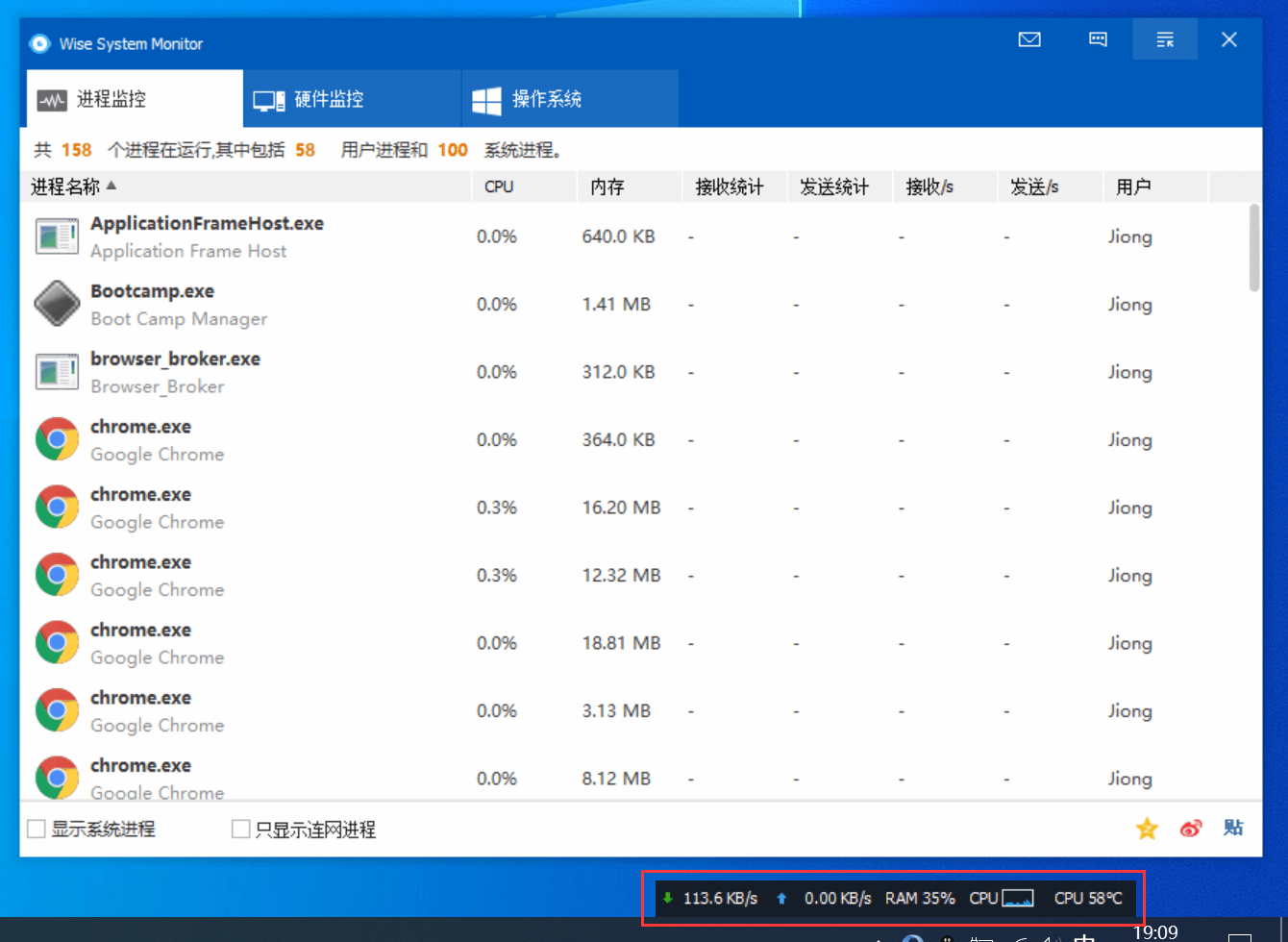
Clicking on the monitoring floating window can pop up detailed information; clicking on network speed displays the current process's network speed details, and clicking on memory displays detailed memory information.

Wise System Monitor is a free tool with an installation package size of only 2M. The software interface is very clean, without any advertisements, making it an excellent Windows system resource monitoring and management tool.
Detailed Feature Introduction
Real-time computer monitoring for peace of mind
Wise System Monitor is designed to provide users with a simple way to monitor memory usage, CPU usage, all running processes, and key hardware information. Under its monitoring, users can understand their computer's CPU usage and operating temperature in real time, and deal with problems before they arise. Ensure the computer runs normally!
Comprehensive program monitoring for a clear overview
Program monitoring clearly displays all processes along with CPU, memory consumption, and data transfer information. Users can end unnecessary processes as needed to make the computer run more smoothly! Most importantly, users can instantly check network connection status and the upload/download speed of each process.
Hardware detection to better understand your machine
Hardware detection mainly displays hardware information: such as CPU, motherboard, RAM, graphics card, hard drive, SSD, network card, and sound card. At the same time, Wise System Monitor can also detect and display real-time temperatures of important hardware, such as CPU temperature, graphics card temperature, motherboard temperature, and hard drive temperature. The operating system provides detailed and accurate information about the Windows system you are using.
System performance monitoring floating window, more convenient and intuitive
Wise System Monitor supports displaying current system network traffic information, memory information, CPU information, memory usage, and core component temperature in a floating window. Only by understanding what is consuming your RAM and CPU, what is affecting internet speed or causing your computer to overheat, can you take targeted measures to solve these problems and ensure stable computer performance.
Low CPU usage, compatible with all Windows versions
Wise System Monitor is a green, compact, and clean computer system process monitoring tool that helps users more easily monitor and manage processes on their computer. Tests have shown that Wise System Monitor is compatible with all Windows versions. If you are using Windows and often feel your computer is hot or occasionally laggy, try using Wise System Monitor to check whether it's CPU congestion, full memory, or a component that needs cooling.